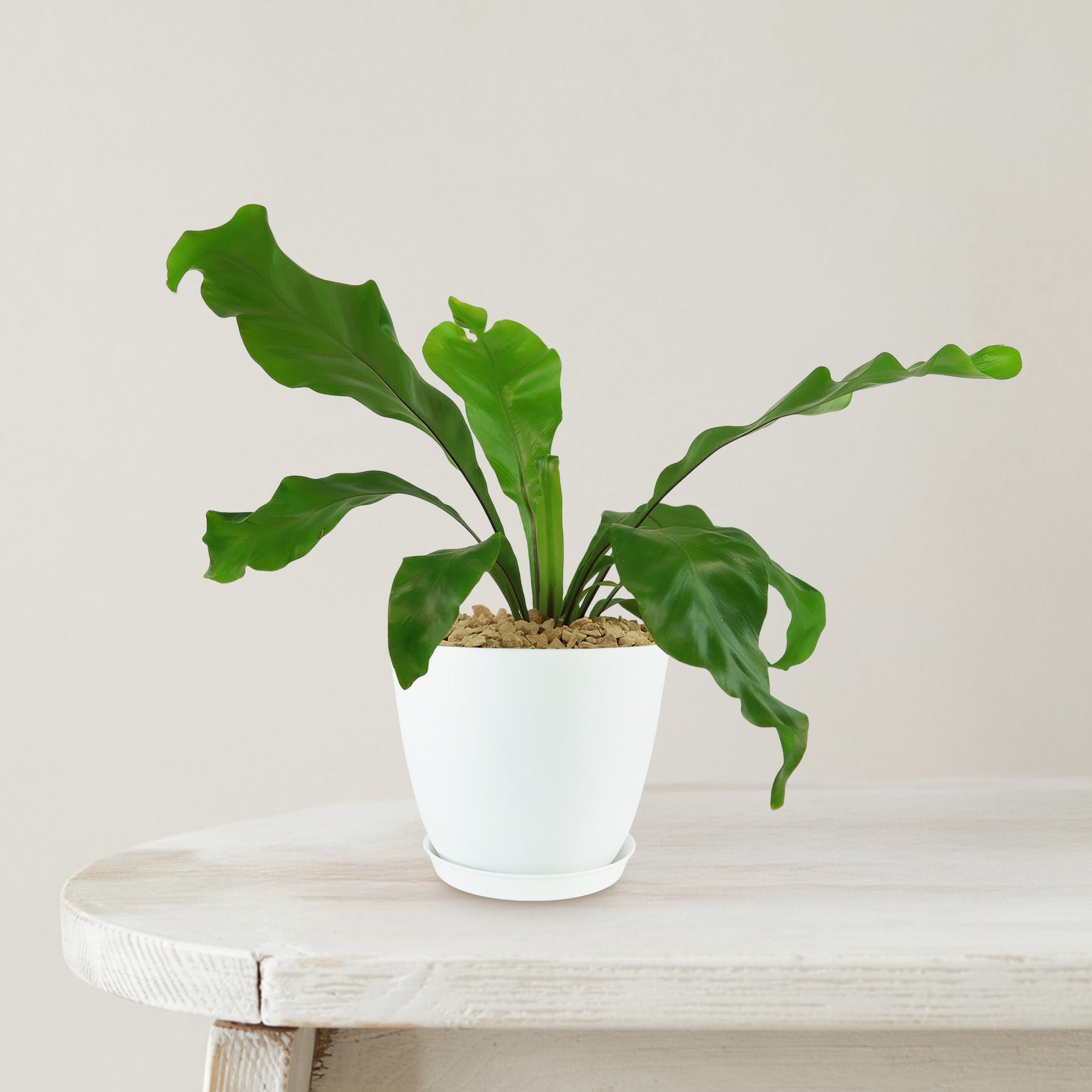
birds nest fern flat Bird’s Nest Fern ‘Asplenium nidus’ 6" Pot / White / Without Pot
SKU: 10034080461
birds nest fern flat

birds nest fern flat Bird’s Nest Fern ‘Asplenium nidus’ 6" Pot / White / Without Pot

Sale price$24.11 Regular price$26.79
Save 10%

Pay in installments of $6.70 with ShopPay, AfterPay and Klarna

Shipping Estimate
USA
  • USA
  • CAN

Ships within 48 hours · Estimated delivery Jul 6 - Jul 11

Promo Codes Available:

For Your Every Summer RSVP, with Code: SUMMER15

Description

birds nest fern flat Bird’s Nest Fern ‘Asplenium nidus’ 6" Pot / White / Without PotThe Birds Nest Fern, known as Asplenium nidus, is a striking fern prized for its bold, wavy fronds and lush, sculptural appearance. This fern is especially admired for how it naturally creates a nest of fronds that gently unfurl from a central point, resembling a birds nesthence the common name. Native to the tropical rainforests of Southeast Asia, Australia, and the Pacific Islands, Birds Nest Fern thrives in warm, humid, and shaded environments. In

The Bird’s Nest Fern, known as Asplenium nidus, is a striking fern prized for its bold, wavy fronds and lush, sculptural appearance. This fern is especially admired for how it naturally creates a “nest” of fronds that gently unfurl from a central point, resembling a bird’s nest—hence the common name. 

Native to the tropical rainforests of Southeast Asia, Australia, and the Pacific Islands, Bird’s Nest Fern thrives in warm, humid, and shaded environments. In the wild, it often grows epiphytically, nestled high in tree canopies where it collects organic debris and moisture. This natural habitat gives clues to how it prefers to be grown at home: warm, indirect light and high humidity are key. 

The bird’s nest fern plant features bright, glossy green fronds that grow in a circular rosette pattern, giving the plant a neat, symmetrical look.

Unlike many ferns that have finely divided leaves, Asplenium nidus has broad, tongue-shaped fronds with rippled or wavy margins.

These leathery leaves add strong architectural interest and a bold textural contrast in both houseplant collections and tropical landscape beds.

When mature, Bird’s Nest Fern can reach about 4 feet tall and 3 feet wide, depending on conditions.

Indoors, it typically stays closer to the lower end of that size range unless given ample humidity and consistent warmth.

It does not grow aggressively or require frequent pruning, making it a low-maintenance plant for those who want lush greenery without the fuss.

The Bird’s Nest Fern does not produce flowers in the traditional sense, as it is a true fern and reproduces via spores. These spores are produced in small rows or dots on the undersides of mature fronds. While not as showy as flowers, the reproductive structures give the plant a botanical charm and interest for fern collectors and hobbyists. 

One of the unique aspects of Asplenium nidus is its adaptability as both an indoor and outdoor plant in warmer climates, as well as its ability to improve air quality. It is often placed in bathrooms and kitchens thanks to its love of humidity and tolerance of indirect light.  

When and How to Water Your Bird’s Nest Fern 

The Bird’s Nest Ferns are mildly drought-tolerant; they store water in their leathery fronds. Always water thoroughly when the top 1–2 inches of soil feel dry. Avoid letting the soil completely dry out, especially during active growth, as it can cause browning tips and stunt development. Bird's Nest Ferns should be watered deeply every 5-7 days from spring to early fall, then reduced to once every 10-14 days in winter. 

From March to September, during the growing season, water every 5–7 days using about 1/3 to 1/2 cup for small to medium pots, making sure water drains freely. Keep humidity high and mist occasionally if your indoor air is dry. Avoid watering directly into the rosette to prevent rot. 

From October to February, during the dormant period, reduce watering to once every 10–14 days with smaller quantities, around 1/4 cup for medium containers. Let the soil mostly dry out between watering, but never become bone dry. Lower light and cooler air will slow the plant’s water needs. 

Light Requirements – Where to Place Your Bird's Nest Fern 

When growing indoors, the Bird’s Nest Fern thrives in bright indirect light for 6–8 hours daily, avoiding direct sunlight to protect its fronds.

Place your fern near an east-facing window or a few feet away from a south or west window filtered with sheer curtains.

It can tolerate low light but will grow more slowly. Rotate the pot occasionally to maintain even foliage.

When grown outdoors, place your Bird’s Nest Fern in bright filtered light or dappled shade for 4–6 hours a day, never in full sun.

Morning sun or deep shade under trees or patios is ideal. Avoid harsh midday rays that can burn the fronds. For either setting, too little light causes slow growth and pale leaves, while too much causes crisping or browning.  

Optimal Soil & Fertilizer Needs 

Bird’s Nest Fern thrives in loose, well-draining, and slightly acidic soil rich in organic matter. Planet Desert has specialized potting soil, opens in a new tabGo to soil cactus mix blend 1 gal 4 qt cacti succulent dirt compost growing media that includes an organic substrate with mycorrhizae to help with the growth of a healthy root system and help your bird's nest fern thrive. Avoid compacted or overly sandy soils that dry out too fast. 

Fertilize your bird’s nest fern once a year in the spring with a balanced liquid NPK fertilizer of about 5-10-5. Over-fertilizing causes frond burns and salt buildup, so avoid feeding in the dormant season. In winter, skip fertilizing completely. The plant’s metabolism slows down and doesn’t need nutrients during rest. 

Bird’s Nest Fern Indoor Requirements 

When growing indoors, Bird’s Nest Fern thrives in temperatures between 65°F and 80°F, with humidity levels of at least 50% and exposure to filtered bright light. These tropical ferns are native to humid rainforests, so maintaining warmth and moisture indoors is key. Keep them away from air conditioners, heating vents, and drafty windows to avoid cold or dry air stress. Ideal indoor spots include bathrooms or kitchens where humidity is naturally higher. If needed, place the pot on a pebble tray with water or use a humidifier to boost the surrounding moisture. 

Hardiness Zones & More 

When growing outdoors, it is hardy in USDA zones 10–11 and prefers temperatures above 55°F, with bright indirect light and 60–80% humidity.

If temperatures dip below 50°F, bring it indoors.

Place in shaded patios, under canopies, or in fern gardens where moisture and shade are consistent.

Extended cold or dry wind exposure can cause frond browning and leaf drop, so protect accordingly. This plant is native to tropical rainforests and needs similar conditions. 

Wildlife – Bird’s Nest Fern Attract the Following Friendly Pollinators 

The Bird’s Nest Fern still attracts helpful insects like beneficial wasps, hoverflies, and frogs due to its moisture and form. Its wide, bowl-like rosette traps moisture, drawing in insects and tiny animals that help regulate pest populations. It’s a passive part of a healthy garden ecosystem. 

According to the ASPCA, Bird’s Nest Fern is non-toxic to dogs, cats, and horses, making it a safe choice for pet-friendly homes. This makes it ideal for indoor placement where curious pets roam. 

How to Propagate Your Asplenium nidus 

Bird’s Nest Fern is most commonly propagated by division, not spores like other ferns. To divide, remove the plant from its pot and gently separate offshoots or pups with attached roots. Use clean, sharp scissors or hands and pot the divisions in fresh, moist soil. Avoid disturbing the central rosette, as it is the plant’s main growth point. Keep new plants warm and humid, with indirect light, until well-rooted. 

Key Takeaways

  1. Bird’s Nest Fern is known for its bright green, leathery fronds with ruffled or wavy edges that grow in a circular rosette, mimicking a bird’s nest.
  2. As a true fern, it doesn’t bloom; instead, it reproduces by releasing spores from the undersides of mature fronds.
  3. It thrives in humidity-rich environments like bathrooms and kitchens, making it a natural choice for tropical-style interiors.
  4. This fern helps improve indoor air quality by filtering out pollutants and adding fresh oxygen to enclosed spaces.
  5. According to the ASPCA, Asplenium nidus is non-toxic to cats and dogs, making it a safe and stylish option for pet owners.

The Bottom Line 

Overall, the Bird’s Nest Fern (Asplenium nidus) is a striking, easy-to-care-for fern that brings lush tropical greenery into any indoor or shaded outdoor space. With its ruffled, upright fronds forming a nest-like crown, it offers unique texture and visual interest. It’s moderately drought-tolerant, safe for pets, thrives in high humidity, and is a perfect match for beginners looking for non-fussy foliage. Whether used in containers, bathrooms, or as part of a shade garden, it rewards minimal effort with maximum impact. 

Shipping Notes
  • Free Standard Shipping on $100+ Orders to the USA.
  • Except Preorder products are shipped in 48 hours.
  • Delivery to the USA:
  1. Standard Shipping : 3-10 business days
  • If time is of the essence, please consider selecting expedited delivery for faster service.
Exchange/Return Notes
  • We offer a 30-day return/exchange service after receiving.
  • Final sale items are not eligible for returns or exchanges.
  • To process your return/exchange, please contact us at [email protected]
  • Please click here for more details>>> Return & Exchange Policy
SKU: 10034080461

Discover Niche Categories That Outsell birds nest fern flat

Top-Converting Item to Boost Your Average Order

4.1 ★★★★★
Based on 2443 reviews
Sort
Highest Rating
Newest First
Oldest First
Product Reviews
S
Verified Purchase
Stanley Chen
Battle Creek, US
★★★★★ 3
Great, yet, not so great
I never bother leaving reviews, but this one gave me an opinion that was strong enough that I had to say something. Much like many other reviews out there, a lot of people complain about the placement of the buttons. Actually I think for the most part everything is fine except for the scroll wheel and the default left click. My problem with those two is, if you're using your index finger to use either feature, you have to really stretch your finger outwards to access it. If you tilt the whole device so that it reaches more easily, then the thumb buttons are now at an odd position. I do have to say though, I originally thought that a non vertical hand position would kill my wrist but surprisingly it didn't. It didn't save my wrist either. But creating finger pains isn't exactly a good alternative due to the uncomfortable positioning. Yes I know you can remap the buttons to different functions but that's settling for less as that means you're opting out on using the uncomfortable buttons. A quick little history on my previous devices. I've used regular mice like everyone else before all these problems creeped up on my hands. The most comfortable regular mouse for me is the logitech mx revolution. But eventually using that started to cause pain. I then moved onto the evoluent vertical mouse 3. That mouse is great and I still use it depending on what I need it for. However I recently ordered the zero tension mouse and I find that for overall usage, that one is the most comfortable since your wrist is at its most relaxed state. No twisting of any kind. Not only that, the fingers curl naturally along the device to reach the buttons. Some people palm their mice leaving their fingers straight, but for others with longer fingers it's a bit difficult to use a mouse without curling your fingers backwards a bit to accommodate positioning. What is the whole point of that long paragraph? This trackman doesn't allow your hand to be in a resting state and *may* cause more strain, or a different type of strain in addition to whatever problem you may already experience. While it sounds like I'm claiming that this is the worst pointing device ever, I'm just stressing on the bad points. It's definitely a solid piece of technology. Doesn't feel cheap, the ball is super easy to clean along with the insides where some dust may collect. All the buttons feel solid. Overall it's got heft so that the whole thing doesn't slide around during use. But build quality and maintenance takes a backseat if comfort isn't there.
WAS THIS REVIEW HELPFUL?YesReportShare
Reviewed in the United States on June 22, 2010
M
Verified Purchase
Mesa Mountain Gal
Whiting, US
★★★★★ 4
Macho Macho Mouse!
This is the biggest mouse ever! At least the biggest I have ever seen or held. It is more like a large rat than a mouse. It was a bit too large for my petite/medium sized hand (I should have read the dimensions more carefully). I did not like the long cord it came with, and the device at the end of it for wireless capability - not very portable. The lock button malfunctioned and just quit working. The scoll buttons are too close together for me and too small. The ball was nice and smooth, but it did not ease the pain in my hand as I had expected. But I have inflamation issues. If a smaller one were available, it might have worked better for me, but the design/layout of some buttons didn't work for me. I surmise that this mouse works superb for men or women with large hands. But it was just not a good fit for me or my work area, and it malfunctioned. I ended up buying and loving... My husband, who is utterly finickly about his mice, actually found this one comfortable and easy to use. The biggest reasons for a trac ball mouse are 1) it works nicely by my side when laptopping on my bed-top - no need to move the mouse around, only the trac ball. 2) The ball and buttons do not cause inflammation in my hands.
WAS THIS REVIEW HELPFUL?YesReportShare
Reviewed in the United States on November 12, 2009
L
Verified Purchase
logodaedaly
Whiting, US
★★★★★ 5
Great for radiology
I work intensively with computers. In radiology, the number of data points to process quickly is multifarious: dictation software, PACS, and workstations, 4 screens, etc. Volume is also inherently high. I've used this product for two-years and am very satisfied. At times, I was finding wrist fatigue a bit of an issue with the classic two-button mouse with a center roller. My symptoms were nothing serious, just irritation at the end of each day from "clicking". I purchased this roller as a trial, to see if I get any relief. It worked just as I had hoped. I have no symptoms during or at the end of the day. I not will not go back to just a mouse. Build is very comfortable and solid. Ease of use. For me, it is a 5*, but you should know that it does have quite of bit of complexity. As you can see, it has any number of buttons--which I was specifically looking for. I find that these myriad buttons are very functional and easy to use in practice. You just have to map out what are high volume or repetitive motions/keystroke actions. Now I love Macs and their simplicity (and this trackball also works nicely with them), but their mouse is too stripped down for my needs. I am someone who uses keyboard shortcuts whenever possible to speed things up. And again, in my business, speed and accuracy are critical. I already was already maxed-out with mere two-button mouse. This trackball allows me to custom assign functions and keyboard assignments. For instance, page-up and down are assigned to arrow buttons on the trackball. Now when I'm on a website or scrolling through ultrasound exams, I just click rather than moving to the keyboard. To initiate a case dictation is typically alt-8: now this function is tasked to a button on the trackball. Clicking the middle mouse scroll wheel is now assigned to mini-scroll wheel on the trackball. And so on. I worried that the trackball would have trouble interfacing with the programs I used. It essentially had no problem. It was recognized across the board. There has been only one function that still requires a mouse: a shortcut I use for zooming on the PACS is to hold down the option key and spin the center wheel. For some reason I am unable to replicate this function. Because the zooming shortcut is something I use all the time, the mouse stays on my desktop next to the trackball Which brings up another nice feature of this product: it can co-exist with a mouse. I plug the wireless transmitter into the front USB port and leave the mouse connected in back. I can use either device whenever I like. If a colleague comes over to review a case, they never know what to do with the trackball so I just move it out of the way and they use the mouse. If I move to a different workstation, I just unplug the transmitter and move and plug it into the next computer. The trackball will need to be configured as a first-time each time you start on a new computer, but done the profile will remain. There is logitech software that needs to be installed, but all of the mice are logitech, so the software for adjusting the trackball is for me already in place. My productivity is higher and I have less frustration thanks to this device. For not only does the device allowing me to short-circuit and subsume common tasks, but it it simply much faster than a mouse. You can adjust the speed of cursor tracking and you can also embellish cursor movement with an accelerator. With multiple large, high-resolution monitors, this is very rewarding. Everything is faster. When I have to review a case on a colleague's workstation with a mere mouse, I am given a glimpse of how I used to work: the mouse is sluggish and I have to do a lot of wrist movement. Sure, the conventional mouse can itself be accelerated, but you still have the basic fact that you have to keep moving your wrist to cover four screens and to scroll through hundreds of images. I appreciate afresh that I am using a trackball and not a mouse. Lastly, I do have to give high credit to logitech itself. 6-12 months into purchase, the buttons I had assigned to serve as "page-up" and "page-down" were not responding 100% of the time. Sometimes that signals that the AA batteries are wearing out, but even with new batteries the issue persisted. I called logitech and they switched out the device without any questions. Really top-flight service. The replacement is going on strong after 1 year. So in short, if you are considering a trackball, get one. This one is I think the top of the line. If you don't need to extreme functionality, consider the Logitech Trackman Marble Mouse which has fewer buttons but works on the same principle (I actually use the marble mouse at home, because my at-home use is much lighter). I have read about "review mills" that churn out praise or scorn. I find Amazon's reviews to be a great source for separating wheat from chaff. It has a critical mass of users and reviewers. That said, when I was looking for a trackball, however, I did not see a review that was on-point for my niche needs. Hopefully this review will fill that lacuna.
WAS THIS REVIEW HELPFUL?YesReportShare
Reviewed in the United States on May 26, 2011
M
Verified Purchase
Mike Fratto
Birmingham, US
★★★★★ 5
Solid Hardware; Doesn't fit all hands
I use Windows 7 Premium 64bit and I also run Windows 7 Ultimate 64bit in VMware workstation for work. All buttons and functions work properly in both the host an the guest machines. This trackball is solid Logitech. It feels substantial and the buttons and track back are well made. Cleaning the trackball is a snap. Just pop it out, give it a wipe, and done. The software is also very easy to use and to customize the buttons to your liking. I am not a huge fan of the external USB radio transmitter that is used and that alone might have stopped me from buying this). It does not use the Logitech USB receiver other mice use, so I wouldn't recommend trying to travel with it. The programmable buttons are great. I like the default assignments, but I programmed the scroll lock button to send "Enter" instead. I have set-up Windows to move the mouse to the default button when a dialog appears, so I can just hit that key rather then moving the mouse or moving my hand back to the keyboard. It's a little thing, but it's productive. A note about fit. I did not ding the score for fit since fit is very personal. What I like may not be what you like. But here is my $.02. If you can get to a store to try it out, do so. I have average sized hands for someone who is 5' 9" tall. The Trackman is a little bit big to easily get to all the buttons. I tend to rest the side of my hand on the desk which means I can easily get my index and ring fingers on the ball, my ring finger on the right mouse key, and thumb on the left mouse button and the forward/back buttons above the left click. The other buttons along the top ridge are out of reach. I have to shift my hand. Not a huge deal until you consider my hand is now out of place with respect to the trackball and buttons so I have to shift back and forth. It's an annoyance for me. I have tried moving my hand up to rest more on the ample real estate on the back of the body, but that is more uncomfortable. I also tried floating my hand over the unit. That hasn't stopped me from using the Trackman, but I am not likely to buy another one these models. However, if you find it fits your hand, then this I highly recommend this trackball.
WAS THIS REVIEW HELPFUL?YesReportShare
Reviewed in the United States on August 28, 2011
M
Verified Purchase
Mark Norton
Chelsea, US
★★★★★ 5
Best right-handed trackball ever
This is the best pointing device I've ever used, hands-down. This is the second one I've purchased since I've managed to run out the last one in 4-5 years of very heavy usage. Here's what I like about it. The real centerpiece of this trackball is the off-center ball. Now, this does make this definitely a right-handed trackball and lefties will probably feel left out, but putting the ball off-center matches the general distribution of your fingers over your hand. It's been to be maneuvered with your index through ring finger, and it is perfectly positioned to roll to any of those fingers as you need to use the scroll wheel or the right mouse button. Compared to a more omni-handed Kensington and the comfort difference is astounding. Likewise, for me, this is infinitely more comfortable than using my thumb for the trackball. The trackball pointing devices that use the thumb inevitably make my hand and thumb joint feel jammed up. Also compared to Kensington, having a proper vertical scroll wheel is infinitely better than their "orbit ring" in my mind. The index finger quite naturally lines up with the wheel. The overall shape fits my hand comfortably and makes for easy long hours working or gaming. Construction is solid and it's durable with good maintenance. As noted I used the previous one for at least 4 years, and used it quite heavily for general computer tasking, through EDA tools (Modelsim), through heavy gaming (including FPS and MMORPGs). If you are a button hog, then you might run out, but there's more than enough for me to use and i'm quite pleased with what I've been able to make it do. Defictis: There are few. As noted, if you are a left handed computer pointer... you'll have to go with a mouse or a Kensington. If you've trained your right hand to point this may work for you. The wireless aspect of the device is not it's strongest feature and there have been a few rare moments when it seems to lose its connection with the base station. And wireless range is probably a little limited, though I've used it successfully several feet away from the base. It does have a few dropouts in motion further away though, so don't use this for a large presentation room or TV gaming. But that's pretty much it. The sad thing is that Logitech doesn't seem to push this product into stores, so it's a bit hard to find on the shelf where you can do a touch fit. They've used this form factor for awhile though, so hopefully it'll continue to be useful in Amazon sales and make a comeback in a new product again soon. I"m tempted to buy another though to have in reserve in 4-5 years though!
WAS THIS REVIEW HELPFUL?YesReportShare
Reviewed in the United States on December 31, 2010

recommand products