Pay in installments of $6.01 with
 ,
,
 and
and

Shipping Estimate
USA
- USA
- CAN
- USA
- CAN
Ships within 48 hours · Estimated delivery Oct 10 - Oct 15
 Promo Codes Available:
For Your Every Summer RSVP, with Code: SUMMER15
Description
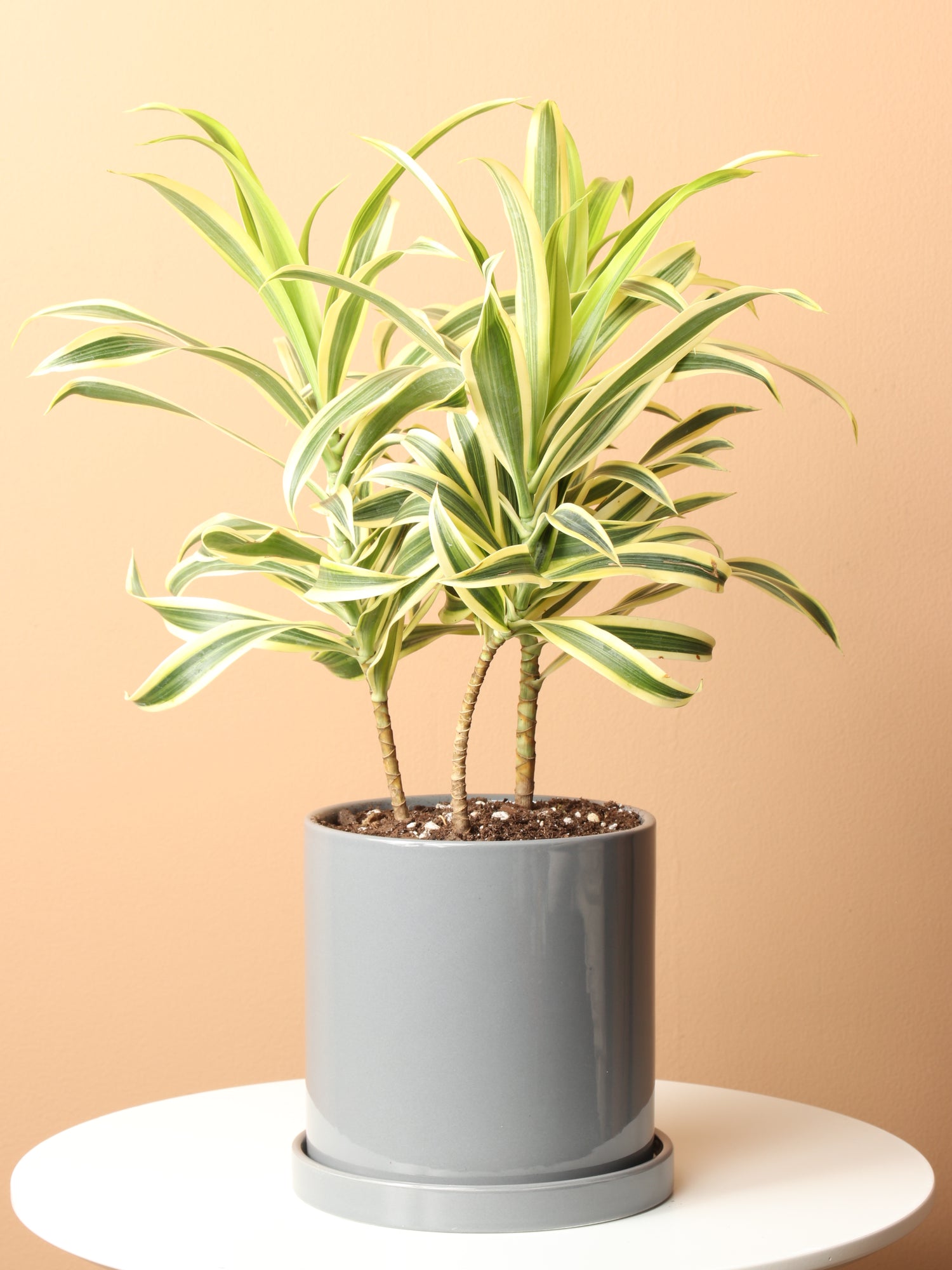
house plants native to india Medium Dracaena 'Song of India'Description The Dracaena Song of India offers you stunning beauty with its variegated leaves featuring creamy yellow margins against deep green centers. This tropical treasure brings natural elegance to any space while being wonderfully adaptable to indoor environments. Native to Madagascar and Indian Ocean islands, the Dracaena Reflexa Song of India (its botanical name) develops into a graceful, bushy statement plant. With proper care, it will
Description
The Dracaena Song of India offers you stunning beauty with its variegated leaves featuring creamy yellow margins against deep green centers. This tropical treasure brings natural elegance to any space while being wonderfully adaptable to indoor environments.
Native to Madagascar and Indian Ocean islands, the Dracaena Reflexa ‘Song of India’ (its botanical name) develops into a graceful, bushy statement plant. With proper care, it will transform your living space while purifying the air you breathe, creating a healthier home environment for you and your loved ones.
Care
How do you keep a Dracaena Song of India happy?
Keep your Dracaena Song of India thriving by providing bright indirect light, watering when the top inch of soil feels dry, and moderate humidity. This forgiving plant doesn't demand constant attention, making it perfect for new and experienced plant parents.
Regular dusting of the leaves, occasional fertilizing during the growing season, and ensuring proper drainage will help your plant flourish. For the best Dracaena Song of India care, remember that it's always better to underwater than overwater this beautiful plant.
How often should I water a Dracaena Song of India?
Water your Song of India when the top 1-2 inches of soil feel dry to the touch. Depending on your home environment, this means watering every 10-14 days. Always let your plant guide you by checking the soil moisture first.
Overwatering can lead to root problems, so it's important to be mindful of your watering routine. During winter months, reduce watering frequency as the plant's growth naturally slows. Using filtered water when possible will help prevent leaf tip browning from chemicals found in tap water.
Can Dracaena Song of India survive in low light conditions?
The Dracaena Song of India can adapt to lower light conditions, though it will grow more slowly and its beautiful variegation may become less pronounced. The distinctive yellow stripes need good light to maintain their vibrant color.
In dimmer areas, your plant will gradually produce more green and fewer variegated leaves as it adjusts to capture available light. For the healthiest growth and most striking foliage, a bright spot with indirect light will help your Song of India truly flourish.
What are the signs that my Dracaena Song of India needs more humidity?
Brown leaf tips often indicate that your Dracaena Song of India needs more humidity. This tropical plant is communicating that the air is too dry, and it needs your help to create a more comfortable environment for healthy growth.
Other signs include leaves that feel dry and crisp rather than supple, or new growth that appears smaller than usual. If you notice these symptoms, consider adding a humidifier nearby, grouping plants together, or placing your plant on a pebble tray with water to increase moisture levels around it.
Where is the best place to put a Dracaena Song of India?
Position your Dracaena Song of India near an east-facing window where it can enjoy the gentle morning sunlight. This location gives it the perfect balance of light without the intensity that could damage its beautiful variegated leaves.
If an east-facing window isn't available, placing it a few feet back from south or west windows works well too. Your plant will appreciate stable temperatures between 65-75°F and protection from cold drafts or heating vents that can stress its tropical nature.
Does Dracaena Song of India need full sun?
Your Dracaena Song of India plant doesn't require full sun and actually prefers bright, indirect light. In fact, direct sunlight can damage its delicate variegated leaves, causing them to develop brown, scorched patches that can't be reversed.
What your plant truly appreciates is consistent, filtered light that mimics its natural habitat beneath the canopy of larger trees. A sheer curtain can help diffuse intense light if your space is particularly sunny, creating the perfect environment for your plant to thrive.
Does Dracaena Song of India need misting?
Your Dracaena appreciates occasional misting, especially during drier seasons when the humidity levels inside your space drop. In that situation, this gentle moisture refreshes the leaves and helps recreate the tropical environment where these plants naturally thrive.
If regular misting doesn't fit your schedule, grouping plants together or using a pebble tray with water also works well. In particularly dry environments or during winter when heating systems reduce humidity, your plant will benefit from these extra moisture-boosting efforts.
How do I make my Song of India plant bushy?
To encourage a fuller, bushier Song of India plant, you can gently prune the stems just above their leaf nodes using clean, sharp scissors. Each cut stimulates new growth, creating a more compact and lush appearance over time.
Regularly rotating your plant ensures even growth on all sides, preventing it from stretching in one direction. Each cutting can be placed in water to root, allowing you to grow new plants to enjoy or share with friends and family.
How can I make my Song of India grow faster?
You can help your Song of India grow at its best by providing bright, indirect light, consistent warmth (65-75°F), and moderate humidity. During spring and summer months, feed monthly with a balanced houseplant fertilizer diluted to half strength.
Focus on creating stable, optimal conditions rather than trying to rush growth. With proper care, your Dracaena will add approximately 1-2 feet per year, developing at a natural pace that allows for strong, healthy growth and beautiful variegation.
What’s the best fertilizer for Song of India plant?
If you’re looking to up your Dracaena Song of India care, then the best fertilizer is a balanced, water-soluble houseplant formula (10-10-10) diluted to half the recommended strength. This gentle nutrition supports healthy growth without overwhelming your plant's system.
Feed your Dracaena every 2-4 weeks during spring and summer when active growth occurs. During fall and winter, your plant naturally enters a rest period and doesn't require fertilizer. Over-fertilizing can damage roots and cause leaf burn, so gentle, mindful feeding is best.
How do I prune my Song of India plant?
Prune your Song of India plant using clean, sharp scissors to make precise cuts just above leaf nodes. Spring is an ideal time for pruning as your plant enters its active growing phase. Light maintenance trimming can be done year-round.
Begin by removing any yellowing or dead leaves, then shape the plant as desired to encourage fuller growth. Each cutting can be rooted in water to create new plants, extending your garden family or offering a thoughtful, living gift to someone special.
Pet-friendly?
The Dracaena Song of India contains compounds that are toxic to cats and dogs if ingested. If you have furry family members, it's important to place this plant out of their reach or consider pet-safe alternatives for your home.
Is the Dracaena Song of India safe for dogs?
The Dracaena Song of India is not safe for dogs. If ingested, it can cause symptoms including vomiting, excessive drooling, weakness, and in some cases, dilated pupils or lethargy. Always place these plants where curious pets cannot reach them.
If you suspect your dog has nibbled on your Dracaena, contact your veterinarian right away. Quick professional guidance is important, as your pet's health and comfort are the top priority.
Is the Dracaena Song of India poisonous to cats?
The Song of India is poisonous to cats and should be kept in areas they cannot access. If it’s ingested, cats may experience symptoms such as dilated pupils, drooling, vomiting, and lethargy, which need prompt veterinary attention.
Cats are naturally curious and may be attracted to plants, making careful placement essential. If you notice any concerning symptoms after suspected plant contact, don't wait to see if they improve—contact your veterinarian immediately for guidance and support.
How to keep a cat away from a Song of India tree?
Consider creating pet-friendly plant areas with cat grass or catnip in accessible spots to redirect their interest. Some pet owners find success with natural deterrents like citrus peels or aluminum foil around plant bases, which many cats prefer to avoid.
Factoids
What are the different names for the Song of India plant?
The Dracaena Song of India is botanically known as Dracaena reflexa 'Variegata' but goes by several common names including Pleomele, Song of Jamaica plant, and Variegated Song of India. Despite these names, it's native to Madagascar and nearby islands.
These varied names all refer to the same beautiful plant with its distinctive yellow-edged green leaves. Regardless of what you call it, the care requirements remain the same—moderate light, careful watering, and protection from extreme temperatures.
How big are Dracaena Song of India plants?
Indoors, Dracaena Song of India typically grows to a manageable 3-8 feet tall and 1-4 feet wide, making it perfect for brightening corners or adding vertical interest to your space. (If it’s any taller, it’s special!) In outdoor tropical settings, it can reach 12-18 feet tall.
This moderate indoor size makes the Song of India versatile for various living spaces, from apartments to houses. Its upright growth habit means it doesn't demand much floor space while still creating a significant visual impact in your home.
Does the Song of India bloom?
The Song of India may occasionally produce small, fragrant white flowers indoors, but seeing them is pretty rare. The plant’s main attraction is definitely its stunning variegated foliage, which you then get to enjoy all year round.
If your plant does bloom, usually during winter months, consider it a special moment to be appreciated. The delicate flowers offer a subtle fragrance and add an unexpected dimension to this primarily foliage plant.
What is the meaning of the Song of India plant?
The Song of India symbolizes prosperity, adaptability, and resilience in many different cultural traditions. In feng shui practices, it's believed that the plant attracts positive energy and good fortune when you place it in appropriate areas of the home.
How long does the Song of India live?
With thoughtful care, a Dracaena Song of India can thrive for 5-10 years or longer in your home. So you can develop a relationship with your plant as you care for it through different seasons and stages of growth.
Over time, you'll learn to recognize your plant's specific needs and rhythms, making adjustments to care as it matures. With occasional pruning to refresh its appearance, your Song of India can remain a beautiful companion in your home for many years.
Is Song of India invasive?
The Song of India isn’t invasive and grows at a manageable pace. In native tropical habitats, it coexists harmoniously with other plants. As a houseplant, it stays comfortably within its pot, focusing its energy on upward growth rather than spreading.
Buy a Dracaena Song of India
Looking for a piece of tropical beauty to bring into your home? Our Dracaena Song of India plants are carefully selected for their vibrant leaves and overall health, so you receive a plant that will thrive under your care.
During our virtual shopping consultations, you can personally select the exact Song of India that resonates with you. We carefully package and ship your chosen plant using specialized methods that protect every leaf, delivering the precise plant you selected directly to your door.
Shipping Notes
- Free Standard Shipping on $100+ Orders to the USA.
- Except Preorder products are shipped in 48 hours.
- Delivery to the USA:
- Standard Shipping : 3-10 business days
- If time is of the essence, please consider selecting expedited delivery for faster service.
Exchange/Return Notes
- We offer a 30-day return/exchange service after receiving.
- Final sale items are not eligible for returns or exchanges.
- To process your return/exchange, please contact us at [email protected]
- Please click here for more details>>> Return & Exchange Policy