SKU: 14646281912
philodendron braune blätter

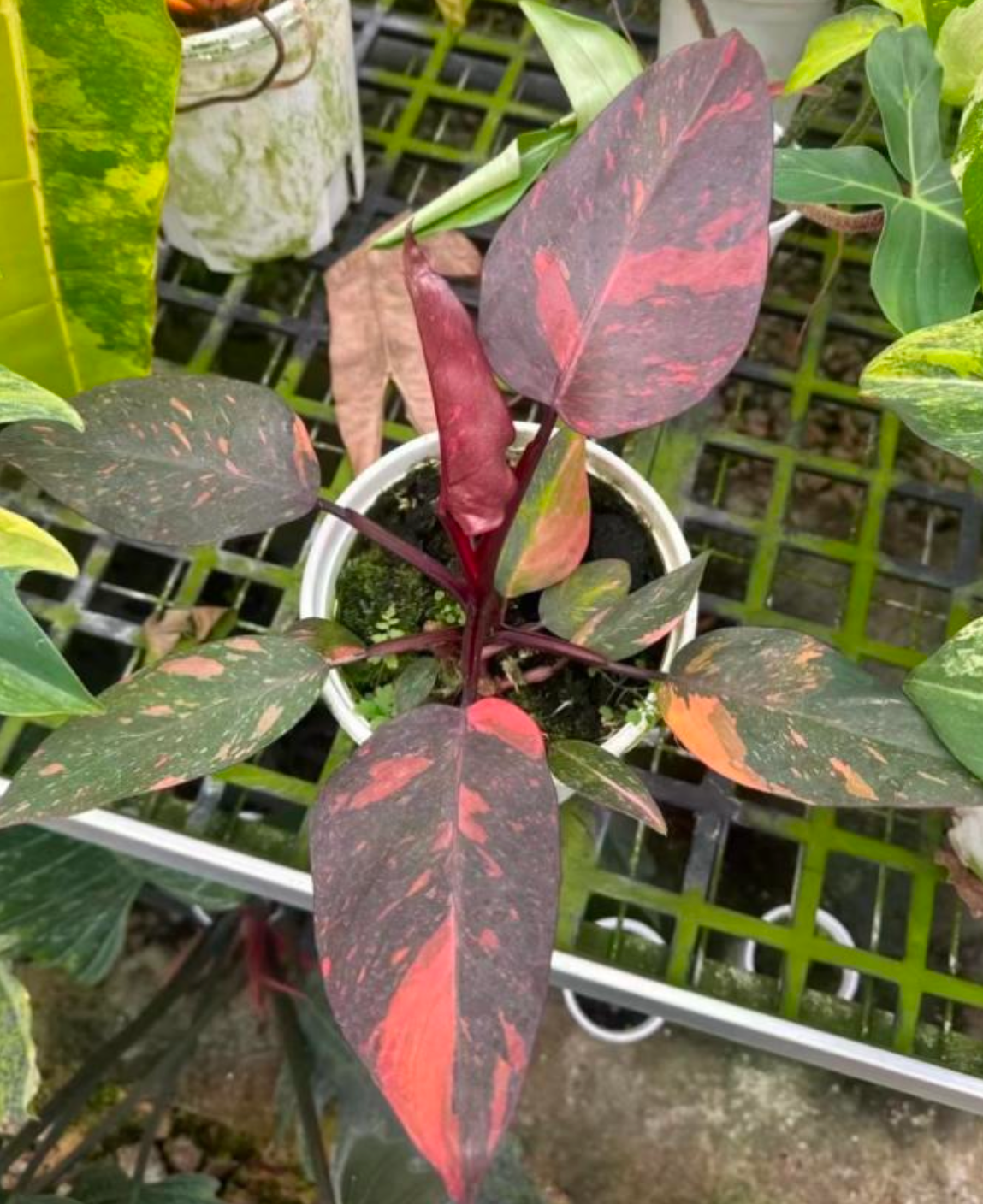
philodendron braune blätter Philodendron Orange princess marble

Sale price$20.05 Regular price$22.28
Save 10%

Pay in installments of $5.57 with ShopPay, AfterPay and Klarna

Shipping Estimate
USA
  • USA
  • CAN

Ships within 48 hours · Estimated delivery Jul 18 - Jul 23

Promo Codes Available:

For Your Every Summer RSVP, with Code: SUMMER15

Description

philodendron braune blätter Philodendron Orange princess marbleDer Philodendron Orange princess marble ist ein wunderschner Philodendron mit marmoriertem Blatternmuster eine tolle Ergnzung fr jede tropische Pflanzensammlung. Was ist eine Tissue Culture (TC) Pflanze? Tissue Culture Pflanzen werden steril im Labor in einer Nhrlsung (Agar) angezogen frei von Schdlingen, Pilzen und Krankheitserregern. Das macht TC Pflanzen zur idealen Wahl fr Sammler, die gesunde und saubere Pflanzen in ihre Sammlung aufnehmen

Der Philodendron Orange princess marble ist ein wunderschöner Philodendron mit marmoriertem Blatternmuster – eine tolle Ergänzung für jede tropische Pflanzensammlung.

🌿 Was ist eine Tissue Culture (TC) Pflanze?

Tissue Culture Pflanzen werden steril im Labor in einer Nährlösung (Agar) angezogen — frei von Schädlingen, Pilzen und Krankheitserregern. Das macht TC-Pflanzen zur idealen Wahl für Sammler, die gesunde und saubere Pflanzen in ihre Sammlung aufnehmen möchten.

Zur Nährlösung — das ist alles normal:

Je nach Rezeptur kann das Agar fest und gummiartig oder eher flüssig sein — beides ist völlig okay. Manchmal ist es durch den Transport auch brüchig, verteilt sich in der Tüte oder berührt die Blätter. Das schadet deiner Pflanze überhaupt nicht. Auch wenn das Agar seine Farbe verändert oder "umkippt" — das passiert durch Temperaturschwankungen und ist kein Qualitätsmangel.

Braune Blätter?

Beim Übergang aus der sterilen Umgebung in die „echte Welt" können manche Blätter braun werden. Das ist völlig normal und kein Grund zur Sorge.

Nach dem Erhalt: Bitte nicht zu lange in der Tüte lassen!

Hol deine neue Pflanze möglichst bald nach dem Erhalt raus — vor allem wenn das Agar bereits umgekippt ist. In dem Fall hat die Lösung keinen Nährwert mehr. Je schneller du sie rausholst, desto besser für sie! 😊

📋 TC Pflanze einpflanzen — so geht's:

  1. Pflanze vorsichtig aus der Tüte nehmen.
  2. Alle Agarreste gründlich unter lauwarmem Wasser abspülen — wirklich 100 %! Auch kleinste Rückstände können zu Wurzelfäule führen.
  3. Braune oder weiche Blätter entfernen.
  4. In feuchtes Substrat einpflanzen — wir empfehlen Sphagnummoos, Perlit oder Stratum für die Akklimatisierung von TC-Pflanzen.
  5. Hohe Luftfeuchtigkeit (80–90 %) sicherstellen und langsam an normale Bedingungen gewöhnen.

💡 Eine ausführliche Schritt-für-Schritt-Anleitung zur TC Akklimatisierung findest du demnächst in unserem Blog!

Reklamationen & Hinweise

Sollte bei dir etwas nicht stimmen, melde dich bitte direkt nach dem Erhalt — nur dann können wir eine Reklamation berücksichtigen. Da es sich um ein Naturprodukt handelt, können wir leider keine Garantie für die weitere Entwicklung der Pflanze übernehmen. Wir geben unser Bestes — den Rest macht die Natur. 🌱

Shipping Notes
  • Free Standard Shipping on $100+ Orders to the USA.
  • Except Preorder products are shipped in 48 hours.
  • Delivery to the USA:
  1. Standard Shipping : 3-10 business days
  • If time is of the essence, please consider selecting expedited delivery for faster service.
Exchange/Return Notes
  • We offer a 30-day return/exchange service after receiving.
  • Final sale items are not eligible for returns or exchanges.
  • To process your return/exchange, please contact us at [email protected]
  • Please click here for more details>>> Return & Exchange Policy
SKU: 14646281912

Discover Niche Categories That Outsell philodendron braune blätter

Top-Converting Item to Boost Your Average Order

4.4 ★★★★★
Based on 18 reviews
Sort
Highest Rating
Newest First
Oldest First
Product Reviews
T
Verified Purchase
The Right Tool
Port Orchard, US
★★★★★ 5
Setup Is SOO Easy - Compact Size - Intuitive - Automatic Device Connections
Size: 1 add-on extender, Configuration: without eero Plus, Size: 1 add-on extender, Configuration: without eero Plus
We were hoping to solve an issue we were having with our Wifi setup which prevented us from reliably connection to our two alley cameras and interior garage camera/door opener. These 3 devices were just a bit too far from our Wifi to get a strong connection to stream a video feed, though strong enough to stay connected. However, after install this extender, the signal is super strong and connecting to these cameras is much faster. Setup and usage was also SUPER simple. Since we are already running an Eero setup with 2 routers, install was as simple as plugging the device in, opening the app and clicking through just a couple buttons to start the automatic process for building out the network. Best of all, each of the alley devices are automatically connecting to the extender without needing to manually assign them, so convenient! If you're concerned about compatibility, we had no issues running this with the Eero 6e routers found here https://amzn.to/41kfEv5 I can't speak to all the compatible options but the Eero 6 and 6e routers are a sure bet. So for us, the coverage and stability of the network is now excellent across all devices and we finally have proper functionality of all our connected devices.
WAS THIS REVIEW HELPFUL?YesReportShare
Reviewed in the United States on March 22, 2026
H
Verified Purchase
Heather
Charlottesville, US
★★★★★ 5
So Far So Good
Size: 1 router, Configuration: without eero Plus
My modem crashed a few months ago and Spectrum had to replace the system. I learned during that installation that I was being charged an extra $10/month for my router. Didn't realize that for 5 years, I was only "renting" my router. Which has been an absolute waste of $600. During the initial install, I was not informed of that and I have never seen an actual paper statement for my bill breaking down my plan. My first Spectrum router was very spotty towards the back of my house (1050sq ft. house) and the new router which was supposed to be an upgrade to Wi-Fi 6, was even worse. My phone would lose connection to the new router on my front porch which is 5 feet away from my router. I initially thought that all I needed was an extender and that is how the Spectrum guy and I got on the subject because I am NOT very tech savvy. I had already been looking at the Eero router and he recommended it. I found the one that is compatible to my internet plan (400Mbps) and went for it while it was on sale. This router is very well packaged. Very pretty packaging, too. OMG!! Super super easy to install. Your grandparents could install this. The only thing that I recommend is being sure of your password which you should be able to find in your providers app (at least I can with Spectrum). If you do happen to forget one digit to your password, and you accidentally change your password, you will have to reconnect each device individually. This router was compatible with my internet plan and provider. I'm very happy with the quality, signal strength, functionality. It has been very reliable for the three days that I have had it. I have not lost signal once. Not even on my front porch. My phone is now showing that I am connected to Wi-Fi 6 when before, it kept dropping it and dropping back down to 5G. Even with the 5G, it would buffer really bad. I got this on sale and I do think that the price is competitive for how well this router performs. The app is super easy to navigate and every device that is linked to your router is located in the app. You can monitor what devices are connecting to your router. I do think that this Eero router was the upgrade to my internet plan. I would recommend saving yourself the cost to "rent" your router through your service provider and upgrading to the Eero router. This will pay for itself in 6 months now that I am not "renting" my router.
WAS THIS REVIEW HELPFUL?YesReportShare
Reviewed in the United States on November 19, 2025
I
Verified Purchase
Idin Javadi
Omaha, US
★★★★★ 5
Better than most!
Size: 1 add-on extender, Configuration: without eero Plus
I found that this extender works better than most in that it seamlessly boosts the signal without having to switch networks. The set up was super simple and easy, just plug and play basically. Does exactly as advertised, only about a 30% reduction in speed.
WAS THIS REVIEW HELPFUL?YesReportShare
Reviewed in the United States on May 16, 2026
M
Verified Purchase
MAC4Freedom
Lowell, US
★★★★★ 4
Almost perfect...
Size: 1 router + 2 extenders, Configuration: without eero Plus
I needed to extend my wireless reception for my home office. This was recommended by the cable guy and was easy to install. Instead of just picking up a signal and patching it through, it creates a web in my home and extends the wi-fi not only to my office, but upstairs as well. It works with my Comcast modem and provides much greater speed and coverage in my home. It's not perfect as I still get occasional freezing when on video calls, but unless I want to move my office to the dining room this will have to do. I don't know how much this should cost, but I had a little bonus money so I spent it on this upgrade. It seems to be worth it.
WAS THIS REVIEW HELPFUL?YesReportShare
Reviewed in the United States on February 4, 2026
P
Verified Purchase
Paige
Chelsea, US
★★★★★ 5
Super Easy Setup & Great Coverage
Size: 1 add-on extender, Configuration: without eero Plus
This was incredibly easy to set up. The app walked me through everything step by step and within just a few minutes the extender was connected and working. I’m not super techy, so I really appreciated how simple and straightforward the process was. I added this to help improve Wi-Fi coverage in parts of the house that normally had weaker signal, and it made a noticeable difference right away. Everything feels faster and more reliable now, especially when streaming or using multiple devices at once. Definitely a great option if you want to extend your coverage without dealing with a complicated setup process.
WAS THIS REVIEW HELPFUL?YesReportShare
Reviewed in the United States on May 7, 2026

recommand products