Pay in installments of $5.91 with
 ,
,
 and
and

Shipping Estimate
USA
- USA
- CAN
- USA
- CAN
Ships within 48 hours · Estimated delivery Oct 20 - Oct 25
 Promo Codes Available:
For Your Every Summer RSVP, with Code: SUMMER15
Description
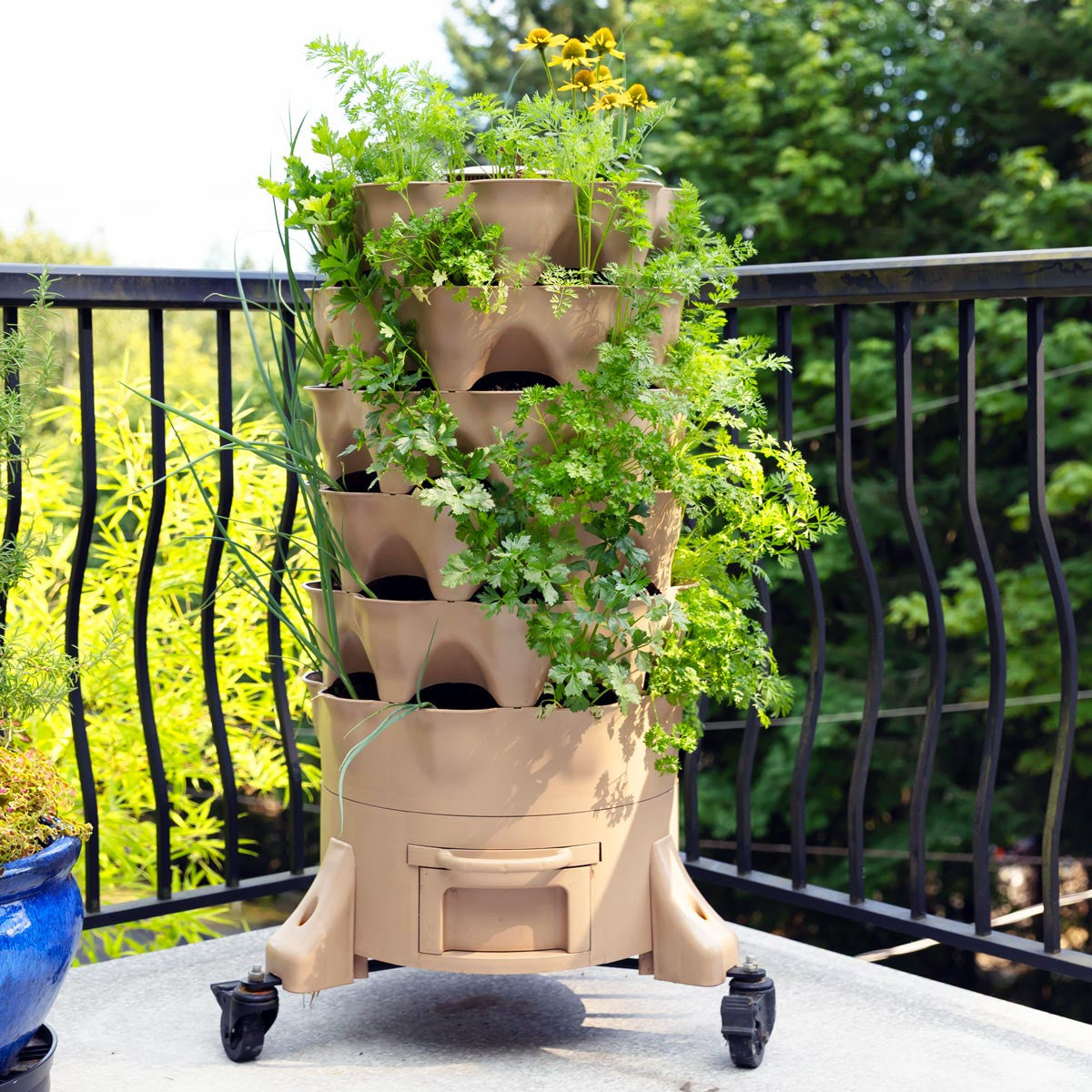
pot planter sale Garden Tower 2The Garden Tower vertical garden planter and composting system replicates a natural ecosystem allowing plants to access nutrients recycled through organic composting processes. Easily grow nearly any vegetable, herb or flower organically with the Garden Tower 2! This vertical gardening system eliminates weeding, nutrient loss and most water loss associated with conventional gardening. Read more The Garden Tower 2 gives you space for 50 individual
The Garden Tower® vertical garden planter and composting system replicates a natural ecosystem allowing plants to access nutrients recycled through organic composting processes.
Easily grow nearly any vegetable, herb or flower organically with the Garden Tower 2! This vertical gardening system eliminates weeding, nutrient loss and most water loss associated with conventional gardening.
The Garden Tower 2 gives you space for 50 individual plants, as well as a large vermicomposting column down the middle. This system utilizes your kitchen scraps to produce nutrient rich compost that is then made accessible to the roots of your flowers, herbs or vegetables.
The Garden Tower 2 is a great option for those looking to save space on a patio, balcony, store-front or even in a greenhouse. It's made from food-grade, USA-made HDPE (non-toxic, BPA & PVC free plastic) components, FDA-approved dye, and UV-protection antioxidant package for health, durability, and recyclability.
Features & Benefits:
- Create organic fertilizer delivered right to your plants in one system
- Eliminate weeding, and most water and nutrient loss
- Made from food safe & BPA-free polyethylene
- 50 individual spaces for different plants in just 4 square feet
- Holds 6 cubic feet of soil
- Rotating tower
- Collect both the castings and "worm tea"
- Odorless operation
- Made in the USA
- 3-year manufacturer's warranty
Please note the Garden Tower does not include soil, seeds, bedding material or worms. Composting worms can be purchased here, or from a variety of local and online sources.
Planting Recommendations:
Below is a shortlist of what we recommend planting in your Garden Tower!
Vegetables
Amaranth (vegetable type), Arugula, Beans, Broccoli, Brussels Sprouts, Cabbage, Cauliflower, Chard, Chicory, Collards, Cucumbers, Eggplant, Endive, Escarole, Gourds, Kale, Leeks, Lettuce, Melons, Mesclun, Mustard Greens, Dwarf Okra, Peas, Peppers, Radicchio, Sorrel, Spinach, Squash, Strawberries, Tomatoes
Note: vines such as squash and melons grow nicely from the bottom holes, trailing onto an in Tower trellis or a railing, chair, stool or piece of garden art)
Herbs
Angelica, Anise Hyssop, Basil, Calendula, Catmint, Catnip, Chamomile, Chervil, Chives, Cilantro, Dandelion, Dill, Echinacea, Feverfew, Flax, Garlic Chives, Goldenseal Hyssop, Lavender, Fennel, Lemon Balm, Marjoram, Milk Thistle, Mint, Nettle, Oregano, Parsley, Passion Flower, Pleurisy Root, Rosemary, Sage, Salad Burnet, Saltwort, Savory, Shiso, Stevia, Thyme, Valerian, Wormwood
Flowers
Edible Flowers: Calendula, Carthamus, Dianthus, Marigolds, Nasturtiums, Pansies, Salvia, Violas
Ornamental Flowers: Ageratum, Amaranth, Ammi, Aster, Bells of Ireland, Bupleurum, Morning Glory, Nigella, Petunia, Phlox, Polygonum, Poppy, Ptilotus, Rudbeckia, Safflower, Salpiglossis, Sanvitalia, Scabiosa, Snapdragon, Stock, Strawflower, Sweet Peas, Verbena, Yarrow, Zinnia
Using Your Garden Tower
The Garden Tower planter works on an aerobic (with air) composting principal, so light, fluffy soil is best. Issues can arise from over-compaction, either in the soil column or in the compost column. Straw, grass, leaves & coir are good bedding for worms and should periodically be added directly in the compost column to avoid compaction.
Start with at least 250-500 composting worms for the center compost tube. Add at least 25-50 earthworms into the soil column.
A general watering schedule during the growing season is 4-6 gallons of water every 2-3 days. That being said, this will vary for everyone, and we recommend watering with a container instead of a hose to avoid over-watering.
Every so often, once the column is full, you can empty some of the finished compost from the bottom. To do so, ensure the drawer has no water in it and pull the screen out half way to allow vermicompost to exit the bottom of the compost column, and fall into the drawer. You can use the finished compost in your gardens, and the liquid that drains down through the tower is also an ideal fertilizer.
What to Feed your Worms:
Most fruit and vegetable scraps, pulps from juicer
Cooked food
Tea leaves/bags and coffee grounds
Crushed/ground eggshells
Hair, vacuum cleaner dust, soiled paper, tissue, paper towels, shredded egg cartons
Shredded newspaper, cardboard, sawdust (untreated), wood ash
Lawn clippings in small quantities, weeds, clippings, prunings, dirt and leaves
What to Avoid or Limit:
Limit citrus and acidic fruit skin
Limit bread, pasta and other wheat based products
Avoid hard fruit pits
Avoid spice foods, onions, garlic and leeks
Avoid animal products such as meat, dairy, or fats
Avoid shiny paper
Do not feed rotten food to your worms
Taking Care of Your Worms
Worms are low maintenance and will be happy as long as they are fed, have enough moisture, and are kept between 40° and 80° F. Worms should be protected from extreme temperatures. The vertical tower planters can be used successfully both indoors and outdoors, and they are a great space-saver in a greenhouse!
You don't need to feed your worms every day – just add scraps as you have them. We recommend a generous handful or two of food every couple of days. Worms can survive up to 2 weeks without any new food. Worms reproduce inside the tower according to their space limitations. They will regulate their own population, so you never need to worry about overcrowding your tower.
It is very important that the Garden Tower compost is not overfed. Worms prefer to eat their food as it begins to decompose, but not if it has become slimy and smelly.
In Mid & Northern regions, overwintering is possible during milder winters. In a cold winter, we suggest that the center compost should be removed (with worms) and placed in a 1-foot deep hole in the ground outside of your dwelling (if accessible). Alternatively, you could empty the contents and worms into a indoor worm composting system.
Shipping Notes
- Free Standard Shipping on $100+ Orders to the USA.
- Except Preorder products are shipped in 48 hours.
- Delivery to the USA:
- Standard Shipping : 3-10 business days
- If time is of the essence, please consider selecting expedited delivery for faster service.
Exchange/Return Notes
- We offer a 30-day return/exchange service after receiving.
- Final sale items are not eligible for returns or exchanges.
- To process your return/exchange, please contact us at [email protected]
- Please click here for more details>>> Return & Exchange Policy