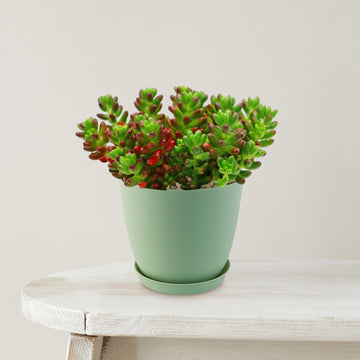
pork and beans succulent plant Jelly Bean Succulent 'Sedum rubrotinctum' 6" Pot / Light Green / With PotIntroducing the Jelly Bean Plant, botanically known as Sedum rubrotinctum, is a charming, low growing succulent admired for its colorful, bead like foliage. Its cascading stems make it an excellent choice for hanging baskets, window boxes, and container arrangements, where its colorful foliage can spill over the edges beautifully. Native to Mexico, this evergreen perennial is commonly called pork and beans or banana cactus due to its plump, jelly bean
Introducing the Jelly Bean Plant, botanically known as Sedum rubrotinctum, is a charming, low-growing succulent admired for its colorful, bead-like foliage. Its cascading stems make it an excellent choice for hanging baskets, window boxes, and container arrangements, where its colorful foliage can spill over the edges beautifully.
Native to Mexico, this evergreen perennial is commonly called pork and beans or banana cactus due to its plump, jelly bean-shaped leaves that give it a playful and unique appearance.
This hybrid jelly bean succulent has small, fleshy leaves that start out green but develop vibrant shades of red, orange, or bronze when exposed to bright sunlight, making it a standout in any succulent collection.
It is often used as a ground cover in rock gardens or featured in decorative containers and dish gardens.
As the plant matures, Sedum rubrotinctum typically reaches about 8 inches tall and up to 24 inches wide, forming a spreading, trailing habit.
Jelly bean succulent flowers are yellow, small, and star-shaped, blooming in clusters at the tips of their stems.
While the blooms are subtle, they provide a delicate contrast to the bold foliage and usually appear in spring to early summer.
Pink Jelly bean Succulent - Sedum rubrotinctum aurora
One particularly eye-catching variety is Sedum rubrotinctum ‘Aurora’, also known as Pink Jelly Bean, which features soft green leaves that blush into shades of pink and cream under bright light. This variety adds an extra layer of color and visual interest, especially when grouped with other succulents.
Learn more →
What truly makes the jelly bean succulent so popular is its combination of low-maintenance care and vibrant color transformation. It is drought-tolerant, easy to grow, and adapts well to both indoor and outdoor environments with proper light. Its ability to change color with sunlight adds dynamic beauty throughout the year.
When and How to Water Your Sedum rubrotinctum Plant
This jelly bean succulent is highly drought-tolerant and prefers drying out between waterings, making it more resilient to underwatering than overwatering.
The Sedum rubrotinctum should be watered once every 1-2 weeks during the growing season, with light soaking and minimal watering once every 3-4 weeks during the dormant season, with very light moisture.
During the active growing season, allow the soil to dry out completely between waterings. This helps prevent overwatering, which can cause the Sedum rubrotinctum roots to rot.
During the dormant season, your jelly bean requires even less water. It's important to remember that succulents like the jelly bean plant are more tolerant of underwatering than overwatering.
Light Requirements - Where to Place Your Jelly Bean Succulent
When growing indoors, you can grow it in the areas where it can receive atleast at least 6 hours of bright, direct light to maintain their vibrant red coloring and compact, healthy growth.
Place it near a window that receives plenty of sunlight, but make sure to protect your jelly bean plants from direct exposure to intense sunlight, especially during the hottest parts of the day.
A south or west facing window works best, but protect it from harsh midday sun. If natural light is limited, you can use grow lights.
When growing outdoors, it loves basking in the full sun, so find a location in your garden or patio that receives at least 6 hours of direct sunlight each day.
When grown in direct sunlight, the color ranges from bright green leaves to red-tipped leaves, with the brightest hues. However, it's important to note that the jelly bean plant can also tolerate partially shaded areas, especially in regions with intense summer heat.
Newly purchased jelly bean succulent may burn if placed in full sun right away, so increase exposure gradually.
- If the leaves stretch or turn pale, it needs more light.
- If they become scorched or develop brown spots, it is getting too much sun.
Optimal Soil & Fertilizer Needs
The Sedum rubrotinctum favors very airy, sandy soil that drains well, and NPK fertilizers once a year in spring. Planting your Sedum rubrotinctum in ordinary wet soil will result in compacted roots, stunted growth, and, most likely, root rot. Instead, make or buy a well-draining potting mix, or ideally, use our Go to Soil cactus mix blend 1 gal 4 qt cacti succulent dirt compost growing media that contains organic mycorrhizae to promote the development of a strong root system that helps your jelly bean plants and other succulents to thrive.
A balanced, low-strength fertilizer works best for your Jelly bean succulent plant, ideally with an NPK ratio around 5-10-5, where phosphorus is slightly higher than nitrogen to support healthy growth. Apply fertilizer once in spring at the start of the growing season to give it a gentle boost to support stronger roots and better nutrient absorption.
Hardiness Zones & More
In the United States, this jelly bean succulent is mostly an indoor plant, but if you live in southern Florida or Hawaii, then you can cultivate it outdoors in USDA zones 9-11.
If you live in a colder climate, it's best to bring the jelly bean plant indoors or provide some protection during the winter months.
As for humidity, the jelly bean plant can handle a range of humidity levels, from drier to more humid environments. Just ensure that the soil has good drainage to prevent waterlogged conditions.
How to Grow as a Houseplant
Your jelly bean succulent grows best indoors in temperatures between 60°F and 75°F. It can tolerate slightly cooler temperatures during the winter months, but it's best to keep it away from drafts or extreme temperature fluctuations. As for humidity, the Sedum rubrotinctum jelly bean plant can handle average indoor humidity levels, so you don't need to worry too much about providing extra humidity. Just make sure the air isn't too dry, especially during the winter when indoor heating can cause dryness.
Wildlife - Jelly Bean Succulent Flowers Attract the Following Friendly Pollinators
Jelly Bean Succulent 'Sedum rubrotinctum' can attract friendly pollinators such as bees, butterflies, hummingbirds, and other beneficial insects. These pollinators play a crucial role in the ecosystem by aiding in the reproduction of plants and ensuring biodiversity.
Butterflies
Bees
Hummingbirds
Lady Bugs
Multi Pollinators
Other Birds
According to ASPCA, the Sedum rubrotinctum is mildly toxic to humans or pets if ingested in large amounts. However, it is safe to touch and handle, making it a popular choice for indoor gardens or landscaping due to its vibrant colors and low maintenance requirements.
How to Propagate Your Sedum rubrotinctum Plant
To propagate your jelly bean plants, stem or leaf cuttings can be used. Both are simple and have a high success rate. Keep the cutting in a spot with bright, indirect light instead of direct sunlight, and give it some time until you begin to see new growth.
Key Takeaways
- Jelly bean succulents are low-maintenance and drought-tolerant. They prefer infrequent watering and can handle dry conditions better than excess moisture, making them beginner-friendly plants.
- 'Sedum rubrotinctum' is known as pork and beans succulent or banana cactus, because of their jelly bean-shaped leaves.
- These succulents thrive in airy, sandy soil, and keeping roots from sitting in moisture is key to maintaining plant health.
- Jelly bean succulents' leaves shift from green to vibrant red or bronze, in bright sunlight.
Final Thoughts
Overall, the jelly bean succulents (Sedum rubrotinctumm) are captivating succulents with their bean-shaped leaves and trailing growth habit. With their vibrant green foliage and occasional bursts of colorful flowers, they add a touch of whimsy to any space. A succulent tends to live for many years and grows slowly. Plant them in the spring after the weather warms up. Propagating these succulents is relatively easy, whether through stem cuttings or fallen leaves. Jelly bean succulents are a delightful addition to any succulent collection, bringing charm and beauty to both indoor and outdoor settings. If you're looking for a unique and low-maintenance plant, the jelly bean succulent is definitely worth considering!
Don't miss out on this opportunity to add something truly exceptional to your garden. Order your very own jelly bean Sedum rubrotinctum today!
 ,
,
 and
and

 Promo Codes Available: