Pay in installments of $7.29 with
 ,
,
 and
and

Shipping Estimate
USA
- USA
- CAN
- USA
- CAN
Ships within 48 hours · Estimated delivery Oct 27 - Nov 1
 Promo Codes Available:
For Your Every Summer RSVP, with Code: SUMMER15
Description
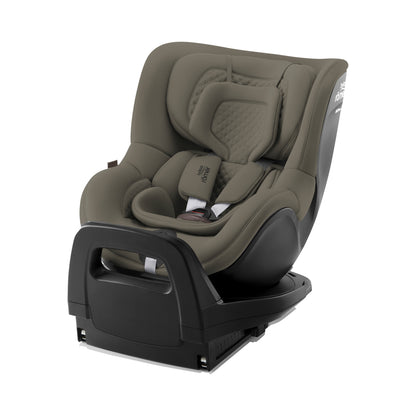
base isofix britax romer Britax-Römer Vario Base 5Z – Rear Facing ToddlersThe Vario Base 5Z is part of Britax Rmer's Modular System and is used with the Baby Safe Pro for newborns up to 85cm and the Dualfix 5Z for children up to 105cm. The Baby Safe Core infant carrier also fits on the Vario Base. With the VARIO BASE 5Z, you are ready for four years of convenient safety on the road. The modular base is compatible with the BABY SAFE PRO, the BABY SAFE CORE as well as the DUALFIX 5Z i SIZE and each of them can be installed on
The Vario Base 5Z is part of Britax-Römer's Modular System and is used with the Baby-Safe Pro for newborns up to 85cm and the Dualfix 5Z for children up to 105cm.
The Baby-Safe Core infant carrier also fits on the Vario Base.
With the VARIO BASE 5Z, you are ready for four years of convenient safety on the road. The modular base is compatible with the BABY-SAFE PRO, the BABY-SAFE CORE as well as the DUALFIX 5Z i-SIZE – and each of them can be installed on the base with just one click.
The rotating feature allows you to turn each seat towards the car door, making it easy to place your child in the seat and fasten the harness.
The easily accessible release button allows you to effortlessly pick up the infant carrier by the handle. And the rebound bar adjusts to the angle of the car's backrest and provides leg space when travelling rearward facing.
In cars with inclined vehicle seats, your child's head might tip forward when they fall asleep in the seat. That's why the VARIO BASE 5Z can be adjusted to six different positions to provide the best combination of safety and comfort for your little one. With the infant carriers it's best to set the correct angle before installing the seat and with the DUALFIX 5Z i-SIZE you can adjust the angle on the go to a more comfortable position when your toddler falls asleep.
Dimensions:
Height: 30cm
Width: 44cm
Depth: 64cm
Weight: 8kg
Meets the UN R129 i-Size regulation
Shipping Notes
- Free Standard Shipping on $100+ Orders to the USA.
- Except Preorder products are shipped in 48 hours.
- Delivery to the USA:
- Standard Shipping : 3-10 business days
- If time is of the essence, please consider selecting expedited delivery for faster service.
Exchange/Return Notes
- We offer a 30-day return/exchange service after receiving.
- Final sale items are not eligible for returns or exchanges.
- To process your return/exchange, please contact us at [email protected]
- Please click here for more details>>> Return & Exchange Policy
4.5 ★★★★★
Based on 5 reviews
Sort
Product Reviews
★★★★★ 5
My kid loves them!
My kid loves these. They also said they like that, unlike some other ones, they can see underneath it somewhat to tell when its more ready to come off.
WAS THIS REVIEW HELPFUL?YesReportShare
Reviewed in the United States on April 5, 2026
★★★★★ 5
Love this entire skincare line
We love this product! I have a teenage daughter who uses it and absolutely raves about it. We use the entire line, including the facial cleanser, toner, and more. Everything about these products has been great—effective, gentle, and high quality. Highly recommend!
WAS THIS REVIEW HELPFUL?YesReportShare
Reviewed in the United States on December 18, 2025
★★★★★ 4
Works great, just no different from any other pimple patch on the market
These pimple patches by Thayers are made from 100% hydrocolloid and definitely work in terms of helping speed up the pimple healing process. These pimple patches work best when your pimple is ripe enough. If you stick these pimple patches on when your pimples are not ripe enough yet, they will not do anything, and it would be a waste of a pimple sticker. You know when your pimple is ripe when it comes to a head and has that little white spot. When it's ripe, I would stick this pimple patch overnight and typically by the time I wake up, the pimple patch will have absorbed all the gunk from my pimple. You will know that it worked if you see your pimple patch turn white. Sometimes it might take an extra night for the gunk to come out. When you stick these pimple patches on, make sure your face is freshly washed without any face products or else they won't stick as well. Given what the Thayers brand is known for (natural remedies and herbal extracts), I would think that they would infuse some natural ingredients into this pimple patch to help speed up the healing process even more. But to my disappointment, they did not add any additional active ingredient to this pimple patch despite what their brand stands for so I took off a star.
WAS THIS REVIEW HELPFUL?YesReportShare
Reviewed in the United States on March 6, 2025
★★★★★ 5
Great for my teen
We love Thayers everything. They work so great and they truly are invisible. My daughter can wear them to school and not even realize they’re on her face.
WAS THIS REVIEW HELPFUL?YesReportShare
Reviewed in the United States on November 22, 2025
★★★★★ 5
A MUST Buy for your TEEN.
Helping my son so much - these work within a couple of hours to flatten ouchie whiteheads. My 14 years old son is so grateful!
There’s 2 sizes, 22 patches, and they truly are “invisible” like the box says.
These have been working so well (better than any other brand - and we’ve tried them all) and the price is the cheapest. We Love THAYERS brand now - lifetime user here for sure.
WAS THIS REVIEW HELPFUL?YesReportShare
Reviewed in the United States on July 27, 2025