Pay in installments of $6.38 with
 ,
,
 and
and

Shipping Estimate
USA
- USA
- CAN
- USA
- CAN
Ships within 48 hours · Estimated delivery Oct 21 - Oct 26
 Promo Codes Available:
For Your Every Summer RSVP, with Code: SUMMER15
Description
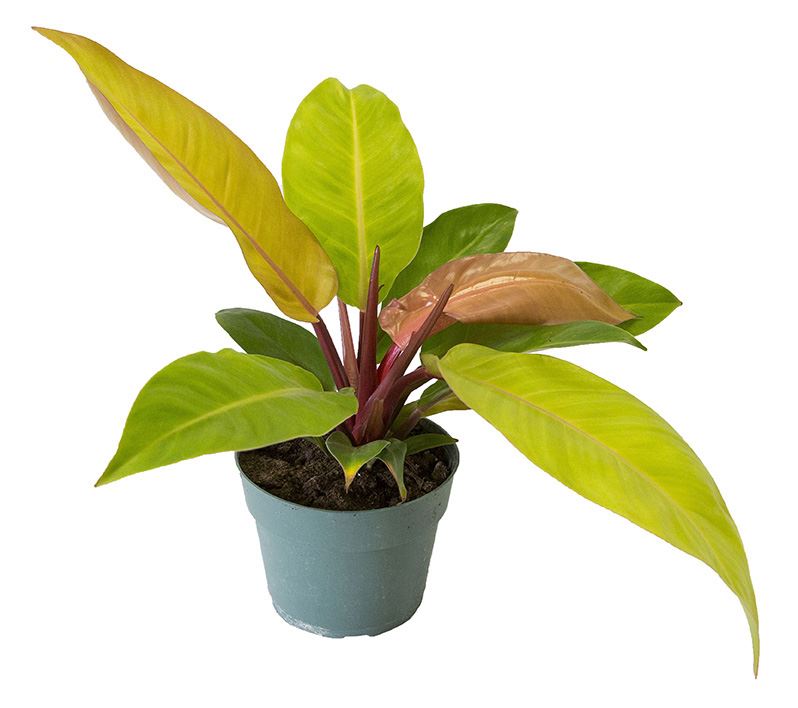
hybrid philodendron Philodendron HybridsPhilodendron Hybrids have been developed by growers in the past few years. Common and rare varieties include Imperial, Congo, Autumn, Prince of orange to name a few. They are also called self heading philodendrons. These plants are both attractive and very easy to care for. We usually carry Green (moonlight), Red (imperial) and Orange hybrids and shipping is based on what's available from our growers. Plant Care: Pot Size: 6" Water: When growing
- Philodendron Hybrids have been developed by growers in the past few years. Common and rare varieties include Imperial, Congo, Autumn, Prince of orange to name a few. They are also called self-heading philodendrons. These plants are both attractive and very easy to care for. We usually carry Green (moonlight), Red (imperial) and Orange hybrids and shipping is based on what's available from our growers.
- Plant Care:
- Pot Size: 6"
- Water: When growing philodendron plants, allow the top inch of soil to dry out between waterings. The length of your index finger to the first knuckle is about an inch, so inserting your finger into the soil is a good way to check the moisture level. Droopy leaves can mean that the plant is getting too much or not enough water. But the leaves recover quickly when you correct the watering schedule.
- Light: Set the Philodendron in a location with bright, indirect sunlight. Find a position near a window where the sun’s rays never actually touch the foliage. While it’s normal for older leaves to yellow, if this happens to several leaves at the same time, the plant may be getting too much light. On the other hand, if the stems are long and leggy with several inches between leaves, the plant probably isn’t getting enough light.
- Soil: Philodendrons do best in loose, well-drained soil that is high in organic matter. They will grow in 100% sphagnum peat moss. Soilless mixtures such as peat-vermiculite or peat-perlite are also satisfactory.
- Whats Included:
- Plant, Basket, Moss & Enclosure Card.
Shipping Notes
- Free Standard Shipping on $100+ Orders to the USA.
- Except Preorder products are shipped in 48 hours.
- Delivery to the USA:
- Standard Shipping : 3-10 business days
- If time is of the essence, please consider selecting expedited delivery for faster service.
Exchange/Return Notes
- We offer a 30-day return/exchange service after receiving.
- Final sale items are not eligible for returns or exchanges.
- To process your return/exchange, please contact us at [email protected]
- Please click here for more details>>> Return & Exchange Policy
4.8 ★★★★★
Based on 22 reviews
Sort
Product Reviews
★★★★★ 5
Good
Size: One Size, Color: Black Signature
Good quality
WAS THIS REVIEW HELPFUL?YesReportShare
Reviewed in the United States on April 2, 2026
★★★★★ 5
LOVE
Size: One Size, Color: Black Smooth
This was a last minute christmas gift for my husband and I was honestly worried about spending $200 on a Coach wallet from anywhere other than the Coach store but I knew it would ship and arrive fast! This wallet is authentic and beautiful and I'm so glad I bought it for him! He loves it!
WAS THIS REVIEW HELPFUL?YesReportShare
Reviewed in the United States on January 12, 2026
★★★★★ 5
Quality
Size: One Size, Color: Black Signature, Size: One Size, Color: Black Signature
Very good quality, soft leather, true to size , not small like some others. Very satisfied with this product, I recommend it !!!
WAS THIS REVIEW HELPFUL?YesReportShare
Reviewed in the United States on January 11, 2026
★★★★★ 5
Family
Size: One Size, Color: Black1
I love the wallet it's a fathers day gift my husband
WAS THIS REVIEW HELPFUL?YesReportShare
Reviewed in the United States on May 25, 2026
★★★★★ 4
Amazing wallet.
Size: One Size, Color: Black Signature
Beautiful, soft luxury wallet. I wish it was RFID protective but the wallet is amazing. Well worth the price. It's my first coach brand purchase. Very happy with it.
WAS THIS REVIEW HELPFUL?YesReportShare
Reviewed in the United States on February 15, 2026
recommand products
Slim Extra Large Planter By Plantatorem Falling Blue / Set of 3
28.63
Individual Leaf Planter | Stunning Stone (Basket Weave Texture)
23.02
Large No Decor Planter
27.73
Orchids Supplies: Pot Hanging Flower Pots, Breathable Mesh Net Hanging – La Foresta Orchids
29.48
Buy Coco Pots Set of 4 – Handmade Ceramic Outdoor Planters 23" D x 20" H / Lavish Red
21.34