SKU: 29729520383
cobweb succulents

cobweb succulents Shop ' Sempervivum arachnoideum

Sale price$21.99 Regular price$24.43
Save 10%

Pay in installments of $6.11 with ShopPay, AfterPay and Klarna

Shipping Estimate
USA
  • USA
  • CAN

Ships within 48 hours · Estimated delivery Sep 18 - Sep 23

Promo Codes Available:

For Your Every Summer RSVP, with Code: SUMMER15

Description

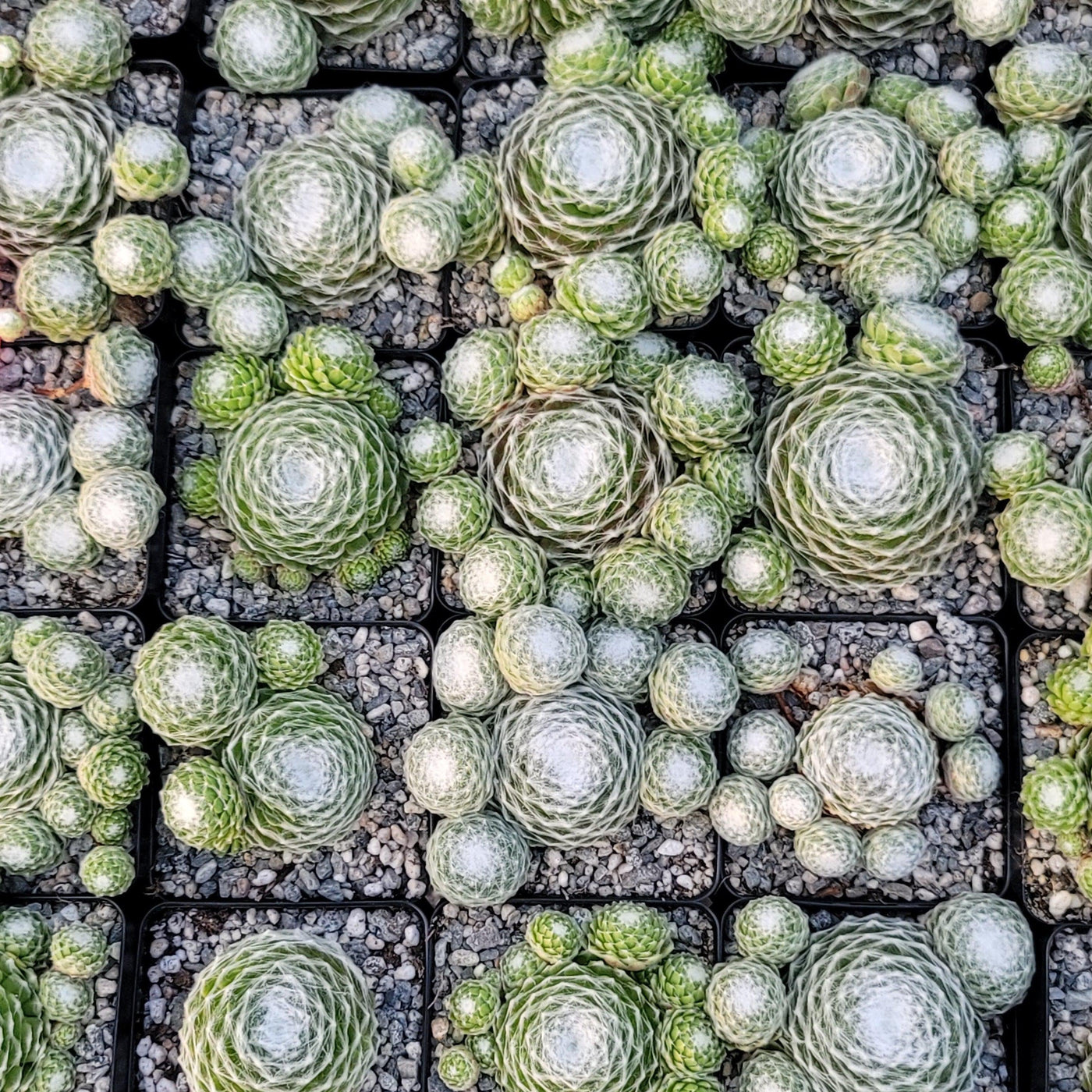
cobweb succulents Shop ' Sempervivum arachnoideumIntroducing the Cobweb Hens and Chicks, known as Sempervivum arachnoideum, which is a vibrant mat forming succulent plant, that belongs to the Sempervivum genus. The Sepervivum arachnoideum has several other common names such as Cobweb Houseleek, Cobweb sedum, or Spiderweb Hens and Chicks because of its fine, web like hairs that cover its leaves. The webs on Sempervivum arachnoideum, are actually a natural characteristic of the plant. These webs, made

Introducing the Cobweb Hens and Chicks, known as Sempervivum arachnoideum, which is a vibrant mat-forming succulent plant, that belongs to the Sempervivum genus. The Sepervivum arachnoideum has several other common names such as Cobweb Houseleek, Cobweb sedum, or Spiderweb Hens and Chicks because of its fine, web-like hairs that cover its leaves. 

The webs on Sempervivum arachnoideum, are actually a natural characteristic of the plant. These webs, made up of silvery-white hairs, serve a few purposes. They help protect the plant from excessive sunlight by providing some shade. The webs can help trap moisture around the leaves, acting as a natural insulation and reducing water loss. Additionally, the webs add a unique and visually appealing feature to the plant, making it stand out among other succulents. 

The Hens and Chicks plants form tight evergreen rosettes of fleshy, pointed leaves that are covered in silvery-white hairs, resembling a spiderweb. The leaves have a green or reddish coloration, depending on the variety. With a fast growth rate, it can grow up to 3 inches tall and 12 inches wide, which creates a beautiful, textured carpet-like effect.

Sempervivum arachnoideum crested is a unique variant of Sempervivum arachnoideum distinguished by its distinctive crested fan-shaped growth pattern.  

The Sempervivum arachnoideum flower blooms in late summer and produces tall flower stalks that rise from the center of the rosettes. The flowers are star-shaped and can vary in color, ranging from pink to red or even yellow. The monocarpic plant will produce numerous chicks before dying, with offsets or "chicks" around the mother plant's base after flowering. 

The Cobweb Hens and Chicks can be propagated through offsets or leaf cuttings. The offsets, which are the small rosettes that grow around the mother plant, can be carefully separated and replanted to establish new plants. Additionally, individual leaves can be removed and rooted to grow new plants. This succulent is relatively easy to propagate, making it a popular choice for plant enthusiasts. 

Remember, the Cobweb Hens and Chicks Sempervivum arachnoideum are generally considered non-toxic to both humans and pets. Sempervivums, like many cacti and succulents, require little maintenance once established and will survive near-total neglect.  

Watering Needs 

Like other succulents, the Sempervivum arachnoideum has adapted to survive in arid conditions, which means it prefers drier soil. It's important to allow the soil to dry out completely between regular watering to prevent overwatering, which can lead to root rot and other issues. Aim for a watering schedule of once every 1-2 weeks in the summer, during the growing season, and even less frequently during the winter months when it goes into a dormant phase. 

When watering your Cobweb Hens and Chicks Sempervivum arachnoideum, it's important to water the soil directly rather than spraying or misting the leaves. This helps prevent excess moisture from getting trapped in the cobweb-like threads and causing rot. Water the soil thoroughly until it is evenly moist, but avoid letting the plant sit in standing water, as this can also lead to root rot. 

Remember, it's always better to underwater rather than overwater your Hens and Chicks plant. These Sempervivum arachnoideum succulents are quite resilient and can tolerate short periods of drought. Observing the leaves can also give you an indication of when to water. If the leaves start to appear slightly wrinkled or feel soft, it's a sign that your Hens and Chicks plant is thirsty and could use a drink. 

Light Requirements 

When it comes to growing Sempervivum arachnoideum indoors, they thrive in bright, indirect light. Place them near a south or west-facing window where they will get plenty of sunlight throughout the day. If you don't have access to a lot of natural light, you can also use artificial grow lights to provide the necessary light intensity for the plant. 

If you decide to grow your Sempervivum arachnoideum Cobweb Hens and Chicks outdoors, they prefer a spot with full sun to partial sun. These plants can handle direct sunlight, but they may appreciate some protection from intense afternoon sun, especially in hotter climates. A location that receives 4-6 hours of sunlight per day is generally ideal for their growth and color development. 

It's critical to remember that during a heatwave or periods of extreme heat, your Sempervivum arachnoideum could still sustain sun damage or get sunburned. You can protect the plant in this situation by moving it indoors or to a shaded area. 

Optimal Soil & Fertilizer Needs 

The Cobweb Hens and Chicks prefer well-draining soil that allows excess water to escape easily. A good mix for these succulent plants is a combination of regular potting soil and coarse sand or perlite. This mixture helps prevent the roots from sitting in too much water alone, which can lead to root rot. Planet Desert specializes in succulents and has specialized succulent potting soil that includes an organic substrate with mycorrhizae to help with the growth of a healthy root system to help your succulents thrive. As an okay alternative, you can create your own potting mix by combining equal portions of perlite, coarse sand, and good natural potting soil. 

The Sempervivum arachnoideum are generally low-maintenance plants and don't require heavy fertilization. In fact, they can do well without any additional fertilizers. However, if you want to give them a little boost, you can use a balanced (5-10-5), water-soluble NPK fertilizer diluted to half-strength. Apply the fertilizer sparingly, only once a year during the growing season, which is typically spring. Avoid fertilizing during the winter months when it is in a dormant phase. 

Remember that Sempervivum arachnoideum is native to rocky, mountainous regions, so replicating its natural habitat is key. Make sure to select a fast-draining soil with adequate drainage. As for fertilization, it's better to under-fertilize than over-fertilize, as excessive nutrients can cause the plants to become leggy or lose their vibrant colors. Always follow the instructions and err on the side of caution. 

Hardiness Zone & More 

When planted indoors, the Sempervivum arachnoideum prefers temperatures between 50°F and 65°F. They can tolerate slightly lower temperatures during their dormant period in winter. It's important to place them in a well-lit area, preferably near a sunny window where they can receive at least 4 to 6 hours of indirect sunlight per day. 

If you are living in USDA zones 5-8, you can grow your Cobweb Hens and Chicks outdoors in the garden, year-round. They are generally frost-tolerant and can survive temperatures as low as 20°F. However, it's important to ensure good drainage in the soil to prevent waterlogging during heavy rain or snow. 

As for humidity, they are adaptable and can tolerate a variety of humidity levels, from dry to moderately humid environments. It can tolerate average indoor humidity, but it's important to avoid excessively dry conditions. You can increase the humidity around the plant by placing a tray of water near it or by using a humidifier. 

So, no matter where you live, as long as you provide the right temperature, humidity, and Sempervivum care, your Cobweb hens and Chicks will be happy and healthy! 

Final Thoughts 

Overall, the Sempervivum arachnoideum (Cobweb hens and chicks) are unique, silvery-white succulent plants with a unique appearance. They have a fast-growing habit and tight clusters of rosettes, creating a visually appealing carpet-like effect. They produce star-shaped flowers in various colors during the summer and are easy to propagate through offsets or leaf cuttings. They are hardy in USDA hardiness zones 5 to 8, preferring temperatures between 50°F and 65°F and well-lit areas with indirect sunlight. They are non-toxic, making them safe for households with pets or children. Whether you're a succulent enthusiast or just starting your plant collection, Sempervivum arachnoideum Cobweb Hens and Chicks add beauty and intrigue to any space. 

Shipping Notes
  • Free Standard Shipping on $100+ Orders to the USA.
  • Except Preorder products are shipped in 48 hours.
  • Delivery to the USA:
  1. Standard Shipping : 3-10 business days
  • If time is of the essence, please consider selecting expedited delivery for faster service.
Exchange/Return Notes
  • We offer a 30-day return/exchange service after receiving.
  • Final sale items are not eligible for returns or exchanges.
  • To process your return/exchange, please contact us at [email protected]
  • Please click here for more details>>> Return & Exchange Policy
SKU: 29729520383

Discover Niche Categories That Outsell cobweb succulents

Top-Converting Item to Boost Your Average Order

4.1 ★★★★★
Based on 20 reviews
Sort
Highest Rating
Newest First
Oldest First
Product Reviews
D
Verified Purchase
Diana Crossman
Carnegie, US
★★★★★ 5
Quality Printer
Color: Black, Style: ET-2800-B, Pattern Name: Printer
Wonderful multi purpose printer. I bought this months ago and finally got it set up. Set up was easy. Love that the printer is so light weight and fairly compact that I can move it wherever if needed. The supply of ink that came with it was awesome. The ink goes a long way. I have printed out a lot of photos on this printer and the quality has been very good. I have not encountered any paper jams. The photo printing has not been smudged nor has the color been uneven. From documents to photos this little printer does it all and does it very well. When my work printer dies I will be replacing it w another Epson Eco Tank for sure.
WAS THIS REVIEW HELPFUL?YesReportShare
Reviewed in the United States on May 15, 2026
J
Verified Purchase
Joy
Chelsea, US
★★★★★ 1
0 STARS!! DO NOT BUY!! HORRIBLE!!
Color: Black, Style: ET-2800-B, Pattern Name: Printer, Color: Black, Style: ET-2800-B, Pattern Name: Printer
DO NOT BUY! 0 STARS -I would give 0 stars if I could. This EPSON ET-2800 is the worst printer I have ever owned. -I work from home where I need to do small print jobs throughout the month. I didn’t need a printer that is super fast or had a lot of bells and whistles. I searched many, many, many reviews and this Epson ET-2800 kept coming up as a really good option for my purposes. It had great reviews and it supposedly uses less ink. -I went ahead and bought it and it was delivered Dec. 28. -Throughout the month of January I did a few print jobs here and there. Everything seemed ok. Toward the end of January I noticed that there was black shadowing behind a whole horizontal line on one of my print jobs. The shadow went the whole width of the paper. Thought it was a one-off and didn’t think about it too much since I had so much going on at the time. I also never dreamed that I would need to clean my printer since I hadn’t even owned it for a month at this point. -February 2 I started printing some things for work again and the lettering had lines through the center of the page. Even though I had just had the printer for a month and hadn’t printed that much stuff so I really shouldn’t have to clean it already, I used the “clean nozzle” tool on the printer. **I had to do the cleaning cycle 8 times before it was printing correctly meaning there were no missing segments on the sheet that is printed after the cleaning. ** This was a huge waste of my time and ink and paper!!! -February 16 I attempted to print some pages and again there were lines throughout the papers!! -February 17 I called Amazon to try to get a refund and they said I was outside of the return window. So -I called Epson. I explained what was happening and the lady told me before they would do anything I had to go through some “detailed instructions” on how to clean the printer. Only AFTER I completed all the steps would they even think about helping me. -So first step is to perform a nozzle cleaning per the instructions. Did this. -Instructions say to wait 12 hours before doing anything else. So I waited 12 hours and did another cleaning. Did this twice. The printer showed no broken/missing segments. -So I printed some pages and several of the pages had black smudges/lines/dots on the tops of the pages and most of them had black ink all over the bottom right corners of the papers. -Did the print nozzle cleaning and had broken/missing segments again. -Instructions say to do a head cleaning. Did head cleaning twice I think, and no broken/missing segments. -Printed a few pages and several of the pages had the shadows behind the whole horizontal line again and also some random black dots sprinkled throughout several pages. -Ran a Power Cleaning which is the last step of this process. This process by the way uses up A LOT of ink! My black ink is now less than half!! All the colors are down by ¼! They were full obviously when I started using the printer and the black was only down a smidge at the beginning of this whole cleaning process. -Now I have to wait 12 hours to see if the quality improves. -This is absolutely ridiculous!!! This whole process has wasted my time (each cleaning takes at least 3 minutes to do. The Power Cleaning takes 12 minutes). This whole process has used up a TON of my ink! This whole process has used up a ton of paper!! I shouldn’t have to clean my printer head or nozzle every single time I need to print! I have only had this printer for 7 weeks!!! DO NOT BUY THIS PRINTER! It is junk! I only hope I can get a refund after all this...
WAS THIS REVIEW HELPFUL?YesReportShare
Reviewed in the United States on February 18, 2025
S
Verified Purchase
Sam
Battle Creek, US
★★★★★ 5
Almost a year after purchase and this printer has not let me down!
Color: Black, Style: ET-2800-B, Pattern Name: Printer
I wanted to wait to write a review on this printer to see how it held up over time. Happy to report, after almost a year, it is still working perfectly! I was very nervous about purchasing a printer since it was my first time having to shop for one and almost every printer I looked at had something negative to say about the product. After extensive research, I decided to take a leap with the Epson EcoTank 2800. I was looking for a printer to use for recreational use. Something with decent print quality and longevity as well as something on a reasonable budget. I normally print full pages of color and have been using it regularly for around a year and I have about half of the ink that came with the printer left. Safe to say, the ink lasts a while. The quality may not be the top of the line quality you can get with a more expensive printer, but for the price and just everyday use, the quality is satisfactory. It was easy to set up and walked you through the instructions to connect to devices and configure it. The screen is a little small but if you can overlook that, it really is a nice printer. I have used regular printer paper, card stock, and sticker paper with this printer and I try to load only a few sheets at a time to avoid a jam but I haven't had any issues with it so far. Overall, I am extremely happy with my purchase. It can be extremely difficult to find a decent printer and some reviews can be misleading or leave you with questions on if the product is for you. If you are looking for something for printing everyday with decent quality and ink consumption that won't cost you a fortune, this printer is definitely worth taking a chance on!
WAS THIS REVIEW HELPFUL?YesReportShare
Reviewed in the United States on April 24, 2026
S
Verified Purchase
Scott
Carnegie, US
★★★★★ 4
Printing is great, wifi is a problem (I figured out how to make it work!)
Color: White, Style: ET-2800-W, Pattern Name: Printer
I was on the fence about buying this printer because most of the 1 star reviews all said the same thing... "The Wifi would not work" So I followed the instructions, Turned on the print, downloaded the IOS app, connected to the printer via Bluetooth, installed the ink, initialized the printheads. While that was going on, the app asked me to setup the wifi. a List of SSID's came up and I selected the one I wanted. I put in the password and it connected and the icon on the printer turned blue. I have a Unifi setup and I could see that the printer connected to access point #3 @ 2.4ghz and got an ip address. I locked the IP address to the printer. (For my instructions to work for you, you need to make a reservation or lock the ipaddress that your DHCP server provided to the printer. ) If you don't do this, you will get a different address every time you turn the printer on and the computer and app will not be able to find the printer. When the initialization was complete, the app on my phone said it could not connect to the printer. I decided to try to connect to a computer and come back to the phone app. I downloaded the software package from Epson and ran it. When it went to connect to the printer it could not find it and brings up a list of troubleshooting steps that are not likely to do anything. There are videos about this problem and they are all useless. I am an IT professional with 26 years of experience. I am not going to unplug the printer and wait five minutes, I am not going to re-boot my router, I have a Unifi network environment with over 150 devices connected... (I have great wifi coverage, I am not moving my printer anywhere) My network works just fine, this printer is the issue! So at this point, I know that the printer IS connected to my wifi and it got an IP address. This is not a wifi problem as everyone seems to think it is. It is an issue with the Epson software. I decided to try to install it via the windows printer installer. I selected install via TCP/IP and put the ipaddress that my Unifi system provided to the printer. Windows found the printer and since the Epson app had already installed the drivers... just asked me what drivers I wanted to use. The ET-2800 showed up on the right hand side of the screen. I selected it, it installed and I was able to try a test print. It worked fine. I can print from my computer to the printer via the network. Next was the phone app. The phone app has the option to find the printer via the IP address. I put the IP address in and it found the printer. The phone app works now too. So, It took me some time to get this working, it should not have taken any time at all if the software worked correctly. The printer is really nice, it is a shame that the software is so bad when it comes to connecting to the printer. So if you decide to buy one of these printers, save yourself the headache and just install using the ip address, it is quick and easy that way and it just works. I would have just purchased an HP printer, but I did not want to deal with all the issues of their subscription ink service. I feel like the cost of ink makes this printer worth the hassle of getting it to work.
WAS THIS REVIEW HELPFUL?YesReportShare
Reviewed in the United States on December 2, 2024
S
Verified Purchase
Sinbad
Lexington, US
★★★★★ 5
Premium Print Quality Meets Economic Design
Color: White, Style: ET-2803, Pattern Name: Printer
I am very impressed with the manufacturer quality of this printer. It feels durable and well-engineered. The print quality is equally excellent; colors are vibrant and text is sharp, easily meeting the standards I need for both documents and photos. Moving away from cartridges is a huge win. The ink lasts incredibly long, and the refill process is clean and simple. The only thing I miss is a USB port for printing directly from external storage. My old HP printer had this feature, and it was extremely useful for printing files quickly without a computer. I wish this Epson model included that same convenience. Final Verdict A high-quality, reliable printer that produces great results. If you don't mind the lack of a direct USB drive slot, it’s an outstanding choice for home use.
WAS THIS REVIEW HELPFUL?YesReportShare
Reviewed in the United States on April 19, 2026

recommand products