SKU: 32537601655
buy an aloe vera plant online

buy an aloe vera plant online Aloe Vera

Sale price$20.46 Regular price$22.73
Save 10%

Pay in installments of $5.68 with ShopPay, AfterPay and Klarna

Shipping Estimate
USA
  • USA
  • CAN

Ships within 48 hours · Estimated delivery Aug 16 - Aug 21

Promo Codes Available:

For Your Every Summer RSVP, with Code: SUMMER15

Description

buy an aloe vera plant online Aloe VeraIntroducing the fabulous Aloe Vera plant also known as Aloe barbadensis 'miller,' it is also known as a medicinal aloe and burn plant. The Aloe vera plant is by far the most popular out of over 400 varieties of the Aloe genus. This incredible tropical succulent is not your average houseplant. It's a superstar known for its leaves, which hold a magical aloe vera gel for soothing sunburn and as a popular drink to help your stomach. This large Aloe vera

Introducing the fabulous Aloe Vera plant- also known as Aloe barbadensis 'miller,' it is also known as a medicinal aloe and burn plant. The Aloe vera plant is by far the most popular out of over 400 varieties of the Aloe genus.

This incredible tropical succulent is not your average houseplant. It's a superstar known for its leaves, which hold a magical aloe vera gel for soothing sunburn and as a popular drink to help your stomach.

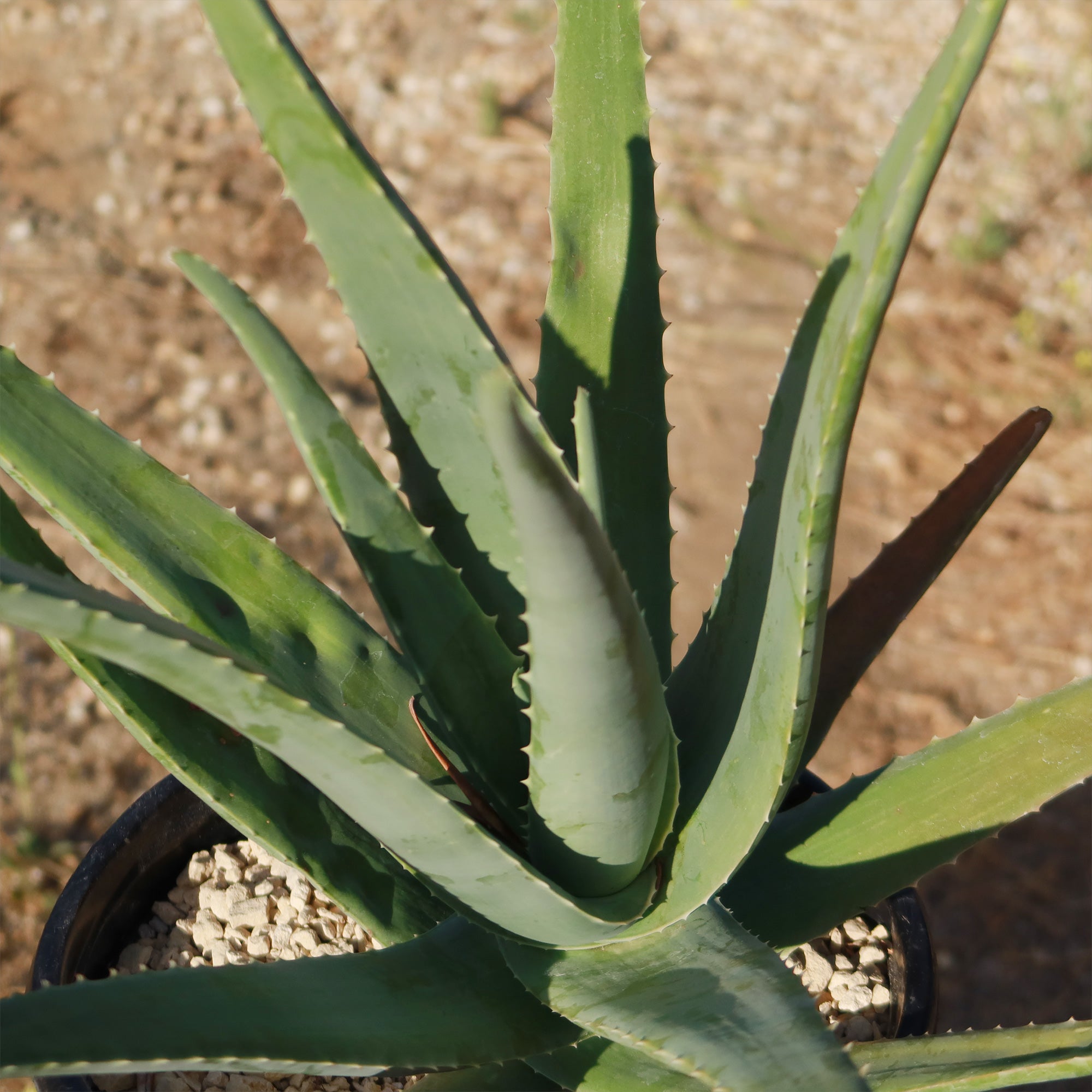
This large Aloe vera plant boasts fleshy lance-shaped grey-green leaves with small white teeth along the edges growing out from a starfish-like basal rosette. 

The edible aloe vera flowers burst into bloom in vibrant shades of yellow at the tips of their stalks when given favorable conditions. Only mature plants will yield flowers, so you'll have to wait at least four years to see an aloe vera bloom. However, in some growing conditions (especially hybrid plants), the flowers can sometimes appear with orange or reddish hues. 

This fast-growing succulent can grow into a large aloe vera plant up to 3 feet tall and 2 feet wide and even produce adorable pups that you can repot or share as delightful gifts with fellow plant enthusiasts.

How to Get Aloe Vera Gel from the plant to use on your skin

  1. Choose and Cut a Leaf: Select a large, healthy leaf from the bottom of the plant. Use a sharp knife to cut the entire leaf off at the base.
  2. Prepare the Leaf: Let the leaf sit upright in a container for 10–15 minutes to allow the yellow sap (aloin) to drain out. This sap can be irritating to the skin.
  3. Slice and Extract the Gel: For a small amount of gel, cut a section from the leaf rather than using the whole thing. Slice the leaf lengthwise to expose the gel. Use a spoon or knife to scoop out the clear gel.
  4. Apply or Store: Apply directly to your skin for soothing relief. Store extra gel in an airtight container in the fridge for a few days.

Aloe vera juice has many benefits for humans, this succulent rich in antibacterial, antioxidant, and anti-inflammatory properties, may enhance digestion, blood sugar levels, and oral health, although certain compounds, particularly aloin, may cause digestive discomfort and other side effects.

An aloe vera indoor plant is a great addition to any home, as it is easy to aloe vera care for and provides a variety of aloe vera benefits. 

According to the American Academy of Dermatology, Aloe vera has anti-inflammatory properties that can help in wound healing. It can also help to moisturize the skin and prevent peeling.

When and How to Water Your Aloe Vera 

As a desert dweller, watering the aloe vera succulent may be tricky, it may shrivel and die if given too little water, but it may also easily rot when given excessive water. So be careful not to overwater your aloe plantyou only want to give it enough to keep it from drying out completely, not drown it! 

A good rule of thumb is to water the Aloe plants deeply and then allow the soil to dry out completely before watering again. In the spring and summer, during the growing season, watering can be done once every 2-3 weeks.

During the winter months, when aloe vera is in a dormant period, it can be watered even less frequently. If you live in a rainy climate, consider planting aloe in gravel or stones. 

It is also important to note that aloe vera plants are sensitive to water quality. They prefer water that is low in minerals and salts, so it is best to use distilled or filtered water. Tap water can be used, but it should be left out for 24 hours before watering the plant to allow the chlorine to evaporate.

Light Requirements - Where to Place Your Aloe Vera Plant 

When growing indoors as a houseplant, place the aloe vera a few feet away from the south-facing window that receives plenty of sunlight, but it is important to avoid direct sunlight, as this can cause the leaves to burn. If the aloe plant is not receiving enough light, the leaves will start to droop and turn brown. In this case, it may be necessary to move the aloe vera plant to a brighter location. 

When planted outdoors, your Aloe plants need their daily dose of sunshine like a beach-loving teenager needs their favorite tunes!

They thrive on at least 6 to 8 hours of direct sunlight, soaking up those glorious rays with joy.

But wait, before you go dragging your aloe plant from its cozy shady spot into the blazing sun, be cautious. That sudden move can dry out your leafy buddy and leave it looking as yellow as a lemon.  

Now imagine you live in one of those cooler climates where clouds have permanent residency or if your home lacks these sunny windows altogether.

Fear not; you can use artificial lights – they're like little suns in bulb form! Hang them about one to two feet above your precious plant during daylight hours (that's roughly 16 hours per day) and watch it flourish happily amidst dim interiors.

Optimal Soil & Fertilizer Needs 

Aloe vera plants prefer well-draining soil that is a mixture of sand, perlite, and peat moss. It is critical to avoid soil that retains excessive moisture, as this can cause root rot. Instead, make or buy a well-draining potting mix, or ideally use our specialized succulent potting mix soil for aloe vera that contains 5 natural substrates and mycorrhizae to promote the development of a strong root system that helps your succulent to thrive.  

In terms of fertilizer, aloe succulents do not require a lot of nutrients. They can be fertilized once a year in the spring with a balanced fertilizer (NPK) of 5-10-5 in ratio. It is important not to over-fertilize the aloe plant, as this can lead to root burn. 

Hardiness Zones & More 

When grown indoors as a houseplant, aloe vera plants prefer a warm and dry environment. They thrive in temperatures between 60°F and 80°F. Aloe vera is a succulent, so it's adapted to arid conditions and doesn't do well in overly humid environments. Aim for a humidity level of around 30% to 40% for your indoor aloe vera plant.

In the United States, this is mostly an indoor plant, but if you live in southern Florida or Hawaii then you can cultivate it outdoors in USDA zones 9-11

Aloe vera can tolerate temperatures as low as 40°F for short periods, but prolonged exposure to freezing temperatures can damage or kill the plant. If you live in a colder climate, it's best to keep your aloe vera indoors or provide protection during winter months.

Aloe vera plants prefer dry air and do not require high levels of humidity. They can tolerate low humidity levels and do not need to be misted or placed in a humid environment. 

Wildlife - Aloe Vera Attracts the Following Friendly Pollinators

Aloe vera plants attract a variety of friendly pollinators, including bees, butterflies, and hummingbirds. These pollinators are essential for the reproduction of aloe vera plants, as they help transfer pollen between flowers, ultimately leading to the production of seeds. Additionally, these pollinators play a crucial role in maintaining biodiversity and ecosystem health.

Butterflies
Bees
Hummingbirds
Lady Bugs
Multi Pollinators
Other Birds

According to the ASPCA, the Aloe vera can be mildly toxic to pets and humans. It is rare but can occur if consumed in large quantities and can cause abdominal cramps, diarrhea, and electrolyte imbalances. It is important to consult a healthcare professional if you experience any adverse effects from consuming aloe vera.

How to Propagate Your Aloe Vera Plant

To propagate your aloe vera plant, you can separate the offsets or "pups" that grow at the base of the main plant. Gently remove these pups and plant them in their own pots with well-draining soil to encourage root growth. Water sparingly until they establish themselves, and place them in a sunny spot to promote healthy growth.

Aloe Vera: The Natural Sunburn Remedy


Aloe vera gel is known for its ability to moisturize the skin, it helps soothe burns and sunburns, as well as being known for its anti-inflammatory and antibacterial properties.

Aloe Vera is also rich in vitamins and minerals that are essential for healthy skin. It is best to use pure aloe gel extracted directly from an aloe vera plant.

To use aloe vera gel to soothe sunburns, cut off a piece of the large aloe vera leaf and open it to reveal the gel.

To maintain the aesthetic appeal of your aloe plant, it is advisable to cut off the entire leaf of the large aloe vera plant when cutting one. Just chop the leaf off as close to the main stem as you can. Cutting leaves from the base of the plant is always preferable. These leaves will be thicker since they are older. If you cut off the tip of a leaf, it will eventually turn brown at the tip because cut leaves keep their scars.

Key Takeaways

  1. Aloe vera is renowned for its medicinal properties, particularly its soothing gel, which is widely used for treating burns, wounds, and skin irritations. Its natural compounds, like aloin and acemannan, have anti-inflammatory and healing properties.
  2. When cut, aloe vera can seal its own wounds by producing protective latex, showcasing its remarkable survival mechanism in harsh environments.
  3. Aloe vera is not just a skincare savior; it also purifies indoor air by removing harmful pollutants like formaldehyde and benzene, making it a great addition to homes and offices.
  4. Native to arid regions, aloe vera thrives in minimal water conditions. It stores water in its thick, fleshy leaves, allowing it to endure prolonged droughts.
  5. The inner gel of aloe vera leaves is edible and used in drinks and food for its health benefits, such as aiding digestion, boosting immunity, and providing hydration. Always ensure proper preparation to remove any bitter or toxic compounds.
  6. The presence of yellow flower buds is a strong indicator of the edible variety.

The Bottom Line

Overall, Aloe vera is a popular plant known for its healing properties and versatility. It has gained popularity for its ability to help heal wounds, cuts, and burns, including sunburns. The gel inside the aloe vera leaves contains soothing and moisturizing properties that can provide relief and promote healing. In terms of care, aloe vera is relatively low-maintenance. It thrives in well-draining soil and requires moderate watering. It prefers bright, indirect sunlight but can tolerate some shade. 

A lot of people have a hard time finding large aloe vera plants, but here at Planet Desert, we regularly have large sizes in stock. Don't miss out on adding an Aloe vera plant for sale to your garden! Order now and enjoy its beauty for years to come. 

Shipping Notes
  • Free Standard Shipping on $100+ Orders to the USA.
  • Except Preorder products are shipped in 48 hours.
  • Delivery to the USA:
  1. Standard Shipping : 3-10 business days
  • If time is of the essence, please consider selecting expedited delivery for faster service.
Exchange/Return Notes
  • We offer a 30-day return/exchange service after receiving.
  • Final sale items are not eligible for returns or exchanges.
  • To process your return/exchange, please contact us at [email protected]
  • Please click here for more details>>> Return & Exchange Policy
SKU: 32537601655

Discover Niche Categories That Outsell buy an aloe vera plant online

Top-Converting Item to Boost Your Average Order

4.7 ★★★★★
Based on 10 reviews
Sort
Highest Rating
Newest First
Oldest First
Product Reviews
J
Verified Purchase
Jessy Nelson
Houston, US
★★★★★ 5
Worth the money (especially if you wait for a Prime Day sale!)
Digital Storage Capacity: 8 GB, Offer Type: Ad-Supported, Color: Black, Option: Without Kindle Unlimited
I've had my paperwhite for about a month now, so I guess it's as good of time as any to properly review it. This is my first paperwhite. I got a b&n Nook Color back in 2010 for Christmas, which has served me really well over the years. However, it reached the point recently where it wouldn't hold a charge and so I found myself in the market for a new e-reader. I was drawn to the paperwhite because it was waterproof and would hold a long charge. I was a little leery about the black-and-white only nature of the paperwhite, especially as my previous ereader was in color, but so far it hasn't been an issue. I used to read comics on my Nook but haven't read digital comics in a few years, preferring print. This might be something someone who does read books with illustrations would want to take into consideration. I really appreciate the long battery life of the paperwhite. I've had it for about a month and have only had to charge it once (and it had only gotten down to about 48% so I probably could have pushed it further than I did). I've been able to read several books with the battery barely being effected. The biggest draw on battery life seems to be using the store or trying to use the rudimentary Web browser. I've been very impressed by the light, too. My Nook was impossible to read on in some lights, which hasn't been an issue at all with the paperwhite. I usually have the brightness adjusted to about the halfway point for casual reading, and brighten the screen if necessary. The brightest option COULD be a little brighter, but that's nitpicky. The device itself is VERY lightweight and portable. I have dvd cases that weigh more. My phone certainly weighs more. It's not too big or bulky to hold; I can easily hold it with just one hand. The only draw back I've really noticed is that the touchscreen is a little sensitive. Sometimes when I'm trying to scroll through my library, I end up selecting a title I wasn't trying to open. Other times, I might scroll through several pages by accidently hitting my thumb on the screen when holding the device. Buy this is a very minor inconvenience. Also, I bought the option with "special offers". They in no way to impede my reading experience. The ads show up on the main screen when the device is not in use, or in a small banner along the bottom of the "home" menu. That's it. No ads popping up during your reading.
WAS THIS REVIEW HELPFUL?YesReportShare
Reviewed in the United States on August 10, 2019
S
Verified Purchase
Sam & Jasmine
Bozeman, US
★★★★★ 5
Impressive Product Overall
Digital Storage Capacity: 8 GB, Offer Type: Ad-Supported, Color: Black, Option: Without Kindle Unlimited, Digital Storage Capacity: 8 GB, Offer Type: Ad-Supported, Color: Black, Option: Without Kindle Unlimited
I bought the Kindle Paperwhite 2018 edition, 8 GB of storage with Special Offers for myself because up until I received it, I've been reading with the Kindle app on my Samsung Galaxy S9 phone instead. While the Kindle app on my phone was great, my eyes were really straining on the smaller screen and I'm a voracious reader. I was looking for something in a larger screen, but won't utilize the other feature and capabilities of a tablet, and beyond Kindle have no use for one at all. Overall, I'm highly impressed with this little Kindle device. I want to start by mentioning the Special Offers, as in all the reviews I read and heard about the device, the Special Offers weren't more than a footnote. They aren't intrusive at all, it's just on the main screen and that's it. They don't interrupt reading at all, and the Kindle Paperwhite personalized my Special Offers based on my reading, Kindle browsing history, and purchases so a lot of the ads that come through are actually interesting to me and in fact one or two of the ads have made me drool enough to purchase whatever book they were trying to peddle. That is definitely a plus, and yet a terrible thing because I AM such a voracious reader and I know I'm going to be spending a lot more money on Kindle books but at least the majority of the ads are tailored to the type of books I enjoy reading. I'm definitely not complaining about the Special Offers, nor will I pay to have them removed when the next ad that is displayed on my Kindle's screen might be a book I might like. Some may find the ads annoying just because it's an ad, but I find it enjoyable and definitely not intrusive in the slightest. The battery life - the Kindle came out of the box at 60% battery life and took virtually no time at all to charge to 100% on my phone's quick charger. I spent from 3 pm until almost 11 pm doing nothing but reading (when I said I'm a voracious reader, I meant it). My Kindle went from 100% battery to only 81% and from 11 pm until 8:30 am, only lost 2% battery. That is absolutely amazing to me and worth every penny I spent on the Kindle. I can't do that with my phone or a tablet; those batteries drain so quickly but this Kindle will last me all day long and still won't need to be charged at night. That's such a huge plus for a reader like me! The light on the Kindle Paperwhite is amazing, and even in my dimly lit room I don't need to have it much above 5 or 6 on the brightness. Although my phone boasts an almost 6" screen, truly the Kindle screen is much larger and thus much easier to read especially with the matte finish. My eyes strain far less on the Kindle even with almost a solid 8 or more hours of nothing but reading. This Kindle screen isn't too large, but it's definitely not too small either, it's just right. It's almost like you have a physical book in your hand, as far as relative size goes, though a little larger than your common paperback. I don't use Audible because I can't pay attention to a book when I'm listening to it being read to me, so the 8 GB of storage (more like close to 6 GB usable), holds plenty of books for me. I only have just a handful downloaded at any one point in time, but even the 10 or so books I have downloaded at once still doesn't take the storage space down anywhere near the 5 GB mark. So 8 GB is more than plenty for just regular printed books if you're like me and suddenly develop a case of A.D.D. when it comes to audiobooks. The speed of the device is just fine too. I won't say it's excellent compared to my Galaxy S9, but that's apples and oranges. For an e-reader the speed is great. There is just a little lag, but not enough to become anything beyond just barely noticeable. It's not annoying at all. It takes maybe a second or so to respond. When turning the page, even reading at a quick pace I'm able to keep up with the story on the next page from where it left off without interruption. The overall build quality is excellent. It is light weight and thinner than I expected. Yes it's plastic, but it doesn't feel cheaply made. It's comfortable to hold in one hand, or two if you like. The only thing I would change about the build is the power button - maybe I'm just used to them being on the right side of the device near the top... but the only thing I would change is the placement of the button. Overall, I'm very satisfied and impressed with my purchase. This was an excellent buy, and my next Kindle purchase is going to be one for a couple other people in my life who read just as voraciously as I do.
WAS THIS REVIEW HELPFUL?YesReportShare
Reviewed in the United States on December 25, 2019
D
Verified Purchase
Dave Regg
Lexington, US
★★★★★ 5
Excited to read!
Digital Storage Capacity: 32 GB, Offer Type: Ad-Supported, Color: Black, Option: Without Kindle Unlimited
This review is based on two months of daily use. I purchased a Kindle without really knowing much about them. I have always been against electronic books because I have always enjoyed the feeling of pages in between my fingers. However, circumstances have made me change my beliefs, mostly not having a nightstand with a light, and books can be bulky for a bike traveler like myself. So let me just begin with a couple of negatives. A couple of my favorite features about actual books is able to leaf back through pages and re-read portions that I misremembered, or that I really enjoyed. Reading on a Kindle makes that difficult because "leafing through" could take forever, especially if you don't recall the area in which the passage occurs. I'm also a big highlighter and margin note-taker in books so I can analyze. Although you can highlight with Kindles, for me, it's just not the same. Finally, Kindle's touch screen can be hit or miss - sometimes I will want to go forward, but the page might be back. Load times for the main screen, or cycling through, can be obnoxious. And just looking through Amazon's library to find a book? Forget about it! A lot of the novels on their suggested books, or top sellers, are "adult" novels, or easy reads. It's very difficult to find a book when you just want to discover a new author or title. Now for the benefits - my favorite feature is integrating Good Reads. It tracks my reading, the books I've read, and the books I want to read. Not only that, but it will give me suggestions based on the books I have saved or I have read. That takes care of the Amazon library problem. The backlight and the battery life are phenomenal! I can go a week without charging my Kindle, and I read it for about 90 minutes a day. It might be attributed to my backlight always being fairly low. I don't really see a reason to raise it above a third of the meter. Finally, the Kindle is small enough to fit in the back pocket of jeans. It's lightweight and waterproof. Basically, it's built for travel. As someone who walks and bikes everywhere, it makes reading on a go so much easier than carrying around a bulky or heavy book. I am grateful for this purchase. Even though it isn't an actual book, I look forward to reading on my Kindle, and if I fall in love with a new book I'm reading on my Kindle, I know that it will be worth the $15 to buy the physical copy and collect dust on my bookshelf!
WAS THIS REVIEW HELPFUL?YesReportShare
Reviewed in the United States on May 17, 2020
S
Verified Purchase
Sir Mike
Fort Morgan, US
★★★★★ 4
Pinhole Bright Spots and Other Issues
Digital Storage Capacity: 8 GB, Offer Type: Ad-Supported, Color: Black, Option: Without Kindle Unlimited, Digital Storage Capacity: 8 GB, Offer Type: Ad-Supported, Color: Black, Option: Without Kindle Unlimited
Updated Review on Oct 6, 2019: After nearly a year of using it, I noticed that the issues I mentioned in the original review were largely negligible while reading. The pinhole near the corner was never bothersome because I'd have to remember to look very closely to see it. The battery can last for a long time during hibernation, even for many many weeks if not used. I also hardly remember to notice the uneven screen color temperature. The only thing that's still a bit inconvenient is the glare. When near a window I'd have to adjust my reading angle to avoid the glare. It's something hard to overcome with a digital device and it's not a big compromise for light-weight and convenience. Therefore please take my original review below with a grain of salt, I was nitpicking on a device that I had a lot of expectations for. I also decided to change the 3 stars to 4 stars. Original review on Nov 12, 2018 (with updates on Jan 26, 2019): I have owned a Kindle Paperwhite since 2014. I really liked that old one and gifted it away a while ago. Perhaps I have had too much expectation for this new 2018 version (waited for many months for the release), I felt quite disappointed with a few of its issues. First I must be clear that I am a fan of e-books, and I think Kindle Paperwhite has always been a nice device, light, easy to use, easier on the eyes than an LCD screen, easy to look up words, etc. I also used a Kindle Oasis for a couple of days, I don't feel comfortable with the hard slick aluminum back, and its front lights are located on the sides, so the slight uneven light can be observed from left to right; while for Paperwhite with bottom lights, the unevenness is from top to bottom, meaning within each text line, the light is usually even, therefore less distracting to reading. Here comes the new 2018 Paperwhite: I like the screen is flat with the bezels now. However, both the first device I received and the subsequent replacement have a bright pinhole dot under the screen (see photos). It's like a piece of tiny defect or dust above the e-ink text and located in the light distribution layer (my guess). When the front light is adjusted to a high level, the dot becomes quite bright and distracting. I was surprised the second device had the same issue (just my luck or something else is going on here?), but because it's near the corner, I decided to live with it. This pinhole bright spot issue apparently can be found on the previous generations as well based on many reviews, I am just astonished Amazon hasn't fixed it. Also, I don't know what happened with the charging cable, it took me a lot of effort to plug it into the device, and pull it out, it's like as if the connectors are not made well. (Update Jan 26, 2019: the difficulty of plugging in the cable only occurred during the first couple of uses, it became normal and smooth later.) Also, the screen feels easier to smudge than my old Paperwhite. The texts appear slightly blurrier where there are fingerprints. Another issue is that the screen has a ton of reflection from bright windows or light sources (please see my photo, taken under an east-facing window in the afternoon). I don’t remember if it has always been like this or it’s because of the new screen update. Even with the window blinds shut, I had to tilt Kindle to certain angles to avoid the glare, albeit softer than on an LCD screen, still quite distracting. Under the same lighting, a real paperback has no reflection glare issues. Furthermore, when front light is on and when external ambient light is somewhat dim, my replacement Kindle Paperwhite appears a bit yellower near the bottom, especially on the left side, it’s distracting but hopefully, I’ll get used to it. It’s like real paper books getting old and parts of pages turning yellow—I try to convince myself. (Update Jan 26, 2019: other reviewers have mentioned issues with poor battery life. My experience is similar that if I don't use it for a few hours, even with WiFi turned on, the device will enter something like a hibernation mode, which requires a bit more time to wake up, but it allows the battery to last for many weeks if left on the shelf. If I read about 1-2 hours a day with wifi on, the battery drains very quickly, and will hardly last beyond a week. However, If you keep airplane mode on during reading, it will significantly conserve battery, the only inconvenience is that if you don't know a word and the dictionary also doesn't have it, which is quite likely the case, Wikipedia won't be able to show up without WiFi.) Perhaps I’m just asking too much for a digital device. Overall, it’s still a great device to read books, and Amazon still provided a fast replacement when I asked. However, with these experiences, I can no longer swear to e-readers. I don’t write reviews often, but I feel strongly about this product and sincerely hope it will help fellow costumers and help Amazon improve their devices.
WAS THIS REVIEW HELPFUL?YesReportShare
Reviewed in the United States on November 12, 2018
J
Verified Purchase
Joseph Blanton
Houston, US
★★★★★ 5
Don't be drama, this is a great kindle.
Digital Storage Capacity: 8 GB, Offer Type: Ad-Supported, Color: Black, Option: Without Kindle Unlimited
My wife attempted to buy the previous generation Kindle, because of some of the negative reviews about this kindle. Thankfully Target didn't have the previous gen so she got me this one instead. I love it, it is light, has a super fast page turn, it's nice knowing that a little splash of coffee won't kill it and it has made me a fan of kindle reading all over again. The backlight is perfect, and turning it all the way down is perfect for reading in the day/sun. I am back to my minimalist ways after getting tired of books piling up around the house. Here are a couple of the negative comments that people have been leaving. 1. "the glare, oh the glare, how can it say anti-glare and then I go out in the sun and I have to squint!" First of all, that's just drama. Try wearing sunglasses next time you are outside or sit in the shade. I am pretty sure, the last I checked, even paper books can be hard to see without them. First day I had it, sat by the pool all day and read. Not once did I notice a glare. 2. "the slick glass layout of the design makes it prone to chipping, my toddler knocked it off the couch and it chipped the screen a little bit." hmmm, I have toddlers. You leaving your device in their reach is not the kindle's fault. They are known to destroy everything in their path, and no fortress is strong enough to withstand their furry. This is definitely a "you" problem. 3. Here are some highlights of other comments. “It’s infuriating that Amazon went to market with this machine. Do not upgrade from prior Paperwhites.” Amazon producing a new kindle is infuriating? Forget everything I know about human rights issues. Sound the alarm bells. “To unlock the device, it goes through a long “waking up” period where the backlight is turned up full blast for some reason. It then reverts to your normal backlight setting after unlocking. I blind myself every night reading in bed.” Please just go to a doctor, any doctor. They should be able to help you with these feelings. “Bottom line: this is not a finished product, and they shoved it out the door because they wanted to have it out for Christmas.” Hey you are the one who wanted it for Christmas, so there is that part of it as well. “Without Wi-Fi, you can't use it.” Yeah that’s been true for a decade now. But since it’s waterproof, you can use it as a coaster. I am being sarcastic because people are drama about the funniest things. It’s a great kindle. Buy one, and remember you do need Wifi lol.
WAS THIS REVIEW HELPFUL?YesReportShare
Reviewed in the United States on May 28, 2019

recommand products