SKU: 34117900797
elephant ear plant huge

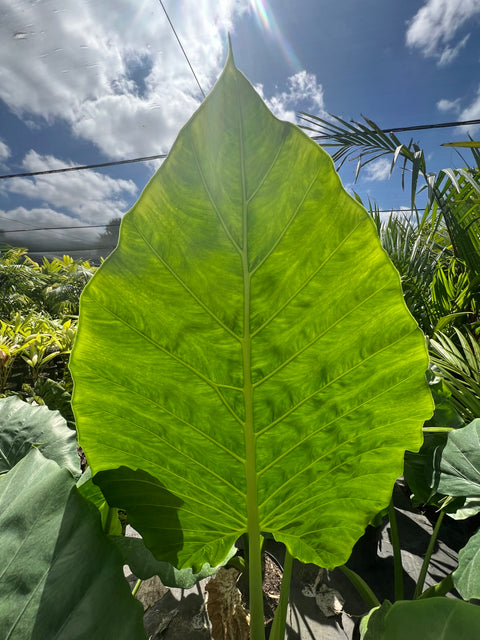
elephant ear plant huge Alocasia Calidora - Majestic Elephant Ear Plant

Sale price$21.44 Regular price$23.82
Save 10%

Shipping Estimate
USA
  • USA
  • CAN

Ships within 48 hours · Estimated delivery Jul 10 - Jul 15

Promo Codes Available:

For Your Every Summer RSVP, with Code: SUMMER15

Description

elephant ear plant huge Alocasia Calidora - Majestic Elephant Ear PlantElevate your indoor jungle with the grandeur of Alocasia 'Calidora'. This stunning variety, also known as Elephant Ear (Alocasia calidora), commands attention with its enormous, heart shaped leaves reminiscent of elephant ears. Whether you're a seasoned plant enthusiast or a novice, the Alocasia 'Calidora' is a captivating addition that brings a touch of tropical splendor to any space. How to Grow Cultivating the Alocasia 'Calidora' is a rewarding

Elevate your indoor jungle with the grandeur of Alocasia 'Calidora'. This stunning variety, also known as Elephant Ear (Alocasia calidora), commands attention with its enormous, heart-shaped leaves reminiscent of elephant ears. Whether you're a seasoned plant enthusiast or a novice, the Alocasia 'Calidora' is a captivating addition that brings a touch of tropical splendor to any space.

How to Grow

Cultivating the Alocasia 'Calidora' is a rewarding endeavor that suits various levels of gardening expertise. Provide bright, indirect light for optimal growth, avoiding intense, direct sunlight that can scorch the leaves. Maintain consistent humidity levels through misting or placing a humidity tray nearby. Allow the top inch of the soil to dry before watering, and ensure proper drainage to prevent root rot.

Care Tips

Nurturing your Alocasia 'Calidora' is a fulfilling task. During the growing season (spring and summer), feed your plant with a balanced liquid fertilizer to support its vigorous growth. Regularly clean the large leaves with a damp cloth to remove dust, promoting proper photosynthesis. Keep a watchful eye for any signs of yellowing or browning leaves, which could indicate overwatering or inadequate light.

Uses

Alocasia 'Calidora' is both a striking ornamental focal point and a conversation starter. Use it as a dramatic centerpiece in your living room or office to infuse a tropical ambiance into your surroundings. Its impressive size and distinctive foliage also make it an eye-catching addition to large indoor spaces, adding an element of lush greenery that commands attention.

Planting Tips

When potting or repotting your Alocasia 'Calidora', select a well-draining potting mix to prevent waterlogging. Choose a container that allows ample room for the plant's growth, as this variety can reach considerable heights. Ensure the pot has drainage holes to prevent excess moisture buildup. Position the plant so it's at the same depth as it was in the previous container, and water thoroughly after repotting.

Maintenance

Maintaining the majestic allure of Alocasia 'Calidora' requires attention to a few key aspects. Regularly inspect the undersides of leaves for common pests like spider mites and scale insects. If detected, promptly treat the plant with insecticidal soap to prevent infestations. Maintain a consistent watering schedule, adjusting it slightly during the dormant winter months when growth slows down.

Sizing

Discover our premium offering: the "Grower's Pick.” This exceptional plant selection stands out as the most sizable option available, featuring the tallest and most robust plant we can ship. Each “Grower’s Pick” is meticulously chosen for its advanced maturity, ensuring a developed root structure for superior growth and vitality.

Shipping Notes
  • Free Standard Shipping on $100+ Orders to the USA.
  • Except Preorder products are shipped in 48 hours.
  • Delivery to the USA:
  1. Standard Shipping : 3-10 business days
  • If time is of the essence, please consider selecting expedited delivery for faster service.
Exchange/Return Notes
  • We offer a 30-day return/exchange service after receiving.
  • Final sale items are not eligible for returns or exchanges.
  • To process your return/exchange, please contact us at [email protected]
  • Please click here for more details>>> Return & Exchange Policy
SKU: 34117900797

Discover Niche Categories That Outsell elephant ear plant huge

Top-Converting Item to Boost Your Average Order

4.0 ★★★★★
Based on 2473 reviews
Sort
Highest Rating
Newest First
Oldest First
Product Reviews
S
Verified Purchase
ScottAK
San Leandro, US
★★★★★ 5
Wonderful Tablet
Color: Gray, Size: 128 GB, Style: Tab A11+
I use a tablet mainly for browsing the web, watching media and reading. I didn't want to spend $350 for a new iPad so started looking at budget Android tablets. After reading and watching reviews I settled on the Galaxy Tab A11+ and I'm glad I did. It performs great even for games like Call o Duty Mobile and is snappy for web browsing and watching videos. The screen is a lower resolution than my old iPad but I really don't notice a huge difference. Overall a great tablet for a good price.
WAS THIS REVIEW HELPFUL?YesReportShare
Reviewed in the United States on May 3, 2026
L
Verified Purchase
Lyla Mae
Waukegan, US
★★★★★ 5
WOW! This printer has been VERY impressive thus far *UPDATE*
Color: Black, Style: ET-2800-B, Pattern Name: Printer
My old printer broke (sooner than I would have liked) so I did A LOT of research before deciding to buy this Epson EcoTank printer for home office use. This is my honest review of it this far and I will definitely update my review if I run into any issues. So far, this printer has been pretty impressive (I've been using it for about a month). The price was pretty average for a printer... but I personally think all printers are overpriced so it was a bit more than I would have liked to spend. It is smaller and more lightweight than I was expecting which is a plus because it takes up less desk space than my previous HP printer. It is very easy to set up, comes with step-by-step easy instructions and guided instructions through the app. It only took me about 10 minutes (Mostly just waiting for the printer to initialize on its own). It is very easy and surprisingly satisfying to fill the ink tank. I like the idea that this ink might last longer than traditional cartridges and won't have as much plastic waste that went along with my old HP Inkjet. I have printed plain black and white documents as well as photos. I print all my photos at home, which is most of the printing that I do, so quality was important to me. The photos came out with pretty good quality! No ink smudges or off colors, colors are bright/vivid, and it is easy to modify what paper you're using with automatic prompts on the printer. Now for the negatives and the reason I'm giving this 4 stars... app to printer connection issues. This was a big issue with my old printer as well. I'm pretty tech savvy and I just have no idea why this is still always an issue for me. There is an extra Epson app that you are supposed to download for printing. Sometimes it can find my printer, sometimes it can't. Sometimes it gives me printer errors or won't let me print documents. And now every time I go to print something it says the paper being used doesn't match the paper settings so I have to bypass that error message (even though it does match in settings and the app, and this happens for both regular paper and photo paper). I've turned everything off and back on again, but the issues with consistent connection and error messages are still an issue. Usually with some fiddling around, I can get the documents/pictures to print but sometimes it feels like I'm jumping through unnecessary hoops. I'm still working out the kinks so if I find some magic solution I'll update my review. Considering this is an issue with most home printers I've used, it's not a deal breaker. All in all, if you are looking for a new home printer, I would definitely recommend this one. The quality has been great for me and I am pleased with my purchase (so far). Hope this helps! *UPDATE*: I have now printed HUNDREDS of photos, they are all excellent quality, and my ink tanks are still mostly full. This is WAY better than my HP printer as far as ink longevity. Changing my review to 5 stars just based on how long this ink lasts. User interface is still a tad annoying but so worth it regardless.
WAS THIS REVIEW HELPFUL?YesReportShare
Reviewed in the United States on May 10, 2024
D
Verified Purchase
Diana Crossman
Carnegie, US
★★★★★ 5
Quality Printer
Color: Black, Style: ET-2800-B, Pattern Name: Printer
Wonderful multi purpose printer. I bought this months ago and finally got it set up. Set up was easy. Love that the printer is so light weight and fairly compact that I can move it wherever if needed. The supply of ink that came with it was awesome. The ink goes a long way. I have printed out a lot of photos on this printer and the quality has been very good. I have not encountered any paper jams. The photo printing has not been smudged nor has the color been uneven. From documents to photos this little printer does it all and does it very well. When my work printer dies I will be replacing it w another Epson Eco Tank for sure.
WAS THIS REVIEW HELPFUL?YesReportShare
Reviewed in the United States on May 15, 2026
J
Verified Purchase
Joy
Pawtucket, US
★★★★★ 1
0 STARS!! DO NOT BUY!! HORRIBLE!!
Color: Black, Style: ET-2800-B, Pattern Name: Printer, Color: Black, Style: ET-2800-B, Pattern Name: Printer
DO NOT BUY! 0 STARS -I would give 0 stars if I could. This EPSON ET-2800 is the worst printer I have ever owned. -I work from home where I need to do small print jobs throughout the month. I didn’t need a printer that is super fast or had a lot of bells and whistles. I searched many, many, many reviews and this Epson ET-2800 kept coming up as a really good option for my purposes. It had great reviews and it supposedly uses less ink. -I went ahead and bought it and it was delivered Dec. 28. -Throughout the month of January I did a few print jobs here and there. Everything seemed ok. Toward the end of January I noticed that there was black shadowing behind a whole horizontal line on one of my print jobs. The shadow went the whole width of the paper. Thought it was a one-off and didn’t think about it too much since I had so much going on at the time. I also never dreamed that I would need to clean my printer since I hadn’t even owned it for a month at this point. -February 2 I started printing some things for work again and the lettering had lines through the center of the page. Even though I had just had the printer for a month and hadn’t printed that much stuff so I really shouldn’t have to clean it already, I used the “clean nozzle” tool on the printer. **I had to do the cleaning cycle 8 times before it was printing correctly meaning there were no missing segments on the sheet that is printed after the cleaning. ** This was a huge waste of my time and ink and paper!!! -February 16 I attempted to print some pages and again there were lines throughout the papers!! -February 17 I called Amazon to try to get a refund and they said I was outside of the return window. So -I called Epson. I explained what was happening and the lady told me before they would do anything I had to go through some “detailed instructions” on how to clean the printer. Only AFTER I completed all the steps would they even think about helping me. -So first step is to perform a nozzle cleaning per the instructions. Did this. -Instructions say to wait 12 hours before doing anything else. So I waited 12 hours and did another cleaning. Did this twice. The printer showed no broken/missing segments. -So I printed some pages and several of the pages had black smudges/lines/dots on the tops of the pages and most of them had black ink all over the bottom right corners of the papers. -Did the print nozzle cleaning and had broken/missing segments again. -Instructions say to do a head cleaning. Did head cleaning twice I think, and no broken/missing segments. -Printed a few pages and several of the pages had the shadows behind the whole horizontal line again and also some random black dots sprinkled throughout several pages. -Ran a Power Cleaning which is the last step of this process. This process by the way uses up A LOT of ink! My black ink is now less than half!! All the colors are down by ¼! They were full obviously when I started using the printer and the black was only down a smidge at the beginning of this whole cleaning process. -Now I have to wait 12 hours to see if the quality improves. -This is absolutely ridiculous!!! This whole process has wasted my time (each cleaning takes at least 3 minutes to do. The Power Cleaning takes 12 minutes). This whole process has used up a TON of my ink! This whole process has used up a ton of paper!! I shouldn’t have to clean my printer head or nozzle every single time I need to print! I have only had this printer for 7 weeks!!! DO NOT BUY THIS PRINTER! It is junk! I only hope I can get a refund after all this...
WAS THIS REVIEW HELPFUL?YesReportShare
Reviewed in the United States on February 18, 2025
S
Verified Purchase
Sam
Whiting, US
★★★★★ 5
Almost a year after purchase and this printer has not let me down!
Color: Black, Style: ET-2800-B, Pattern Name: Printer
I wanted to wait to write a review on this printer to see how it held up over time. Happy to report, after almost a year, it is still working perfectly! I was very nervous about purchasing a printer since it was my first time having to shop for one and almost every printer I looked at had something negative to say about the product. After extensive research, I decided to take a leap with the Epson EcoTank 2800. I was looking for a printer to use for recreational use. Something with decent print quality and longevity as well as something on a reasonable budget. I normally print full pages of color and have been using it regularly for around a year and I have about half of the ink that came with the printer left. Safe to say, the ink lasts a while. The quality may not be the top of the line quality you can get with a more expensive printer, but for the price and just everyday use, the quality is satisfactory. It was easy to set up and walked you through the instructions to connect to devices and configure it. The screen is a little small but if you can overlook that, it really is a nice printer. I have used regular printer paper, card stock, and sticker paper with this printer and I try to load only a few sheets at a time to avoid a jam but I haven't had any issues with it so far. Overall, I am extremely happy with my purchase. It can be extremely difficult to find a decent printer and some reviews can be misleading or leave you with questions on if the product is for you. If you are looking for something for printing everyday with decent quality and ink consumption that won't cost you a fortune, this printer is definitely worth taking a chance on!
WAS THIS REVIEW HELPFUL?YesReportShare
Reviewed in the United States on April 24, 2026

recommand products