Pay in installments of $7.32 with
 ,
,
 and
and

Shipping Estimate
USA
- USA
- CAN
- USA
- CAN
Ships within 48 hours · Estimated delivery Oct 23 - Oct 28
 Promo Codes Available:
For Your Every Summer RSVP, with Code: SUMMER15
Description
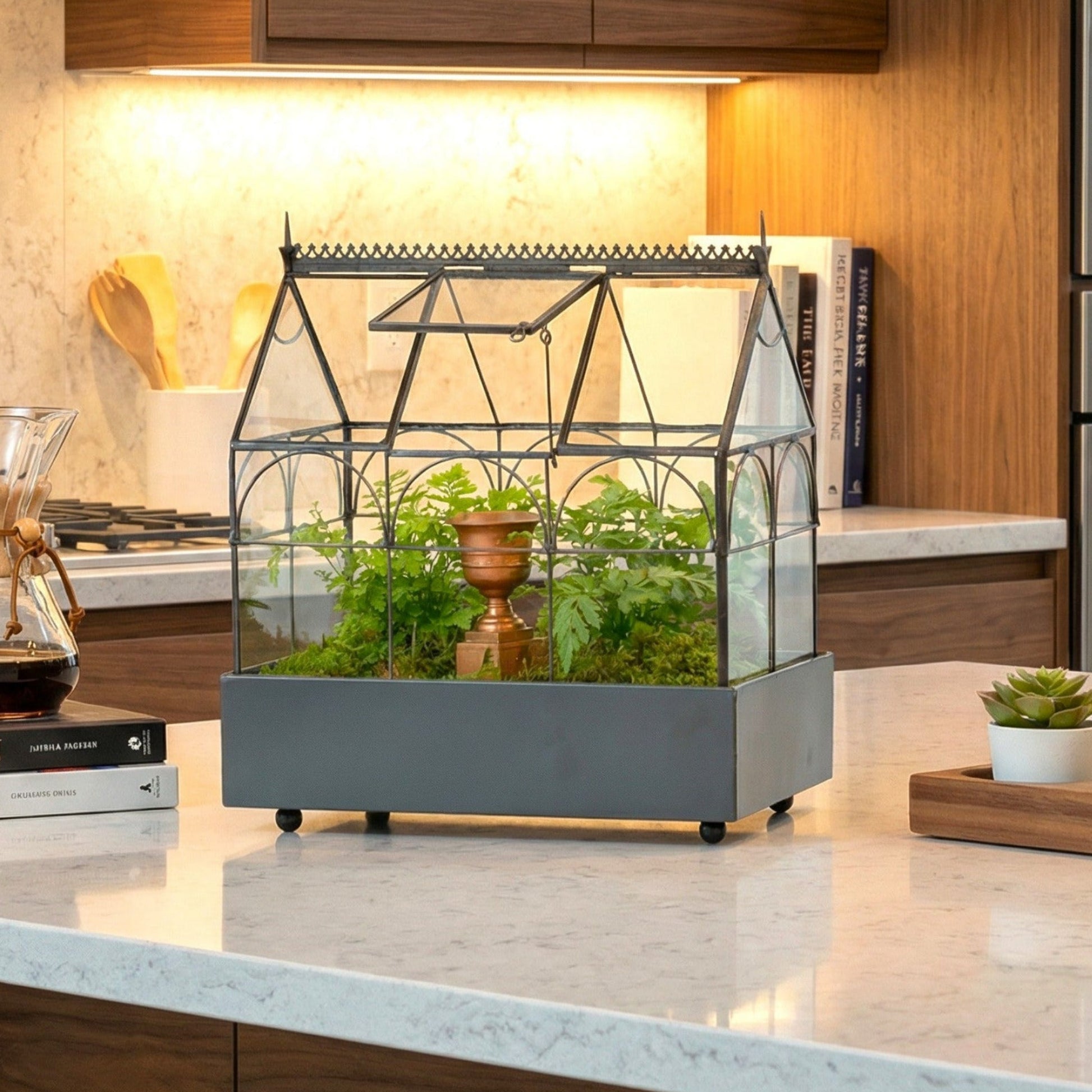
small terrarium plants H Potter Classic Wardian Case Terrarium – Small Sealed Glass DesignVintage Design Glass Terrarium (Small Sealed Style) This H Potter glass terrarium is reminiscent of English conservatories of the nineteenth century, and at 9. 5" L x 5. 5" W x 10. 5" H, its the perfect size for nearly any tabletop. The entire glass terrarium container top lifts off for easy planting and care, and the roof center panel is hinged for quick access when you need to water or tidy your plants. Designed with brass filigree trim and brass
Vintage Design Glass Terrarium (Small Sealed-Style)
This H Potter glass terrarium is reminiscent of English conservatories of the nineteenth century, and at 9.5" L x 5.5" W x 10.5" H, it’s the perfect size for nearly any tabletop. The entire glass terrarium container top lifts off for easy planting and care, and the roof center panel is hinged for quick access when you need to water or tidy your plants.
Designed with brass filigree trim and brass finials, this terrarium sits on a metal powder-coated tray with a plastic liner and side ledges for the glass top to rest securely. The tray is approximately 2 inches deep—a perfect planting depth for small terrarium plants. 3 mm thick glass provides strength, and this handcrafted hinged roof does not form an air tight seal with the house section, allowing for minimal ventilation.
Why You’ll Love This Small Terrarium
- Vintage conservatory look with brass filigree trim and finials
- Easy planting access—the glass top lifts off, plus a hinged roof center panel
- Humidity-friendly, sealed-style design (minimal ventilation, higher humidity environment)
- Sturdy construction with 3mm thick glass for durability
- Powder-coated tray + liner for clean indoor display and easy planting
Note: Plants, moss, stones, and décor props are not included—this listing is for the terrarium only.
Item Specs
| Specification | Details |
|---|---|
| Length | 9.5 in |
| Width | 5.5 in |
| Height | 10.5 in |
| Tray Depth | ~2 in |
| Glass Thickness | 3 mm |
| Access | Lift-off top + hinged roof center panel |
Endless Plant Possibilities
Update and diversify your greenery as often as you like based on season and holiday. You have a fully functional terrarium for tropicals, ivies, mosses, and other small plants that enjoy humidity.
For plant inspiration, see: best plants for terrariums and our guide to tropical terrarium plant ideas.
Terrariums Are On Trend
Terrariums are trending now for good reason. Their beauty and functionality add an earthy warm feeling to any room of your home. This sophisticated planter makes a wonderful gift as a house-warming, birthday or anniversary present and can be used as stunning décor for weddings and parties. The tranquility of greenery is soothing and helps to relieve stress. Plants not only promote a healthy environment, they also bring beauty and splendor to your home.
If you love decorating with terrariums, explore: terrarium décor and centerpiece styling ideas.
Intricate Detail + Minimalist Style
Delicate etching ensures your terrarium is designed and manufactured by H Potter. With precise attention to detail, the end result is a stunning, premium quality terrarium designed for long-lasting durability. To water or prune, use hinged roof panel and prop open with prop rod. A terrarium can also be a display case to showcase your collectibles or antiques.
Materials & Care
Simple Layering Method
- Add a thin layer of pea gravel for drainage.
- Mix in a small handful of activated charcoal, spreading evenly on the bottom of the tray.
- Add soil to nearly fill the tray (leave room for moss or top dressing).
- Carve small cavities, place plants, bury roots, and tamp soil to remove air pockets.
- Water very lightly—sealed-style terrariums need less water than most people expect.
How to Know If You Watered Correctly
- Light, temporary condensation after planting is normal.
- If glass stays heavily fogged for days, open the roof briefly to vent.
- If soil looks dry and there’s no condensation at all, add small sips of water.
For deeper care guidance, read: terrarium care tips, a guide to keeping glass terrariums, and common terrarium concerns.
Choose plants that thrive in a humid environment and don’t place your terrarium in direct sunlight. Every few weeks rotate your terrarium, prune anything not looking its best, and wipe glass with a clean cloth.
H Potter Promise
At H Potter, we take extreme pride in creating distinctive pieces to accent your home and garden. We use only the finest quality materials and professional packaging without cutting corners to save money, as we believe our customers deserve nothing less than the best.
FAQ
Is this terrarium fully sealed?
This is a sealed-style terrarium designed to support a higher-humidity environment, but it is not air-tight. The hinged roof does not form a perfect seal with the house section, which allows minimal ventilation.
How do I access the inside for planting and care?
The entire glass top lifts off for planting, and the roof’s center panel is hinged for quick watering and maintenance.
What plants work best in this small sealed-style terrarium?
This size is great for moss, small tropical plants, ivies, and other humidity-loving varieties. Choose plants with similar moisture needs and avoid harsh direct sunlight.
How often should I water?
Water very lightly after planting. After that, sealed-style terrariums usually need infrequent watering. Use condensation as your guide: vent briefly if it stays foggy for days; add small sips if soil looks dry and there’s no condensation.
What’s included with the terrarium?
Included: the terrarium with metal tray and liner, plus planting instructions. Plants and décor props are not included.
Explore More: Terrarium Guides
Shipping Notes
- Free Standard Shipping on $100+ Orders to the USA.
- Except Preorder products are shipped in 48 hours.
- Delivery to the USA:
- Standard Shipping : 3-10 business days
- If time is of the essence, please consider selecting expedited delivery for faster service.
Exchange/Return Notes
- We offer a 30-day return/exchange service after receiving.
- Final sale items are not eligible for returns or exchanges.
- To process your return/exchange, please contact us at [email protected]
- Please click here for more details>>> Return & Exchange Policy