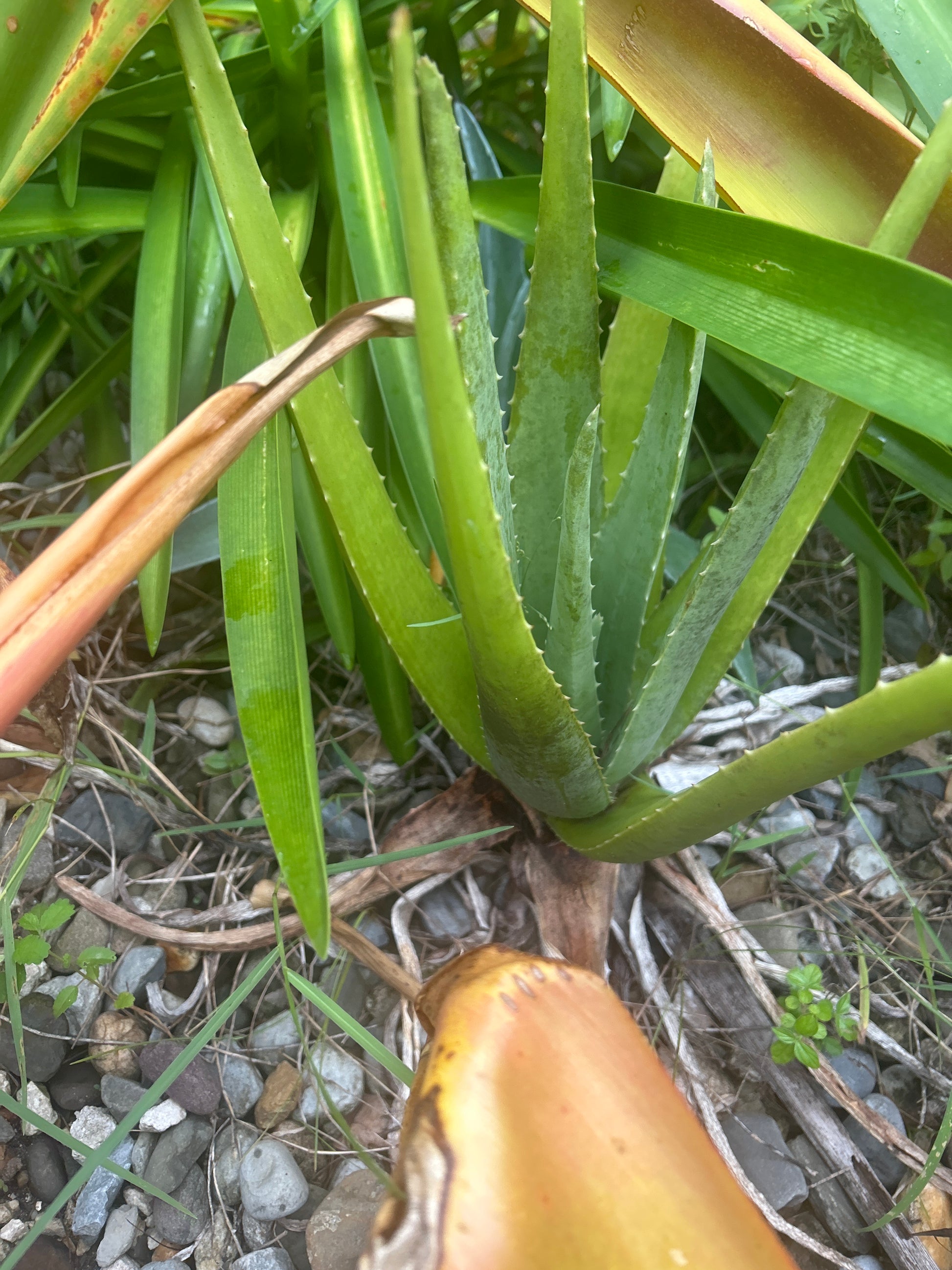
SKU: 45614652118
aloe vera plant pups

aloe vera plant pups Aloe vera pups – What's Growing on Florida?

Sale price$26.80 Regular price$29.78
Save 10%

Pay in installments of $7.45 with ShopPay, AfterPay and Klarna

Shipping Estimate
USA
  • USA
  • CAN

Ships within 48 hours · Estimated delivery Aug 28 - Sep 2

Promo Codes Available:

For Your Every Summer RSVP, with Code: SUMMER15

Description

aloe vera plant pups Aloe vera pups – What's Growing on Florida?Aloe Vera The Most Useful Plant You Can Grow in Florida Young Aloe Vera pups (Aloe barbadensis miller), organically grown right here in Florida and ready to pot or plant. If you could only grow one plant for your health, your skin, and your home Aloe Vera would be the argument. This remarkable succulent has been used by humans for over 6,000 years, appearing in the medical texts of ancient Egypt, Greece, China, and India. Cleopatra reportedly used it

Aloe Vera — The Most Useful Plant You Can Grow in Florida

Young Aloe Vera pups (Aloe barbadensis miller), organically grown right here in Florida and ready to pot or plant. If you could only grow one plant for your health, your skin, and your home — Aloe Vera would be the argument. This remarkable succulent has been used by humans for over 6,000 years, appearing in the medical texts of ancient Egypt, Greece, China, and India. Cleopatra reportedly used it as part of her daily skincare routine. Alexander the Great is said to have conquered the island of Socotra specifically to secure its aloe supply for his army's wounds. And today, modern science has confirmed what ancient healers knew: Aloe Vera is genuinely extraordinary. The best part? It thrives in Florida with almost no effort, and once you have a mature plant, you have a living first-aid kit, skincare product, and wellness supplement growing right in your home.

What's Inside an Aloe Leaf

The thick, fleshy leaves of Aloe Vera contain two distinct substances, each with their own remarkable properties:

  • The clear inner gel: The translucent, water-rich gel that fills the interior of the leaf. This is the part used for skincare, wound healing, and internal wellness. Rich in polysaccharides (especially acemannan), vitamins A, C, E, and B12, enzymes, amino acids, and minerals.
  • The yellow latex (aloin): The bitter yellow layer just beneath the skin of the leaf. This is a powerful laxative and should be avoided for internal use — always fillet the leaf carefully to use only the clear inner gel.

Skincare & Topical Uses

Aloe Vera gel is one of the most effective natural skincare ingredients on earth — and having a living plant means you always have it fresh, potent, and free of the preservatives and fillers found in commercial aloe products:

  • Sunburn relief: The gold standard natural remedy. Aloe's cooling, anti-inflammatory compounds reduce redness, ease pain, and accelerate healing. Apply fresh gel directly to sunburned skin for immediate relief.
  • Wound healing: Aloe has been shown in multiple studies to accelerate wound healing, reduce scarring, and prevent infection. Apply to minor cuts, scrapes, and burns.
  • Moisturizer: Absorbs quickly without leaving a greasy residue — an ideal lightweight moisturizer for Florida's humid climate.
  • Acne treatment: Aloe's antibacterial and anti-inflammatory properties make it effective for reducing acne inflammation and redness.
  • After-shave: Soothes razor burn and irritation immediately. A natural, chemical-free alternative to commercial after-shave products.
  • Hair & scalp: Apply fresh gel to the scalp to soothe irritation, reduce dandruff, and condition hair. Leave on for 30 minutes before washing.
  • Insect bites & stings: Apply immediately to reduce itching, swelling, and inflammation — especially useful in Florida.

Internal Wellness Uses

⚠️ Important: Only use the clear inner gel internally — never the yellow latex layer. Always fillet the leaf carefully.

  • Digestive support: Aloe vera juice has been shown to support digestive health, ease acid reflux, and reduce IBS symptoms. Blend 1–2 tablespoons of fresh gel into a smoothie or juice daily.
  • Immune support: Acemannan, the primary polysaccharide in aloe gel, has demonstrated immune-modulating properties in research studies.
  • Blood sugar support: Several studies suggest aloe vera may help lower fasting blood glucose levels.
  • Anti-inflammatory: Rich in compounds that reduce systemic inflammation when consumed regularly.

⚠️ *These statements have not been evaluated by the Food and Drug Administration. This product is not intended to diagnose, treat, cure, or prevent any disease. Consult your healthcare provider before using internally, especially if pregnant, nursing, or taking medications.

How to Harvest Your Aloe Gel

  1. Choose a mature leaf: Select a thick, outer leaf from a mature plant. Cut it as close to the base as possible with a clean, sharp knife.
  2. Drain the aloin: Stand the cut leaf upright in a glass for 10–15 minutes to allow the yellow latex to drain out. Discard this liquid.
  3. Fillet the leaf: Lay the leaf flat and slice off the top and bottom edges, then carefully slice off the green skin on both sides, leaving only the clear inner gel.
  4. Use immediately: Fresh aloe gel is most potent when used right away. Store unused gel in an airtight container in the refrigerator for up to one week, or freeze in ice cube trays for longer storage.

How to Plant Your Pups

  1. Choose a pot: Aloe Vera prefers a terracotta pot with drainage holes — terracotta wicks away excess moisture and prevents root rot.
  2. Use the right soil: Cactus and succulent mix, or regular potting soil amended with coarse sand or perlite for excellent drainage.
  3. Plant the pup: Place the pup in the center of the pot, roots down. The base should sit just at or slightly above the soil surface.
  4. Wait to water: Don't water for the first week after planting — this encourages roots to establish and prevents rot.
  5. Find a sunny spot: Bright indirect light to full sun. A south or west-facing window is ideal indoors; outdoors in Florida's sunshine is even better.

Growing Tips for Florida Gardeners

  • Sun: Full sun to bright indirect light. Thrives outdoors in Florida year-round.
  • Water: The most common mistake is overwatering. Water deeply, then allow the soil to dry out completely before watering again — typically every 2–3 weeks in Florida's humid climate.
  • Soil: Well-draining is essential. Aloe will rot in soggy soil.
  • Fertilizer: Minimal. A light application of balanced organic fertilizer once in spring is sufficient.
  • Propagation: Aloe produces pups around the base of the mother plant. Separate and pot them to create new plants — your one plant becomes many over time.
  • Pests: Generally pest-resistant. Occasionally susceptible to mealybugs — wipe off with a cotton swab dipped in rubbing alcohol.

Organically grown in Florida 🌿 | Ships as young pups ready to pot | The original living first-aid kit

Shipping Notes
  • Free Standard Shipping on $100+ Orders to the USA.
  • Except Preorder products are shipped in 48 hours.
  • Delivery to the USA:
  1. Standard Shipping : 3-10 business days
  • If time is of the essence, please consider selecting expedited delivery for faster service.
Exchange/Return Notes
  • We offer a 30-day return/exchange service after receiving.
  • Final sale items are not eligible for returns or exchanges.
  • To process your return/exchange, please contact us at [email protected]
  • Please click here for more details>>> Return & Exchange Policy
SKU: 45614652118

Discover Niche Categories That Outsell aloe vera plant pups

Top-Converting Item to Boost Your Average Order

4.7 ★★★★★
Based on 9 reviews
Sort
Highest Rating
Newest First
Oldest First
Product Reviews
M
Verified Purchase
Miles Erickson
Lowell, US
★★★★★ 4
Need to set 60Hz manually - otherwise "No Signal"
Size: 34
Works great as an office monitor - however the HDMI connection defaults to 3440x1440 at 100Hz and the monitor treats that as "No Signal" - it didn't actually work until I went into the display settings and changed it to 60Hz manually. The manual doesn't mention this defect at all, and I have no idea how a non-technical user would know to try this. The size is perfect for office work, especially compared to a 27" monitor which always feels just a little bit too small. The image quality is identical to a more expensive LG 27" monitor that I have next to it (it's a 4K running at 1440p to match pixel density). I don't use the speaker so I don't care about the sound quality. I'm not a gamer so I can't comment on gaming usage. The package includes VESA mount standoffs and even a screwdriver, so I was able to mount it to a monitor arm just with what was in the box! It's too bad that I couldn't order it without a stand, I hate to just throw that part away.
WAS THIS REVIEW HELPFUL?YesReportShare
Reviewed in the United States on May 8, 2026
R
Verified Purchase
RAP - Prime
Natrona Heights, US
★★★★★ 5
A Great Monitor: The Dell UltraSharp U4025QW Delivers
I recently invested in the Dell UltraSharp U4025QW and I am very happy with my choice. For anyone involved in creative/productivity type work like audio and video editing, spreadsheets, etc., this monitor won’t disappoint. The color and clarity are visually stunning. The 5K2K WUHD resolution on the 40-inch screen makes every detail pop, and the text is crystal clear, it makes a huge difference during long editing sessions. Videos look incredibly rich, and I'm noticing details in my footage I hadn't seen before. The 40” size is perfect for my work. The ultrawide 21:9 aspect ratio provides an enormous amount of screen real estate. I can have my editing timelines, mixer boards, and reference windows open all at the same time without constantly going back and forth between windows. The built-in hub functionality is also a plus for this monitor. The assortment of extra ports are incredibly convenient. It is a large investment but it’s a quality product. Highly recommended.
WAS THIS REVIEW HELPFUL?YesReportShare
Reviewed in the United States on December 7, 2025
E
Verified Purchase
Eli
Houston, US
★★★★★ 5
Excellent Monitor
This is a great monitor, picture quality is outstanding with great color fidelity. Coming from a standard 28 inches16X9 Samsung 4K monitor, which I also purchased here on Amazon, sometimes I do notice blurriness on some photos specially if you put them full screen, but this is understandable being that even with the high pixel density on this monitor low quality images will look a little blurry in full screen or when expanded more than %100 of their native size. (Not a monitor's fault). UPDATE: Correction, all I had to do to remove all the blurriness was to decrease the monitor sharpness settings, I brought that down from the default setting to just 40 and that made a huge difference without losing the quality of the images or video. Also, if you want to compensate for that, and you have great vision like 20/20, then you can change the scaling on Windows to just %125 instead of the recommended %150. However, for people like me with not the best vision, then everything becomes a tiny bit too small to look at comfortably. And also at such lower scaling some websites serve smaller lower quality images (specially on sites using WordPress) and this I do not like either, so I stick to the recommended %150 scaling which gives me an overall best experience everywhere. To the user "JVH" who posted a review complaining about the monitor changing sources unexpectedly, this is a feature, you may disable it on the Monitor Menu settings or using Dell Display Manager software which you may install and will give you easier access to the monitor features, or just accessing the built-in monitor Menu. On the monitor, however, you can just go to the Menu using the joystick, then go to "Input Source", then "Auto Select" and change it to OFF. This is a huge monitor, and you need plenty of space on your desk to use it. I also agree the ports in the monitor are placed facing downwards (a trend on most new monitors these days) which makes it hard to reconnect cables if unplugged. Regarding the KVM switch it has worked fine for me for the most part, however the network switch mode doesn't work very well, and it's complicated to switch sources if you use the network switch instead of the KVM USB mode. I also wish more than 2 computers could be connected to the monitor with the USB KVM mode, more than two computers can only be used while utilizing the KVM Network mode. There are only three color modes built in "Standard", "Movie" and "Game". Default color modes and presets are not as many as in other monitors and I find the default colors either too yellow or washed out for my taste, however I selected Movie mode for now then played a little with the brightness/contrast and color saturation and I have gotten it to look good for my taste. By all means please do yourself a favor and install "Dell Display Manager" This app makes it easy to quickly manage your monitor settings, change them and I have also noticed that the display delivers more a more sophisticated picture when that app is installed. You'll also be able to export/import certain settings with it and over control almost everything without the need to play with the joystick in the back. If you have an NVIDIA card, by all means install the Nvidia settings app then go to the Display tab then "Adjust Color Settings" and play with the brightness/contrast/Gama and Digital vibrance a little to make it look even better. Before you do that make sure to take screenshots of the current settings, if you change it too drastically you might find it very hard to find the previous settings, and you might need to reset the app to defaults and start from zero again. Here are my current settings on the "Display/Adjust Desktop Color Settings" on the Nvidia App: 1- First, select ALL channels on the color channel option 2- Brightness +40 3-Contrast +55 4-Gamma +1.12 5-Digital Vibrance +67 6- Save all the settings. Now go to the Video tab on the Nvidia App then go to "Adjust Video Image Settings" 1-) Edge Enhancement select "Use the Nvidia Settings" and set it to +10 2-) Noise Reduction select "Use the Nvidia Settings" and set it to +7 3 Deinterlacing, Select "Use Inverse Telecine" 4 RTX Enhancement, Select Super resolution and set the quality to 4. Here are my hard settings on the Monitor itself: Brightness 69 Contrast 67 Autobrightness OFF Autocolor Temp OFF Color Settings Preset mode: Movie Input color mode: RGB Hue 50 Saturation 67 Display Aspect Ratio 21:9 Sharpness 40 Response Time: Fast Smart HDR: OFF PS: I'm still playing with the settings, so I'll update my settings here as I play more with them. You also have options to change the Color Temperature, Color Space or you can skip all prebuilt picture modes and select "Custom Color" this is ideal for those who really know what they are doing and that's what I'll probably switch to when I have time to play with it. Keep in mind I'm still discovering mode and might radically change these settings again, but so far these settings are the easiest I have found to change and give me stunning picture and video settings. Take the above advice as not from an expert and also as only a base from where to start to tweak the monitor to your liking. Again, ensure to keep screenshots of all your current changes in case you want to go back to what you had, or you'll need to reset everything to defaults and start as a new monitor. I have been holding on from buying an ultrawide for years because I was not willing to downgrade from 4K to any of those ultrawide ones with very low resolution. This is finally a 5k2k that wouldn't make me feel like I was downgrading instead of upgrading. Other than the few cons, this is an excellent monitor and I would recommend it to anyone.
WAS THIS REVIEW HELPFUL?YesReportShare
Reviewed in the United States on January 20, 2025
G
Verified Purchase
Gripper4hire
Phoenix, US
★★★★★ 5
Best monitor I've had (yet).
Upgraded from a Dell 3818dw widescreen. All the reviews online I've read (or watched on YouTube) about this monitor are spot on. The color is excellent (as been my experience with most Dell Ultrasharp monitors), 120Hz is a nice upgrade, as is HDR (abet only HDR600, and not HDR1000) which is bright. Black level is really good for an IPS panel - this display uses "special new-tech" called IPS-Black. Not as good as OLED, but better than the last IPS panel. Viewing angle is very wide. Response time is adequate for professional use - this is not a gaming monitor, rather a monitor designed to get work done - be it coding, photo/video editing, or 3D modeling, although it works for the light gaming. The built in KVM works well, with the Thunderbolt connecting to a Macbook Pro, while the HDMI connects to a KVM that has 4 systems on it. It is nice that you can turn off the 2.5GB network from switching with the monitor's KVM so the one device you want to use the wired connection (like the Macbook Pro on Thunderbolt) doesn't loose it's wired connection when switching to the other device - little details like that show that the folks who designed the monitor actually deal with these use cases. Highly recommend, especially if on sale.
WAS THIS REVIEW HELPFUL?YesReportShare
Reviewed in the United States on April 30, 2025
A
Verified Purchase
Amazon Customer
Los Angeles, US
★★★★★ 4
Great Premium product but overpriced...
Another Great Premium Monitor from Dell with excellent for 2025 Specs! BUT with few Cons: - contrast are not so good in real life (spec 1:2000) due the luck of IPS matrix. great for work in slightly dimmed working environment w/t sun. - plastic feels cheap for that price, but normal for corporate expenses. - prepare extra space on table - mostly for professional usage - NO Remote control :( Pros: - Native 5K Resolution at 120Hz w/t DSC - perfect curvature of screen (less is better) - Tons of Connectivity features for IT Pro users - Great for eye health and long session - Extra 33% of working space after 16:9, 32in monitor - Bunch of usb Ports (B/C ) including power delivery Would be nice to see "Light version" of U4025QW with the same Panel and spec but w/t expensive "Pro HUB" features. The DP + HDMI + 1UpStream(USB-B/C)+DownStream(powered 1USB-C + 1USB3.0) ports should be fine for most demands. Probably called: Home/Personal or Productivity Edition with new code "U4025QE-H/P". Double check with production pipe and accounting dep for targeting market. Thank you DEll... Firm 4+ stars.
WAS THIS REVIEW HELPFUL?YesReportShare
Reviewed in the United States on March 27, 2025

recommand products