Pay in installments of $6.15 with
 ,
,
 and
and

Shipping Estimate
USA
- USA
- CAN
- USA
- CAN
Ships within 48 hours · Estimated delivery Oct 20 - Oct 25
 Promo Codes Available:
For Your Every Summer RSVP, with Code: SUMMER15
Description
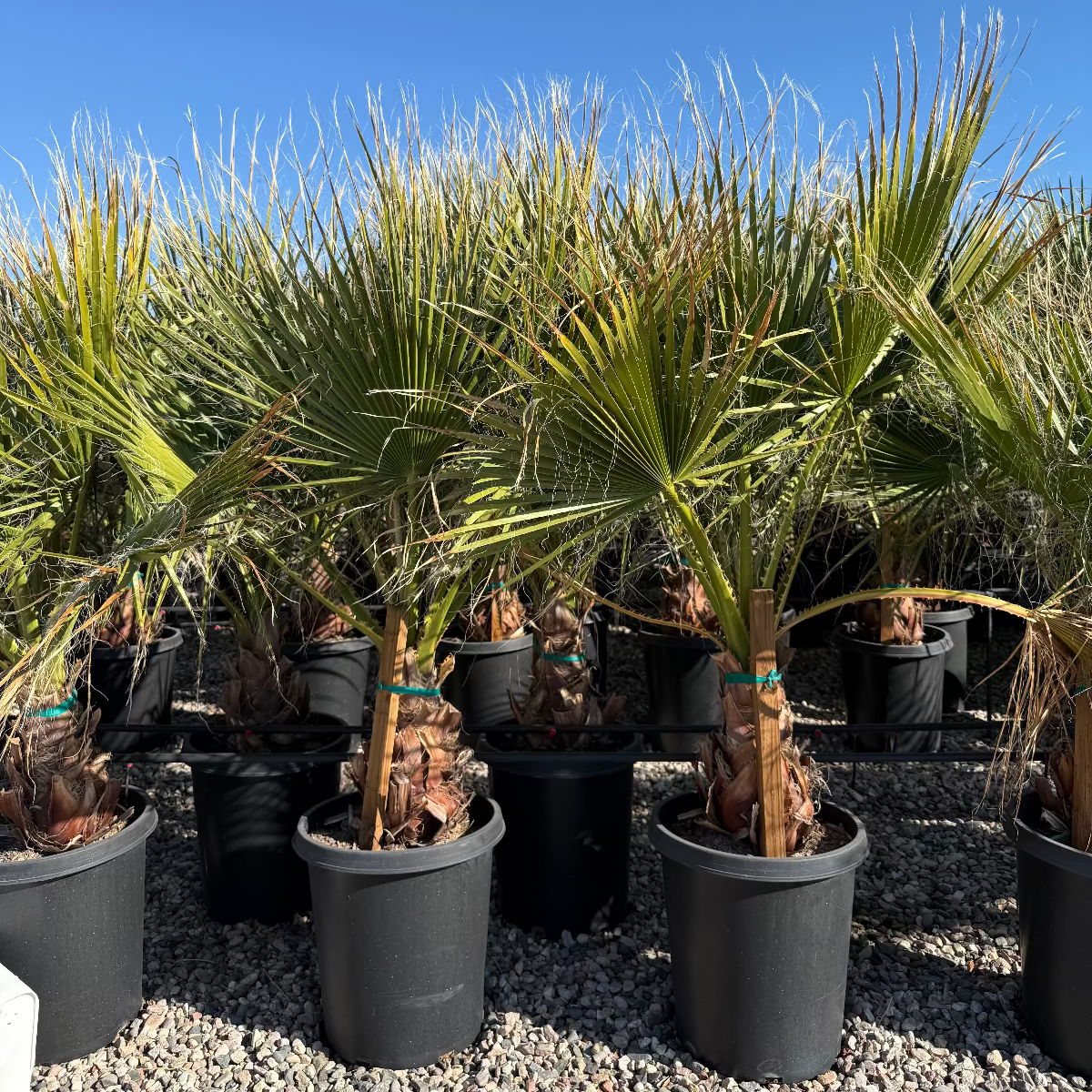
plant pot trees for sale Buy Mexican Fan Palm Phoenix, AZ | Washingtonia robustaThe Toughest Tall Palm for Phoenix Heat Mexican Fan Palm The Mexican Fan Palm (Washingtonia robusta) is the ultimate heat tough, drought tolerant palm for Phoenix and the surrounding Valley. Soaring to 5070 feet at maturity with a slender, graceful trunk and a crown of bold fan shaped fronds, this palm defines the Arizona skyline. Mexican Fan Palms are incredibly low maintenance once established surviving on minimal irrigation, laughing off 115F
The Toughest Tall Palm for Phoenix Heat — Mexican Fan Palm
The Mexican Fan Palm (Washingtonia robusta) is the ultimate heat-tough, drought-tolerant palm for Phoenix and the surrounding Valley. Soaring to 50–70 feet at maturity with a slender, graceful trunk and a crown of bold fan-shaped fronds, this palm defines the Arizona skyline. Mexican Fan Palms are incredibly low-maintenance once established — surviving on minimal irrigation, laughing off 115°F summers, and thriving in the poorest soils. Whether you’re adding dramatic height to a Scottsdale resort-style yard, creating a palm-lined entry in Mesa, or planting a windbreak row in Chandler — the Mexican Fan Palm delivers unmatched vertical impact on the lowest water budget of any landscape palm.
Mexican Fan Palm Plant Details
| Attribute | Detail |
|---|---|
| Scientific Name | Washingtonia robusta |
| Common Names | Mexican Fan Palm, Mexican Washingtonia, Skyduster Palm |
| Mature Height | 50–70 feet |
| Mature Width | 10–15 feet (canopy spread) |
| Growth Rate | Fast — 3–5 feet per year in Phoenix |
| Sun | Full sun (6+ hrs). Thrives in reflected heat from walls and pavement. |
| Water | Very low once established. Extremely drought-tolerant. |
| USDA Zones | 9–11 (Phoenix is Zone 9b–10a) |
| Soil | Extremely adaptable. Handles Arizona caliche, sand, clay, and rocky soils. |
| Foliage | Evergreen — large fan-shaped fronds year-round |
| Trunk | Slender, smooth reddish-brown trunk with distinctive swollen base |
Mexican Fan Palm Uses in Phoenix Landscapes
Dramatic Vertical Accents & Skyline Trees
Nothing adds height and drama to a Phoenix landscape like a mature Mexican Fan Palm. Their slender trunks and elevated canopy create striking silhouettes against Arizona sunsets. Plant as a single focal point in Scottsdale front yards, or group 3–5 at staggered heights for a resort-style statement in Tempe or Paradise Valley properties.
Palm-Lined Driveways & Entryways
Mexican Fan Palms are the classic choice for lining driveways and property entrances throughout the Valley. Space 15–20 feet apart on both sides for a grand allée effect. Their narrow footprint means they won’t crowd walkways or driveways as they mature — perfect for Mesa, Gilbert, and Peoria streetscapes.
Low-Water Windbreaks & Property Borders
Planted in a row at 15-foot intervals, Mexican Fan Palms create an effective windbreak and visual screen at height. They’re ideal for the edges of large Chandler and Surprise properties where you need vertical screening without heavy irrigation costs. Pair with Texas Sage or Ruellia at the base for a layered desert look.
Best Time to Plant Mexican Fan Palm in Phoenix
Fall (October–November) is the ideal planting window. Warm soil accelerates root establishment while cooler air reduces transplant stress. The palm gets 6–8 months of root growth before enduring its first full Phoenix summer. Spring (February–April) is the second-best option. Mexican Fan Palms are tough enough to survive summer planting, but fall gives them the best start.
How to Plant Mexican Fan Palm
- Dig wide, not deep — excavate 2–3x the root ball width at the same depth. Don’t plant too deep — the root flare should sit at soil level.
- Check for caliche — break through any hardpan layer to ensure drainage. Mexican Fan Palms tolerate poor soil but not standing water.
- Backfill with native soil — these palms don’t need amendments. A light 20% organic blend is fine if desired.
- Spacing — 15–20 feet apart for grouped plantings; 25+ feet for standalone specimens.
- Water basin — build a 3–4 inch soil ring to direct water to the root zone during establishment.
- Mulch — 2–3 inches of gravel or bark mulch to retain moisture and suppress weeds.
Watering Mexican Fan Palm in Phoenix
First Year Watering Schedule
- Weeks 1–2: Every 1–2 days, deep and slow (20–30 min drip cycle)
- Months 1–2: Every 3–4 days
- Months 3–6: Every 7–10 days (every 5–7 days in peak summer)
- After Year 1: Every 10–14 days in summer; monthly or less in winter
Drip Irrigation
Place 2 emitters (2 GPH each) 18–24 inches from the trunk. Once established (2+ years), Mexican Fan Palms need very little supplemental water — many mature specimens in Phoenix survive on rainfall alone. This is one of the lowest-water palms you can plant.
How fast does Mexican Fan Palm grow in Phoenix?
Mexican Fan Palms are fast growers, adding 3–5 feet per year in Phoenix with regular watering during establishment. A 15-gallon palm can reach 25–30 feet within 5–6 years.
Is Mexican Fan Palm drought tolerant?
Extremely. Once established, Mexican Fan Palms are among the most drought-tolerant palms available. Mature trees often thrive on little to no supplemental irrigation in the Phoenix Valley — a major advantage over Queen Palms and other tropical palms.
What’s the difference between Mexican Fan Palm and California Fan Palm?
Mexican Fan Palms (Washingtonia robusta) are taller and more slender than California Fan Palms (Washingtonia filifera), which are stockier with a thicker trunk. Mexican Fan Palms grow faster and taller — up to 70 feet — while California Fan Palms typically top out at 40–50 feet.
Do Mexican Fan Palms need trimming?
Yes — Mexican Fan Palms should be trimmed annually to remove dead fronds. Without trimming, spent fronds form a dense "skirt" around the trunk. Most Phoenix homeowners schedule a professional palm trim once a year, typically in late spring.
You May Also Like
- Queen Palm — a fast-growing feather palm for lush tropical shade, reaching 30–40 feet.
- Mediterranean Fan Palm — a compact multi-trunk fan palm, ideal for desert modern landscapes and smaller spaces.
- Pineapple Palm — a bold statement palm with a unique crown shaft, perfect for entryways and focal points.
- Pygmy Date Palm — a petite feather palm for patios, courtyards, and poolside plantings.
How Many Mexican Fan Palm Do I Need?
Mexican Fan Palm is a tall, fast, slender single-trunk specimen palm placed for vertical drama, not planted in hedge rows. Its narrow 10 to 15 foot canopy lets you line it tighter than most big trees.
- Single focal point: one palm makes a skyline statement in a front yard or by a pool. Set the trunk back from the house so the high crown clears the roofline.
- Grove or allée: plant odd-numbered groups of 3 to 5 at staggered heights, or a driveway row at 15 to 20 feet on center for a grand allée.
- Windbreak or screen row: space at about 15 feet on center for vertical screening on a large property.
Mexican Fan Palm Season-by-Season in Phoenix
- Spring (Feb to Apr): fast new frond growth resumes as soil warms. A strong second planting window; late spring is the usual time for the annual frond trim.
- Summer (May to Sep): peak growth, putting on several feet and shrugging off 115°F heat and monsoon winds. One of the lowest-water palms once established.
- Fall (Oct to Nov): the ideal planting season, giving roots 6 to 8 months before the next summer.
- Winter (Dec to Jan): evergreen and cold-hardy to about 20°F. A hard Valley freeze can brown fronds, but the palm pushes fresh growth in spring; no routine cover needed.
At a Glance
✔ Heat-Loving (Reflected-Heat Tolerant) ✔ Drought-Tolerant ✔ Evergreen ✔ Low-Maintenance ✔ Shade-Providing ✔ Cold-Hardy to 20°F
Plant It With
- Mediterranean Fan Palm: a compact multi-trunk fan palm to layer lower, denser form below the tall trunks.
- Pygmy Date Palm: a petite feather palm for the patio or poolside understory.
- Texas Sage: a low-water purple-blooming shrub to soften the base of the palms.
- Desert Spoon: a silvery architectural rosette for bold contrast against the slender trunks.
Is Mexican Fan Palm Right for Your Yard?
Mexican Fan Palm is right for you if you want fast, dramatic height on the lowest water budget of any palm, for full sun and reflected heat, almost any well-drained soil, and a yard with vertical room for a 50 to 70 foot tree. It is not a fit for small lots, near pools where frond litter is a concern, or under power lines, since it gets very tall and drops a frond skirt without an annual trim.
Shipping Notes
- Free Standard Shipping on $100+ Orders to the USA.
- Except Preorder products are shipped in 48 hours.
- Delivery to the USA:
- Standard Shipping : 3-10 business days
- If time is of the essence, please consider selecting expedited delivery for faster service.
Exchange/Return Notes
- We offer a 30-day return/exchange service after receiving.
- Final sale items are not eligible for returns or exchanges.
- To process your return/exchange, please contact us at [email protected]
- Please click here for more details>>> Return & Exchange Policy