Pay in installments of $5.68 with
 ,
,
 and
and

Shipping Estimate
USA
- USA
- CAN
- USA
- CAN
Ships within 48 hours · Estimated delivery Oct 24 - Oct 29
 Promo Codes Available:
For Your Every Summer RSVP, with Code: SUMMER15
Description
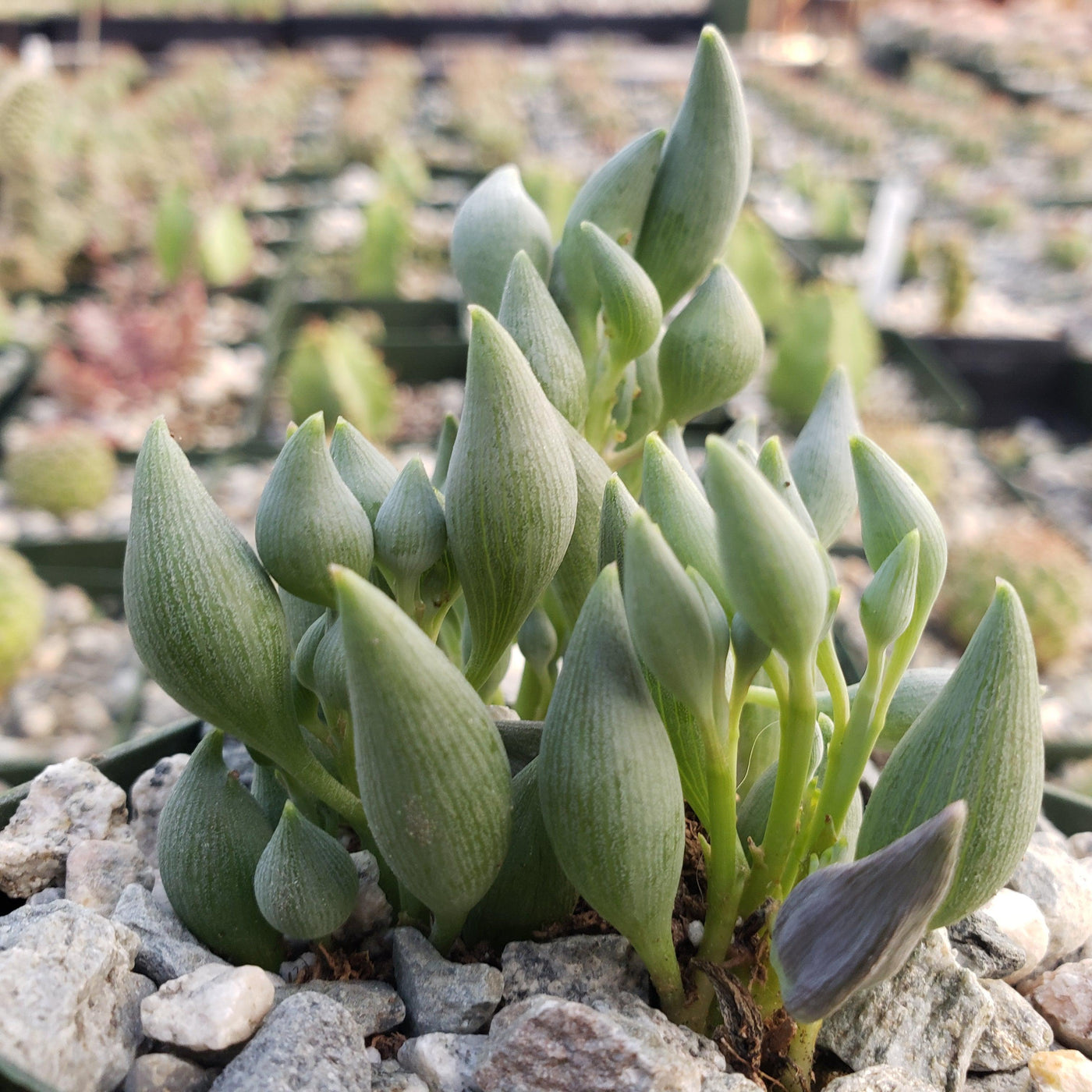
succulent teardrop Shop 'String of TearsIntroducing the string of tears, known as Senecio citriformis, which is a captivating succulent plant that belongs to the Asteraceae family. It is known for its unique hanging trailing growth habit and delicate, teardrop shaped leaves that cascade down like a beautiful green waterfall. Native to South Africa, itmen is also known as Curio citriformis. This succulent has slender, trailing stems that look great in a hanging pot, growing up to 3 feet
Introducing the string of tears, known as Senecio citriformis, which is a captivating succulent plant that belongs to the Asteraceae family. It is known for its unique hanging/trailing growth habit and delicate, teardrop-shaped leaves that cascade down like a beautiful green waterfall. Native to South Africa, itmen is also known as Curio citriformis.
This succulent has slender, trailing stems that look great in a hanging pot, growing up to 3 feet long.
The leaves are small, plump, and elongated, resembling tiny teardrops or beads, that store water.
They have a vibrant green color with translucent windows that allow light to penetrate, giving them a unique appearance.
The string of tears flowers produces small, daisy-like blooms from late summer to early winter.
These flowers can vary in color from pale yellow to white and add an extra touch of beauty to the plant.
The string of tears propagation can be easily done through stem cuttings. Simply take a healthy stem cutting, remove the lower leaves, and allow it to be callous for a few days.
Then, place the cutting in well-draining soil, mist it lightly, and provide indirect light.
With time and proper Senecio care, the cutting will develop roots and establish itself as a new plant.
When and How to Water Your String of Tears Plant
Like other succulents, this plant prefers minimal watering. Allow the soil to dry out between waterings, but don't let it become bone dry. A good rule of thumb is to water your Senecio plant when the top inch of soil feels dry to the touch. Be cautious not to overwater, as this can lead to root rot or fungal infection.
Water your String of tears succulent every 2 to 3 weeks during the growing season, and reduce watering to once every 4 to 6 weeks during winter dormancy.
In the spring and summer, prefers deep but infrequent watering. Let the soil dry out completely between waterings, then water thoroughly until excess drains from the pot. Since it stores moisture in its leaves, it is more tolerant of drought than overwatering.
In the fall and winter, reduce allow the soil to remain dry for longer periods and water sparingly. Overwatering during the cooler months can increase the risk of root rot, so it is best to err on the side of underwatering.
If the leaves start to appear shriveled or wrinkled, it's a sign that the plant needs more water. On the other hand, if the leaves become mushy or translucent, it could be a sign of excessive watering.
Light Requirements - Where to Place Your String of Tears Succulent
When growing indoors, this lovely succulent thrives in bright, indirect light.
Place it near a window where it can receive at least 6-8 hours of bright, filtered sunlight throughout the day.
Avoid exposing it to direct sunlight, as it can burn its delicate leaves.
If you notice the leaves stretching or leaning toward the light source, it's a sign that the plant needs bright sunlight. You can also rotate the pot from time to time to ensure even light distribution.
When growing outdoors, it enjoys warm and sunny conditions. Choose a spot that receives partial to full sunlight for at least 3-6 hours a day. Morning or late afternoon sun is usually ideal, as it's less intense than the midday sun. If you live in a particularly hot climate, it's a good idea to provide some partial shade during the hottest part of the day to prevent leaf burns.
Remember, when transitioning your succulent from indoors to outdoors, do it gradually to avoid shocking the plant. Start by placing it in a partial shade outdoors for a few hours each day, gradually increasing the exposure to sunlight over a couple of weeks.
Optimal Soil & Fertilizer Needs
The string of tears plant prefers sandy, well-drained soil, as excess moisture can promote root and stem rot. A succulent potting mix works well, as it helps prevent water from sitting around the roots.
Planet Desert specializes in succulents and has specialized succulent potting soil that includes an organic substrate with mycorrhizae to help with the growth of a healthy root system to help your succulents thrive. As an okay alternative, you can create your own potting mix by combining equal portions of perlite, coarse sand, and good natural potting soil.
When fertilizing your succulent, use a balanced fertilizer with an NPK ratio of 5-10-5 once a year to support healthy growth. Remember, it's always better to under-fertilize than to over-fertilize, as excessive nutrients can harm your Senecio plant.
Hardiness Zones & More
In the United States, the string of tears plant is mostly an indoor plant, but if you live in southern Florida or Hawaii, then you can cultivate it outdoors in USDA zones 10-11.
It generally prefers temperatures between 60°F and 80°F.
It can tolerate slightly cooler temperatures, but it's best to avoid extreme cold or frost, as it can damage the plant.
As for humidity, this succulent can tolerate average indoor humidity levels, so no need to worry too much about that.
If you live in a colder region, you may want to keep it as an indoor plant or provide protection during the winter months, such as bringing your string of tears plant indoors or using a frost cloth to shield it from frost.
How to Grow Indoors
The String of tears can adapt well to indoor environments when provided with the right light, soil, and watering conditions.
- Place the plant near a bright window where it can receive 6-8 hours of indirect light each day.
- Grow it in a container with drainage holes to prevent excess moisture from accumulating around the roots.
- Use a well-draining succulent potting mix to reduce the risk of root rot.
- Water only when the soil has dried out completely.
- Maintain indoor temperatures between 60°F and 80°F.
- Provide good air circulation around the plant to help keep the foliage healthy and dry.
Wildlife – String of Tears Flowers Attract the Following Friendly Pollinators
The string of tears flowers attract a variety of friendly pollinators, including bees, butterflies, ladybugs and hummingbirds. Its bright, colorful flowers are also appealing to other beneficial insects that help with pollination.
According to to ASPCA, the Senecio citriformis is mildly toxic to pets and humans. It will be best to keep the plant out of reach of curious children, cats, and dogs.
How to Propagate Your String of Tears Succulent
You can propagate it through stem cuttings. Select a healthy stem and cut a section about 4 to 6 inches and allow the cutting to dry for 1-2 days to prevent rot. Once the cutting has callused, place it in a pot filled with a well-draining succulent mix.
Place the pot in a warm location with bright, indirect light and water lightly when the soil becomes dry. Avoid overwatering, as excessive moisture can cause the cutting to rot before roots develop.
Key Takeaways
- The String of Tears is admired for its cascading stems and unique teardrop-shaped leaves that create a beautiful waterfall-like display in hanging baskets.
- It is a drought-tolerant and low-maintenance succulent, perfect for busy plant owners.
- The plant can reward growers with delicate creamy-yellow, daisy-like flowers that add extra ornamental value.
- It is adaptable to both indoor and outdoor growing conditions in warm climates.
- Ideal for hanging baskets, shelves, and indoor plant displays.
Final Thoughts
Overall, the String of Tears (Senecio citriformis) is a captivating succulent with its delicate, tear-shaped leaves that cascade down like a string of beads. Native to South Africa, this plant thrives in arid conditions and features slender, trailing stems and vibrant green leaves with translucent windows. While it may produce small, daisy-like flowers, it is primarily valued for its stunning foliage. String of tears care is relatively easy, as it requires bright indirect light, great drainage, and regular watering to keep the soil moist but not waterlogged. It is important to mist the plant occasionally to maintain humidity levels and prevent the leaves from drying out. Give it a try and enjoy the beauty and intrigue this unique string of tears brings to your home or garden!
Shipping Notes
- Free Standard Shipping on $100+ Orders to the USA.
- Except Preorder products are shipped in 48 hours.
- Delivery to the USA:
- Standard Shipping : 3-10 business days
- If time is of the essence, please consider selecting expedited delivery for faster service.
Exchange/Return Notes
- We offer a 30-day return/exchange service after receiving.
- Final sale items are not eligible for returns or exchanges.
- To process your return/exchange, please contact us at [email protected]
- Please click here for more details>>> Return & Exchange Policy