SKU: 46748511378
succulents from mexico

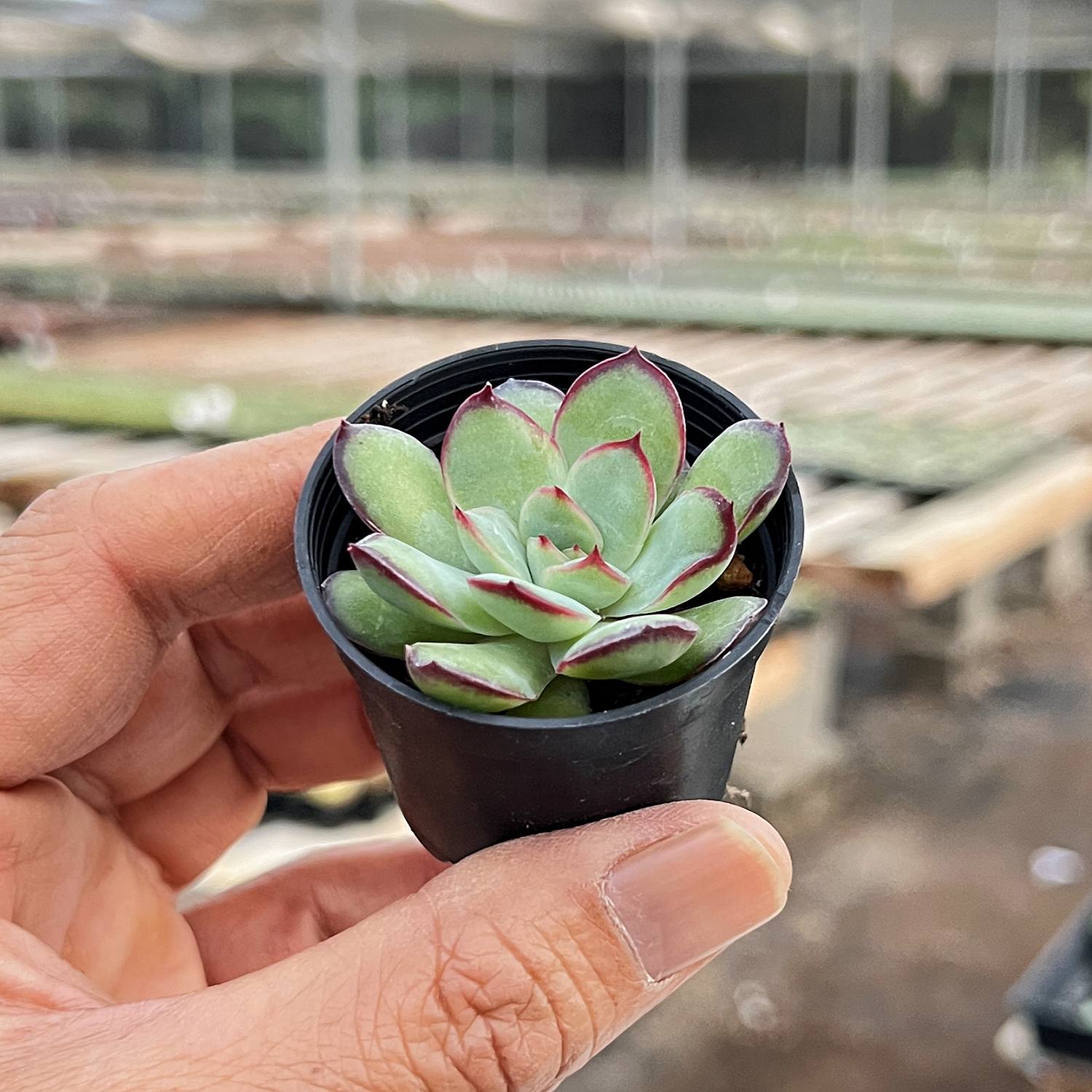
succulents from mexico Echeveria Mexican Pulidonis

Sale price$26.67 Regular price$29.63
Save 10%

Pay in installments of $7.41 with ShopPay, AfterPay and Klarna

Shipping Estimate
USA
  • USA
  • CAN

Ships within 48 hours · Estimated delivery Oct 28 - Nov 2

Promo Codes Available:

For Your Every Summer RSVP, with Code: SUMMER15

Description

succulents from mexico Echeveria Mexican PulidonisAbout Echeveria Mexican pulidonis The Echeveria Mexican pulidonis boasts plump, oval shaped leaves with a stunning red border that encircles each one . The leaves are covered with farian and the blades curve inward. These leaves grow tightly together to form a charming rosette, while the plant's stems develop a unique, stumpy texture over time. In the summertime, this succulent produces gorgeous pale pink flowers. With its low maintenance needs and

About Echeveria Mexican pulidonis

The Echeveria Mexican pulidonis boasts plump, oval-shaped leaves with a stunning red border that encircles each one .The leaves are covered with farian and the blades curve inward. These leaves grow tightly together to form a charming rosette, while the plant's stems develop a unique, stumpy texture over time. In the summertime, this succulent produces gorgeous pale pink flowers. With its low-maintenance needs and visually striking foliage, the Echeveria Mexican pulidonis is an excellent option for anyone new to succulent care. 

How to care for Echeveria Mexican pulidonis

Sun/Temperature: For optimal growth, the Echeveria Mexican pulidonis requires 5-6 hours of bright, diffused, or direct light daily. If you want to enhance the red coloration of its leaves, then total sun exposure is recommended. However, during the summer, you must avoid exposing it to direct solid light as it can cause sunburn. As part of the Echeveria family, it can tolerate varying temperatures, but it's worth noting that extreme temperatures can impede its growth. Therefore, it's best to protect it from temperatures below 30°F and above 90°F. Maintaining temperatures between 60-80°F is ideal for the Echeveria Mexican pulidoni's well-being.

Soil/Watering: To provide your plant with the best care possible, we recommend using commercially available succulent soil or creating your own with a blend of 50% granular soil, 40% peat soil, and 10% vermiculite or coconut flour. For watering, the soak-and-dry method works great. Avoid stagnant water after watering or rain showers to prevent root rot and other potential issues.

Pot: Make sure you use a pot with drainage holes. It will help keep them healthy. Consider notched pots for Echeveria Mexican pulidonis once the stems have matured for a stunning addition to your garden or interior.

Propagation: You have two excellent options: cutting or leaf propagation. The first step is to carefully select healthy, whole leaves and use sterilized scissors or a sharp knife to make your cuts. Allow your cuttings to dry in a shaded area until the wounds heal. Then, plant them in some dry soil and wait for the roots to sprout. Keep the soil slightly moist until the leaves have successfully rooted, and then switch to the soak and dry watering method.

More Information

Primary color: Green-yellow
Secondary color: Red
Cold hardiness:  USDA Hardiness Zones   to  (from °F to °F)
Product format: Rooted in  2" pot
Suitability:  Ideal for balcony, window, garden
Propagation: Easy by leaf propagation
Special characteristic: Pet safe

Shipping Notes
  • Free Standard Shipping on $100+ Orders to the USA.
  • Except Preorder products are shipped in 48 hours.
  • Delivery to the USA:
  1. Standard Shipping : 3-10 business days
  • If time is of the essence, please consider selecting expedited delivery for faster service.
Exchange/Return Notes
  • We offer a 30-day return/exchange service after receiving.
  • Final sale items are not eligible for returns or exchanges.
  • To process your return/exchange, please contact us at [email protected]
  • Please click here for more details>>> Return & Exchange Policy
SKU: 46748511378

Discover Niche Categories That Outsell succulents from mexico

Top-Converting Item to Boost Your Average Order

4.0 ★★★★★
Based on 18 reviews
Sort
Highest Rating
Newest First
Oldest First
Product Reviews
M
Verified Purchase
Mares by the Bay
Whiting, US
★★★★★ 5
It WORKS! I'm Back at Work. Thx to Apple for support and Amazon for fast delivery
I am thrilled to report that the Anker USB C Hub with Ethernet fixed a dire problem that nailed me when I switched from my maybe-20 year old dying wired Apple Extended Keyboard to the Macally keyboard comparable (with USB-C connection). I have a 2023 MacBook Pro 14", a lovely workhorse, with 3 USB-C/Thunderbolt ports, a MagSafe power port and an HDMI port (with, it turned out, limited ability to handle UHD displays, so useless for my desk setup). It turned out my old Dockteck hub with ethernet didn't have thunderbolt capable USB-C ports, so my new MacAlly keyboard connected to that hub stopped working. On top of that, as I swapped with my Logi webcam, it also required a trickle of power the Dockteck hub didn't provide. As soon as I figured out what the issue was, I read up on several multiport adapters with ethernet, and it seemed that either I would be stuck purchasing WAY more than I needed, adding another bulky (annoying!) device on my desk surface and costing me close to $200. This seemed crazy, so I called Apple Store support. The only Apple Store multiport adapter was useless to me (and also $80) because, of all weird things, it had only ONE USB-C/Thunderbolt compatible port among 8--most ports were legacy. (Ugly too, just saying folks don't HAVE to make devices ugly!) The Apple Store rep, in one of those brilliant customer rep incidents, understood quickly the challenge, said Apple Store didn't have anything that would work for me, but SHE KNEW SOMEONE (ta-da! better than AI!) who would know and could recommend. Three minutes later she said this Anker device would work. I had it in hand by 6pm same day. So this is not just a rave for a solution that WORKS, but also a thank you to the great support from Apple to get me back to work fast. And Amazon for getting the item to me fast too!
WAS THIS REVIEW HELPFUL?YesReportShare
Reviewed in the United States on April 20, 2026
C
Verified Purchase
Chris
Chelsea, US
★★★★★ 5
Great as long as you know its limitations; runs warm; monitor settings may need to be changed
I reluctantly gave up MagSafe and joined the USB-C future when my employer issued me a new 2019 16" MacBook Pro. Searching for a way to connect my various peripherals I settled on this hub as a reasonable way to connect a 4K display, pass power from the laptop charger (albeit not the full 96W; macOS reports 79W after hub losses—good enough most of the time), connect 1GigE, and provide a few spare USB ports and occasionally-used SD card slots. I've learned a few things: A port that looks like USB-C does not pass video unless it is a "Thunderbolt" port (look for the lightning bolt logo, apparently); connecting a USB-C-to-mini-DisplayPort adapter to the USB-C port on this hub did not allow my monitor to work. Lesson learned. The HDMI port did work, and did pass 4K@60Hz, but only after I adjusted my monitor settings. At first I was convinced either my HDMI cable or this hub were defective, because macOS would only allow me to select 4K@30Hz. I have an LG 4K display, and from reading forums, one must enable 60Hz in the on-screen display menu before the monitor will tell the computer it is capable of displaying 60Hz video. For my monitor, that meant changing "Ratio" in "Quick Settings" to "Original" (it defaulted to "Wide", with a separate configuration for each port), as well as turning on "HDMI ULTRA HD Deep Color" from "Picture" -> "Picture Adjust." After I changed those two settings, 60Hz was not available until I unplugged the HDMI cable from the hub and plugged it in again. After that I had buttery smooth 4K video at 60Hz. The hub works as advertised, at least for my configuration. The 1GigE port works well, and is equivalent to a direct USB-C to Ethernet adapter I tried. It does run warm to the touch as other reviewers have reported. That's not problematic, but I'd prefer it pass the missing 17W to the laptop rather than dissipate it as heat. Time will tell how well the hub holds up, but for now I'm happy. In summary: if you have a new Mac this hub will likely work for you, though you may need to adjust your monitor settings.
WAS THIS REVIEW HELPFUL?YesReportShare
Reviewed in the United States on September 1, 2020
A
Verified Purchase
Amazon Customer
Lake Worth, US
★★★★★ 4
Older flash drives might not work.
Port labels are too faint to read easily and the PD out port isn't labelled (I suppose they thought it was obvious since it has a fixed cable). The USB ports are speedy except it won't recognize any of my several SanDisk Cruzer Glides. Others flash drives work okay. Works great as an iPhone USB C to TV HDMI converter.
WAS THIS REVIEW HELPFUL?YesReportShare
Reviewed in the United States on May 23, 2026
I
Verified Purchase
Ian H.
Grantham, US
★★★★★ 5
great product
Size: USB C to Ethernet Adapter
I have a bunch of these and the y work great, fast, easy to use
WAS THIS REVIEW HELPFUL?YesReportShare
Reviewed in the United States on May 16, 2026
K
Verified Purchase
KrisB
Massapequa, US
★★★★★ 5
Worth every penny
Size: USB C to Ethernet Adapter
This adapter provides a stable, hardwired connection when Wi-Fi is not fast enough for heavy law school research. It is strictly plug and play, requiring no software installation. The weight is negligible, making it easy to keep in my bag for campus. Given the excellent build quality and consistent functionality without any drop-offs, it offers solid value for money. It’s perfectly versatile for numerous uses (keeps me from having to use like 3 other dongles)
WAS THIS REVIEW HELPFUL?YesReportShare
Reviewed in the United States on May 26, 2026

recommand products