Pay in installments of $6.25 with
 ,
,
 and
and

Shipping Estimate
USA
- USA
- CAN
- USA
- CAN
Ships within 48 hours · Estimated delivery Jul 21 - Jul 26
 Promo Codes Available:
For Your Every Summer RSVP, with Code: SUMMER15
Description
teruno pothos for sale Pothos Teruno Kaguya Lemon Plant | Buy Online | MygreenscapePothos Teruno Kaguya Lemon Epipremnum aureum 'Variegated Neon' Elevate your indoor garden with the striking beauty of Pothos Teruno Kaguya Lemon. This dynamic variety, scientifically known as Epipremnum aureum 'Variegated Neon', boasts vibrant lemon yellow accents that contrast with its lush green foliage. Perfect for modern spaces, this eye catching plant not only purifies the air but also serves as a true statement piece. Bring home a blend of style
Pothos Teruno Kaguya Lemon – Epipremnum aureum 'Variegated Neon'
Elevate your indoor garden with the striking beauty of Pothos Teruno Kaguya Lemon. This dynamic variety, scientifically known as Epipremnum aureum 'Variegated Neon', boasts vibrant lemon-yellow accents that contrast with its lush green foliage. Perfect for modern spaces, this eye-catching plant not only purifies the air but also serves as a true statement piece. Bring home a blend of style and ease today!
Why You'll Love Pothos Teruno Kaguya Lemon
- 🌟 Vibrant lemon-yellow variegation that adds a pop of color
- 🌿 Low-maintenance and easy to care for—ideal for busy lifestyles
- ☀️ Thrives in bright, indirect light, perfect for indoor settings
- 💨 Purifies indoor air while enhancing your décor with a modern twist
Common Names
- Pothos Teruno Kaguya Lemon
- Variegated Neon Pothos
- Lemon Pothos
Botanical Classification
- Kingdom: Plantae
- Order: Alismatales
- Family: Araceae
- Genus: Epipremnum
- Species: Epipremnum aureum
- Cultivar: 'Variegated Neon'
Where It Comes From
Native to the tropical regions of Southeast Asia, Pothos Teruno Kaguya Lemon thrives in warm, humid environments and adapts beautifully to indoor conditions.
A Modern Icon of Indoor Elegance
With its vibrant, contrasting hues and easy-care nature, this pothos variety has quickly become a favorite among plant enthusiasts and interior designers. Its striking variegation and air-purifying qualities make it a must-have for contemporary homes.
Why It’s So Popular
- Transforms indoor spaces with its vibrant, modern look
- Low-maintenance care makes it ideal for beginners and busy plant lovers
- Enhances indoor air quality and adds a tropical vibe
- Perfect as a hanging plant, on shelves, or as a focal point
What Does It Look Like?
Appearance
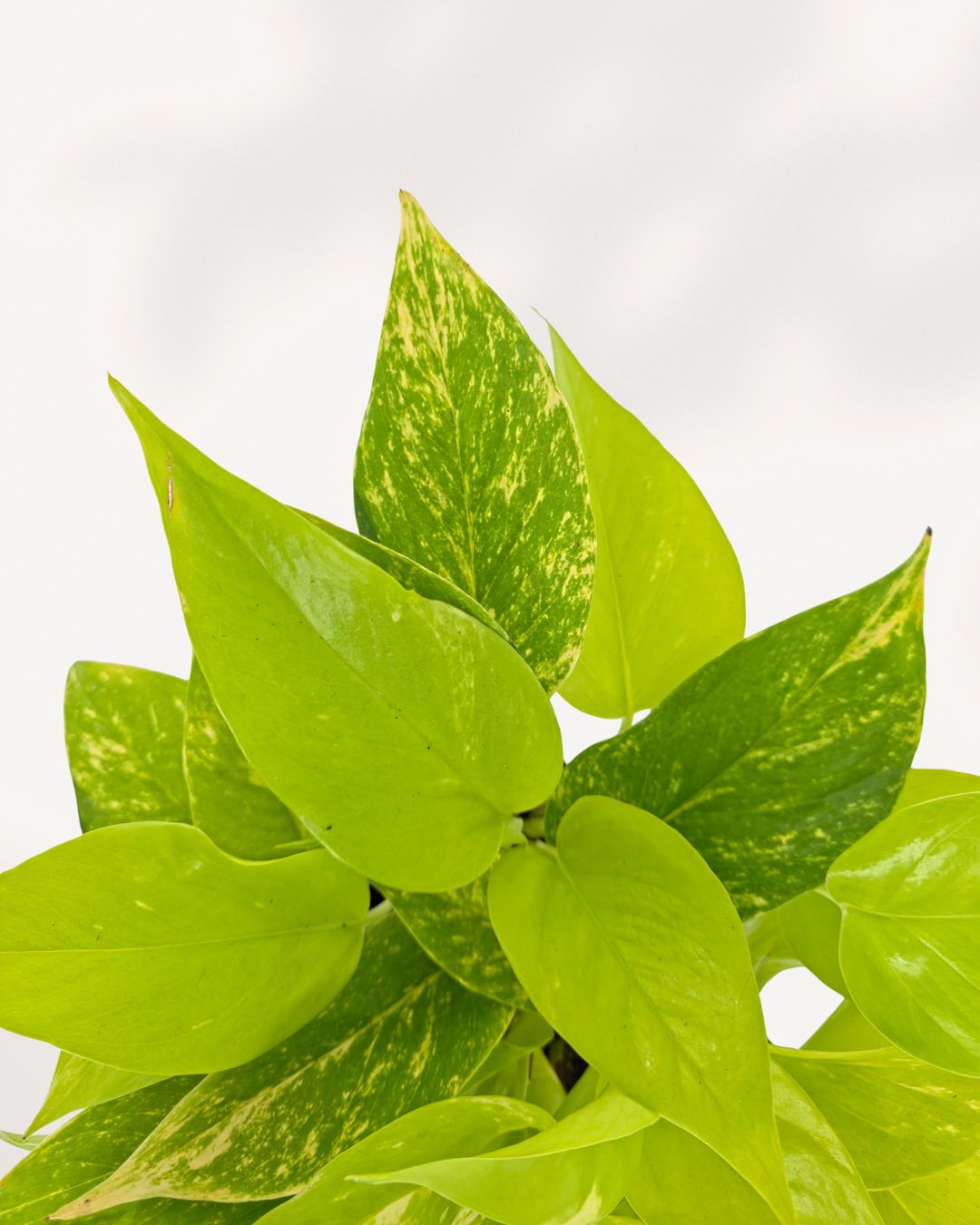
Pothos Teruno Kaguya Lemon features a striking blend of vibrant lemon-yellow and lush green leaves. The variegated pattern is dynamic and eye-catching, offering a modern twist on the classic pothos look.
Growth Habit
This variety grows as a trailing, climbing plant, producing offshoots that can be propagated easily. Its flexible vines make it perfect for cascading displays on shelves or hanging baskets.
Popular Pothos Varieties
Pothos Manjula
- Wavy, variegated leaves with shades of green and white.
Pothos Silver Satin
- Silvery-green leaves with a satin-like sheen.
Pothos Golden
- Classic golden-green foliage, perfect for beginners.
Pothos Cebu Blue
- Silvery-blue leaves with a subtle metallic shine.
Dealing with Common Pests
Aphids
Aphids can cause sticky residue and distorted growth on leaves. Rinse your plant with water or use insecticidal soap to manage infestations. Learn More
Scale Insects
Scale insects may attach to branches and leaves, leading to discoloration and damage. Gently remove them by hand or treat with horticultural oil. Learn More
Spider Mites
Spider mites can lead to speckled leaves and fine webbing. Increase humidity and apply neem oil or insecticidal soap as needed to control them. Learn More
Frequently Asked Questions
What are the best care practices for Pothos Teruno Kaguya Lemon?
Provide bright, indirect light and allow the top inch of soil to dry out between waterings. Regularly trim any yellowed leaves to encourage healthy growth.
How often should I water Pothos Teruno Kaguya Lemon?
Water every 1-2 weeks depending on the indoor humidity and temperature. Adjust the frequency if the plant is in a warmer environment.
Can Pothos Teruno Kaguya Lemon thrive in low light?
While it can tolerate lower light conditions, its vibrant variegation and optimal growth are best maintained with bright, indirect light.
How do I propagate Pothos Teruno Kaguya Lemon?
Propagation is best done via stem cuttings. Place the cuttings in water or moist soil until roots develop, then transplant to a well-draining mix.
Are Pothos Teruno Kaguya Lemon plants pet-friendly?
Yes, they are generally non-toxic to pets, making them a safe choice for households with animals.
Learn More About Pothos Plant Care
For detailed care tips and expert advice on maintaining your Pothos Teruno Kaguya Lemon, visit our Pothos Plant Care Guide.
Ready to Transform Your Indoor Jungle?
Bring home Pothos Teruno Kaguya Lemon today and enjoy its vibrant, air-purifying beauty in your space.
Order Yours NowShipping Notes
- Free Standard Shipping on $100+ Orders to the USA.
- Except Preorder products are shipped in 48 hours.
- Delivery to the USA:
- Standard Shipping : 3-10 business days
- If time is of the essence, please consider selecting expedited delivery for faster service.
Exchange/Return Notes
- We offer a 30-day return/exchange service after receiving.
- Final sale items are not eligible for returns or exchanges.
- To process your return/exchange, please contact us at [email protected]
- Please click here for more details>>> Return & Exchange Policy