Pay in installments of $5.56 with
 ,
,
 and
and

Shipping Estimate
USA
- USA
- CAN
- USA
- CAN
Ships within 48 hours · Estimated delivery Oct 21 - Oct 26
 Promo Codes Available:
For Your Every Summer RSVP, with Code: SUMMER15
Description
boston fern plant care indoor Shop 'Boston Fern Plants – Nephrolepis exaltata' Care and InfoThe Boston fern plant, known as Nephrolepis exaltata, are known for their feathery, arching fronds and lush green foliage, and are among the most popular indoor and outdoor ferns. This popular house plant has been a household favorite since the Victorian era, when it was frequently used to add elegance to indoor spaces. With its gracefully arching fronds that spill over the edges of pots or hanging baskets, the Boston fern lends a soft, natural beauty
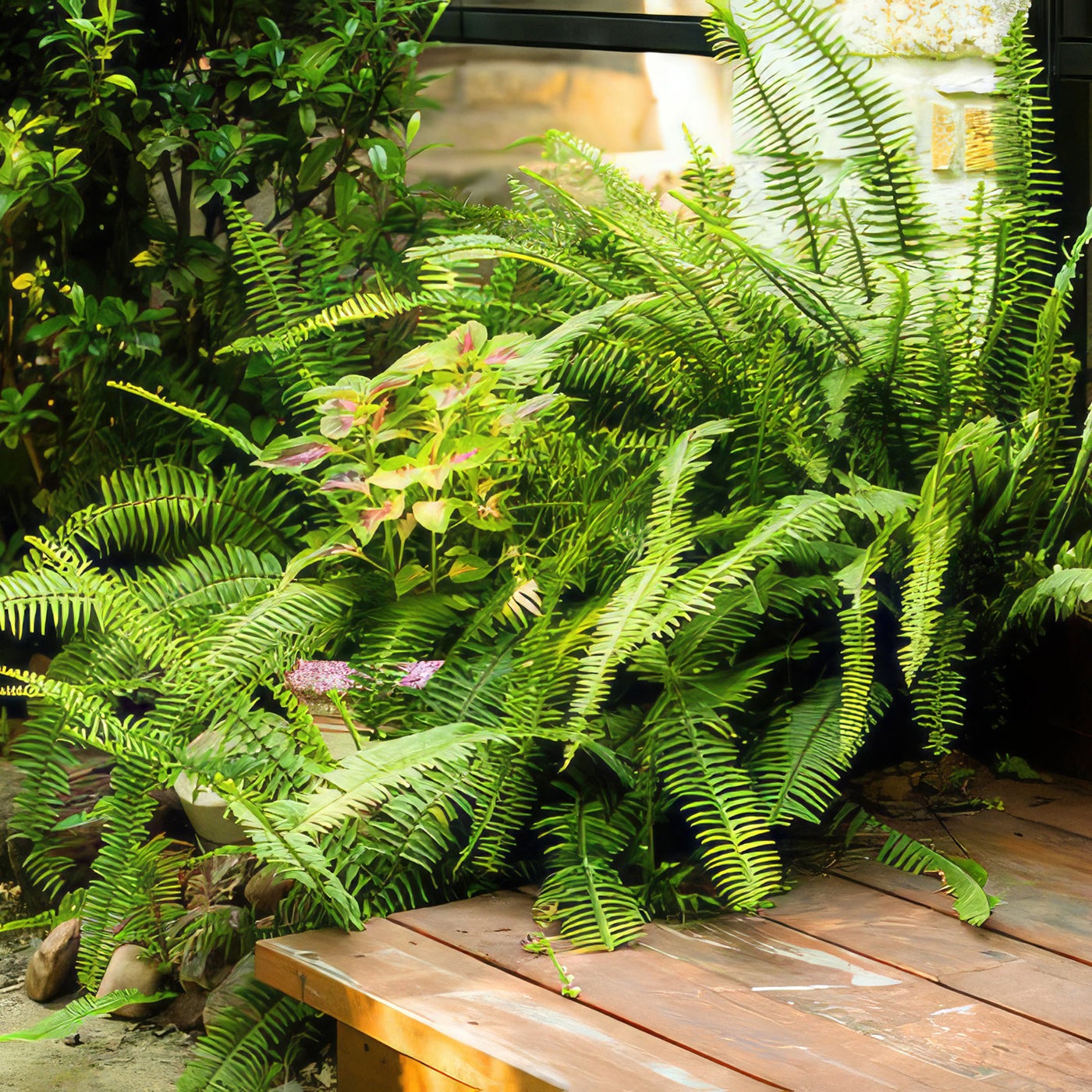
The Boston fern plant, known as Nephrolepis exaltata, are known for their feathery, arching fronds and lush green foliage, and are among the most popular indoor and outdoor ferns.
This popular house plant has been a household favorite since the Victorian era, when it was frequently used to add elegance to indoor spaces. With its gracefully arching fronds that spill over the edges of pots or hanging baskets, the Boston fern lends a soft, natural beauty to any room or shaded garden area.
Native to Central and South America, the Nephrolepis exaltata plant gets its common name ‘Boston fern’ because of its popularity in Boston during the 19th century, this wild Boston fern also goes by names like "Sword Fern" and "Ladder Fern," which refer to the distinctive, sword-shaped fronds and the laddered arrangement of its leaflets. While the origin of the "Boston" moniker isn’t entirely clear, some say it began after a grower in Boston helped popularize the plant. The fern’s botanical name, Nephrolepis exaltata, describes its species and genus, with “exaltata” meaning “lofty” or “elevated,” a nod to the upright nature of its fronds before they cascade downward in a beautiful display.
The Boston fern’s defining feature is its feathery or lacy fronds that arch gracefully from a central base, with each frond covered in numerous tiny, darker green leaflets arranged in a ladder-like pattern.
These fronds can grow up to 3 feet long, creating an eye-catching, cascading effect that makes the fern ideal for hanging baskets or decorative containers.
The plant grows in a clumping form, with new fronds sprouting from a central rhizome, gradually expanding its coverage area over time.
Boston ferns do not produce flowers or seeds.Instead, they reproduce through tiny spores that develop on the undersides of mature fronds.
These spores, which look like small brown dots or lines, are released into the air when conditions are right, potentially germinating to create new ferns. While this natural reproduction process is less commonly observed in indoor settings, it’s fascinating to note how Boston fern propagates and adapt to their surroundings in the wild. This spore-based reproduction is also one of the reasons ferns have been able to thrive for millions of years, outlasting many other plant species.
The ability of Boston fern plants to enhance indoor air quality is one of their many wonderful advantages. NASA research has shown that ferns are among the best plants for filtering out common indoor air pollutants, including formaldehyde, xylene, and toluene. This makes them not only an attractive addition to homes but also a healthy one. Additionally, it releases moisture into the air through a process called transpiration, which can help increase humidity levels in dry indoor spaces. This can be particularly beneficial in climates or rooms where air conditioning or heating dries out the air, making the fern an excellent choice for creating a more comfortable environment.
When and How to Water Your Boston Fern Plants
Boston ferns are fairly drought-tolerant plants, but their lush, vibrant fronds thrive best with consistent moisture. While they can handle brief dry spells, prolonged periods without water will cause the fronds to wilt and the tips to turn brown.
If grown in hanging baskets or pots, it’s especially important to monitor soil moisture regularly, as the soil in containers dries out faster than in-ground settings. Indoor Boston ferns benefit from a humid environment, as they naturally grow in shaded, moist forests, so regular watering and misting help keep them looking their best.
In the spring and fall, during the growing season, they are more active and require consistent watering. Keep the soil evenly moist but not waterlogged. Watering every 2-3 days is often ideal, depending on temperature, humidity, and container size. If you feel that the top inch of soil is dry, it's time to water. Thoroughly water until you see excess draining out, which helps flush out salts and mineral buildup from the soil. High humidity also helps maintain moisture; placing the fern on a humidity tray or misting it daily is beneficial.
During late fall and winter, in the dormant season, Boston fern plants require less frequent watering since their growth slows down. Water your fern plant in winter only when the top inch or so of soil feels dry, which may be every 1-2 weeks. Avoid overwatering, as the plant is less active and more prone to root rot. Reduce misting, as cooler indoor conditions can lead to fungal issues. While humidity remains important, a more relaxed watering routine during dormancy will help the fern rest and prepare for the next growing season.
Light Requirements – Where to Place Your Boston Fern Plant
For indoor growing Boston ferns, an east- or north-facing window is ideal, as these locations offer morning or filtered light without the harshness of the midday sun. If the only available spot is near a south- or west-facing window, try placing this indoor plant a few feet away from the glass or using sheer curtains to diffuse the light. In lower light levels, they may grow more slowly, but artificial grow lights can supplement natural light, especially in winter.
These ferns prefer relatively stable lighting without abrupt changes, so keeping them in a well-lit area with steady, indirect sunlight will promote healthy growth. A lack of light may cause the fronds to thin out or the plant to develop a yellowish hue, signaling that it needs a brighter environment.
Turning the fern every few weeks helps ensure even growth, as all sides of the plant get exposure to light. Additionally, indirect light helps retain humidity around the plant, which is essential for indoor ferns, as they are sensitive to dry indoor air.
When you grow Boston fern outdoors, it prefers a shaded or partially shaded location. It naturally thrives in environments where it can protect from intense sunlight by the forest canopy, so replicating this in outdoor spaces is ideal. Dappled shade from trees or filtered light under a porch or pergola provides the best outdoor conditions. While Boston fern can tolerate some early morning or late afternoon sun, direct midday sun can quickly dry out their fronds, especially in hot climates. Garden spots that offer indirect light help outdoor ferns maintain lush growth and vibrant color.
Optimal Soil & Fertilizer Needs
When it comes to soil for your Boston fern, it's essential to provide them with a well-draining potting mix that retains moisture. A good mix for fern plants includes peat moss, perlite, and pine bark to ensure proper drainage while holding enough moisture for the plant. This type of soil mimics the fern's natural habitat and helps prevent root rot, a common issue with overwatering. Instead, make or buy a well-draining potting mix, or ideally use our specialized potting mix, opens in a new tab that contains 5 natural substrates and mycorrhizae to promote the development of a strong root system that helps your fern plants to thrive.
For fertilizing Boston fern, it's best to use a balanced liquid NPK fertilizer diluted to half strength. During the growing season in spring, you can fertilize your Boston fern once a year. In contrast, do not fertilize your plant during fall and winter when the plant is not actively growing. Over-fertilizing can harm the fern, so it's crucial to follow the recommended dosage and frequency to provide the necessary nutrients without overwhelming the plant.
Hardiness Zones & More
When growing indoors, the potted Boston fern plants prefer temperatures between 60-75°F. These ferns thrive in environments with moderate humidity levels, ideally between 40% to 60%. To increase humidity for indoor Boston fern, you can mist the plant regularly or use a humidifier near the plant to create a more suitable environment.
For outdoor Boston ferns, they are typically hardy in USDA hardiness zones 9 to 11. These ferns prefer temperatures above 60°F and thrive in shaded or partially shaded areas with high humidity levels. If you live in a region with colder temperatures, it's best to bring your plants inside during the winter months to protect them from frost damage.
In the wild, it’s often found growing in the understory of forests where it benefits from natural shade and humidity. Boston fern thrives beautifully in a bed of moist sphagnum moss, which helps retain the consistent humidity and moisture it craves for its lush, delicate fronds. The plant’s adaptation to these conditions makes it ideal for indoor spaces where light levels are lower.
Wildlife: Boston Fern Attract the Following Friendly Pollinators
Boston ferns are not known for attracting pollinators as they reproduce through spores rather than flowers that would typically attract pollinators like bees or butterflies. These ferns rely on spores for reproduction, which are produced on the underside of their fronds and are dispersed by the wind to propagate new plants.
Toxicity: According to the ASPCA, the Nephrolepis exaltata are considered non-toxic to pets and humans. This means that if your curious pets, such as cats or dogs, happen to nibble on the fronds of a Boston fern, it is unlikely to cause serious harm or toxicity.
How to Propagate Your Boston Fern Plants
The Boston ferns can be propagated through division or spores. With a sharp knife, divide the root ball of an established plant into smaller sections, each with roots and fronds that can then be replanted to grow into new ferns. Spore propagation is another method where you can collect spores from mature fronds, sow them on a suitable growing medium, and provide the right conditions for them to germinate and grow into new plants. Both division and spore propagation are effective ways to expand your Boston fern collection or share plants with friends and family.
Key Takeaways
- While Boston ferns prefer consistently moist soil, they are fairly drought-tolerant and can survive short dry spells, making them adaptable for various indoor and outdoor environments.
- Boston ferns are known to purify indoor air by filtering out toxins like formaldehyde, xylene, and toluene, and they also help increase humidity through transpiration, improving air quality in dry spaces.
- This fern thrives in bright, indirect light, making it well-suited for east- or north-facing windows indoors or shaded outdoor spots that replicate its native forest floor habitat.
- Boston ferns require minimal pruning and care, growing best with regular watering, occasional misting, and moderate humidity, which makes them an accessible choice for beginners.
- Instead of flowers and seeds, Boston ferns reproduce through spores located on the undersides of mature fronds, a unique characteristic among many popular houseplants.
The Bottom Line
Overall, the Boston ferns (Nephrolepis exaltata) are low-maintenance perennial plants for both plant enthusiasts and new gardeners, known for their lush, arching fronds and natural elegance. Ideal for adding a vibrant touch of greenery indoors or enhancing shaded areas outdoors, these ferns are versatile, house plants that suit a range of environments. With moderate drought tolerance and air-purifying qualities, they offer more than just beauty, improving indoor air quality and adding moisture to the air. Boston ferns thrive in indirect light and appreciate consistent moisture and humidity, though they can adapt to slightly drier conditions with regular care. Their unique spore-based reproduction adds to their charm, showcasing a fascinating aspect of plant biology. With minimal pruning and straightforward needs, Boston ferns bring classic appeal and numerous benefits to any space, making them an excellent choice for buyers looking to invest in a durable, easy-care plant. Order your very own Boston fern for sale today!
Shipping Notes
- Free Standard Shipping on $100+ Orders to the USA.
- Except Preorder products are shipped in 48 hours.
- Delivery to the USA:
- Standard Shipping : 3-10 business days
- If time is of the essence, please consider selecting expedited delivery for faster service.
Exchange/Return Notes
- We offer a 30-day return/exchange service after receiving.
- Final sale items are not eligible for returns or exchanges.
- To process your return/exchange, please contact us at [email protected]
- Please click here for more details>>> Return & Exchange Policy