Pay in installments of $5.22 with
 ,
,
 and
and

Shipping Estimate
USA
- USA
- CAN
- USA
- CAN
Ships within 48 hours · Estimated delivery Oct 27 - Nov 1
 Promo Codes Available:
For Your Every Summer RSVP, with Code: SUMMER15
Description
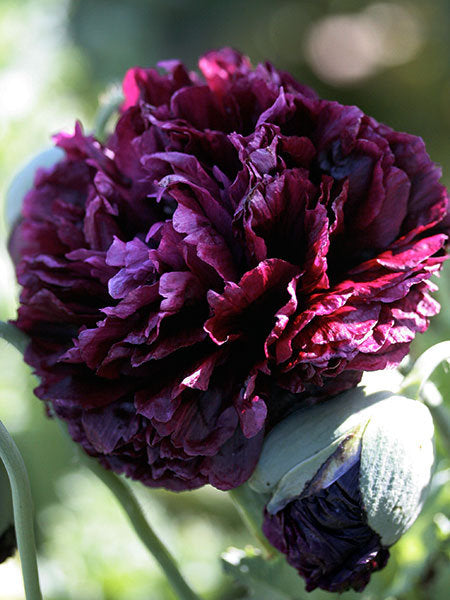
black poppy flower seeds 300 Black Double Peony Poppy Flower SeedsUp for sale is one pack of 500 Black Double Peony Poppy seeds (Papaver Paeoniflorum). Perfect for spring time blooms these poppy seeds create large 4" peony type blooms on 32" stems. Blooms appear black but are actually a very deep dark purple. We offer flat rate combined shipping on all orders, no limit on the amount or type of seed packets. CULTURE Soil temperature: 55 60 degrees fahrenheit Germination lighting: Light required Germination days: 20 2
Up for sale is one pack of 500 Black Double Peony Poppy seeds (Papaver Paeoniflorum). Perfect for spring time blooms these poppy seeds create large 4" peony type blooms on 32" stems. Blooms appear black but are actually a very deep dark purple.We offer flat rate combined shipping on all orders, no limit on the amount or type of seed packets.
CULTURE
Soil temperature: 55 - 60 degrees fahrenheit
Germination lighting: Light required
Germination days: 20 -2 8 days
Plant spread: 6 - 10 inches
Plant height: 32''
Plant type: Annual
Maturation days: 55 days
How to Sow Poppy Seeds:
Best Way (Fall/Winter): In late fall loosen enriched garden soil down to a 6" depth. For zones 3-7 it's best to direct seed into your garden after your first freeze in the fall. For zones 8-9, or mild zones like California, you will get better results if you cold treat your seeds (see below) sow them during the winter.
These poppy seeds are very small so we use the shaker method where you mix your seeds with peat or sand to spread the seeds evenly in your sowing area. We then we top with a fine dusting of peat or sand as they need light to germinate. The poppies will germinate over winter and pop up in very early spring (see the last picture which a young fall sown poppy taken the following April in zone 7).
You can transplant winter sown poppies in the spring. We wait until they are about 3" in diameter and then transplant their root ball if we are expecting mild weather for a few days. Usually they will suffer a bit but will pull through. Be sure and thin or transplant to around 12".
Ok Way (Spring): If you are buying your seeds in late winter or early spring, first try a germination test with 4-5 of your seeds. Place them in a moist paper towel, and then place in a sealed baggie, and put in a window where the temp is at least 65 degrees. If they are ready they will germinate in 4-5 days by sending a fine root hair from the seed. If they germinate you can direct sow them after your last frost using the shaker method. If you are in zones 8-9 where you get a hot summer you need to sow your poppy seeds by March 15th.
If they don't germinate they will have to be cold treated. Place your packet of seeds into a mix of 1/4 cup fine peat (or a mix of peat and coarse sand) and 1 tablespoon of water. You want your mix moist but not soggy. Place the mix in a sealed baggie, inside a sealed container, inside your refrigerator (not your freezer) for 60 days. Check after 30 days to see if you need to add more water as you don't want the mix to dry out. What this does is trick the poppy seed into thinking it has gone through a full cold winter. After 60 days you can take your seeds out and let them dry overnight and then use the shaker method. You can plant the poppies in the late winter or spring, after the 60 day cold treatment, as long as your ground is workable and it's past your last frost date. As always we give them a light dusting with peat so as to disguise them from birds.
When poppies germinate in spring they send up a stalk that looks like a very fine blade of grass. This stalk grows to about 1"-2" before it grows it's first leaf set. Once your poppies are around 2" tall it's time to thin them out. Don't try to transplant as they won't make it. The risk on spring planted poppies is if they germinate and you get a crazy heat wave there is a chance they won't make it. The race in the spring is to try and get the poppy to establish it's root system before the summer heat arrives. A bit easier in zones 3-6 but a more difficult thing for zones 7-9.
Bad Way (Summer): Unless you live in southern California or Hawaii do not try to sow poppy seeds in the Summer. They will germinate but the heat will kill them before they can develop.
Worst Way: We do not recommend starting in pots as poppies disliked being transplanted, but if you want to try use a compostable 4" peat pot and do not remove the plant from the pot when transplanting in the spring. They will probably not mature correctly and have a small chance of flowering
During the summer dead head any spent flowers but at the end of the growing season you can let the flower head form into seed pods where you can collect seeds in late fall, but note that if you have multiple varieties of poppies in your garden they will cross pollinate and you will end up with some different colors.
Shipping Notes
- Free Standard Shipping on $100+ Orders to the USA.
- Except Preorder products are shipped in 48 hours.
- Delivery to the USA:
- Standard Shipping : 3-10 business days
- If time is of the essence, please consider selecting expedited delivery for faster service.
Exchange/Return Notes
- We offer a 30-day return/exchange service after receiving.
- Final sale items are not eligible for returns or exchanges.
- To process your return/exchange, please contact us at [email protected]
- Please click here for more details>>> Return & Exchange Policy
4.2 ★★★★★
Based on 13 reviews
Sort
Product Reviews
★★★★★ 5
OUTSTANDING
Format: Kindle
This was very, very good. The world is vast and characters are complex. There is a good plot with a whole lot going on. This is well written. Good twists and turns and some heart breaking moments. You will love these characters, they have heart and loyalty. I am hoping that there will be several more books. We've yet to see anything from the Sea Court but only a mention of them here and there. The Wood Court was given a quick couple of scenes, and only as far as some warriors, we've yet to enter their court and the Shadow Court, I'm not sure if they will be a force for good or bad, but they definitely will play a much bigger role moving forward. This is primarily the Ice and Air Courts. Told in multiple views, which I loved, it gives you a chance to see things from different eyes. There's alot of political maneuvering and deception. I loved it and will pick up the next book as it becomes available. If you like The Fae and the courts, you should love this. I think the author has mucn in store for us.
WAS THIS REVIEW HELPFUL?YesReportShare
Reviewed in the United States on March 8, 2020
★★★★★ 4
Definitely worth the read!
Format: Kindle
After taking a deep breath and taking in that wicked twist of an ending, I have finally composed myself. My first thought when I started this book was that I love Reyna's character. I was intrigued by her connection with her familiar and the Ruin that is plaguing her land. It came as no surprise that she took her sister's place in an attempt to protect her. When they reach the Air Court everything slows down. This is where it was iffy for me. First of all, I like multiple POV's in books however 7 is a bit much. It starts to interrupt the story line. I felt like I was finally making progress connecting with one character, then it was switched to another person. I felt they all had necessary or pertinent information but not necessarily were they all POV worthy. The only other thing that annoyed me was that Reyna constantly was " trapped." She would rush off without thinking, only to need rescuing. She is brilliant in a fight, but she really doesn't think through anything. Lorcan is amazing. I know he might be on the "bad" list, but his background is so interesting. Eislyn(Reyna's sister) is really so sweet, but calculating. I enjoyed her and Thane's dialogue. The author did an amazing job with the imagery in this book. Everything was so detailed it was easy to fall into the scene. I love unexpected twists and while part of the ending I expected, I wasn't expecting how it took place. All in all, I found it very entertaining and I am very invested in continuing this series.
Favorite quotes:
"The truth may be twisted but never false."
"Who was she if she was not the enemy of the Air Court? What was her purpose of she no longer has that?"
"In a war-torn land, love was always a lie."
WAS THIS REVIEW HELPFUL?YesReportShare
Reviewed in the United States on March 4, 2020
★★★★★ 5
Great Read!!! Great story!!!
Format: Kindle
The series is long, but Ms. Wolfhart does a fantastic job of weaving this tale while bringing so much to the characters. Surprises and plot twists along the way to keep you intrigued. There is some graphic sex, but is no way the focal point. Grammar was excellent (a rare find with a lot of self publishers) with only a few noted errors. I rarely give 4 stars, let alone 5.
WAS THIS REVIEW HELPFUL?YesReportShare
Reviewed in the United States on April 30, 2021
★★★★★ 3
Sadly, DNF
Format: Kindle
I read this thru KU. I LOVED the synopsis. And then I began reading... and it was a DNF at 68% after picking it up and putting it down several times because I really loved the main female character.
*****SPOILERS*****
Pros:
The world is unique, intriguing and fun. The primary female character is bad-a** but not a b*tech or a mary sue. The primary female has depth. I really want to know what happens to her even tho it's been weeks and I don't remember her name. The villains to the point I read are pretty good -- an ever present threat of mysterious and possibly many culprits.
Cons:
Way, way too many points of view. I stopped counting at 7. It's the prime reason why I don't care about most of the characters or remember their names even when I like them. There's just too many points of view so almost none of the characters have enough book space for the author to properly develop them. This literally killed the book for me. Actually it killed my desire to read. For weeks.
The main male is more villain than hero. He agreed to marry the main female then locks her up & eschews her for her sister, all while bad mouthing her as unfit to rule when he never spent any time with her getting to know her. He is actually unfit to rule as he is blind to the woes of his own kingdom and starts off a peace mission to secure a ceasefire through marriage by murdering an inn full of people in her country for no real reason. Plus, he constantly makes promises he does not keep. And it's gross of him to pine for the sister behind the main female's back.
*****
As much as I really wanted to see what happened to the main female character, it wasn't enough for me to keep trying to slog thru this book. There was a lot of potential here that just fell short.
Hence, 3 stars.
WAS THIS REVIEW HELPFUL?YesReportShare
Reviewed in the United States on June 19, 2021
★★★★★ 5
Fae Courts with High Intrigue
Format: Kindle
This book is one that just builds and builds and then surprises you to no end. You may think you know the villains and then you are jolted in another direction. Princess Reyna is a real gem, strong of character, a fierce fighter, and loyal to her family and kingdom. Just when you think she and Lorcan, well you know, the plot is flipped. Can't wait to see where this goes in book two.
WAS THIS REVIEW HELPFUL?YesReportShare
Reviewed in the United States on July 7, 2023