Pay in installments of $6.82 with
 ,
,
 and
and

Shipping Estimate
USA
- USA
- CAN
- USA
- CAN
Ships within 48 hours · Estimated delivery Oct 18 - Oct 23
 Promo Codes Available:
For Your Every Summer RSVP, with Code: SUMMER15
Description
prickly pear cactus pink Buy Purple Prickly Pear Phoenix, AZ | Opuntia santa-ritaArizona's Most Colorful Native Cactus Purple Pads Year Round The Purple Prickly Pear (Opuntia santa rita) is the showstopper of the prickly pear family and one of the most eye catching native cacti you can plant in a Phoenix landscape. Its broad, flat pads shift from blue green to deep purple under cold or drought stress meaning you get stunning color exactly when your garden needs it most. Growing just 23 feet tall and spreading 35 feet wide, this
Arizona's Most Colorful Native Cactus — Purple Pads Year-Round
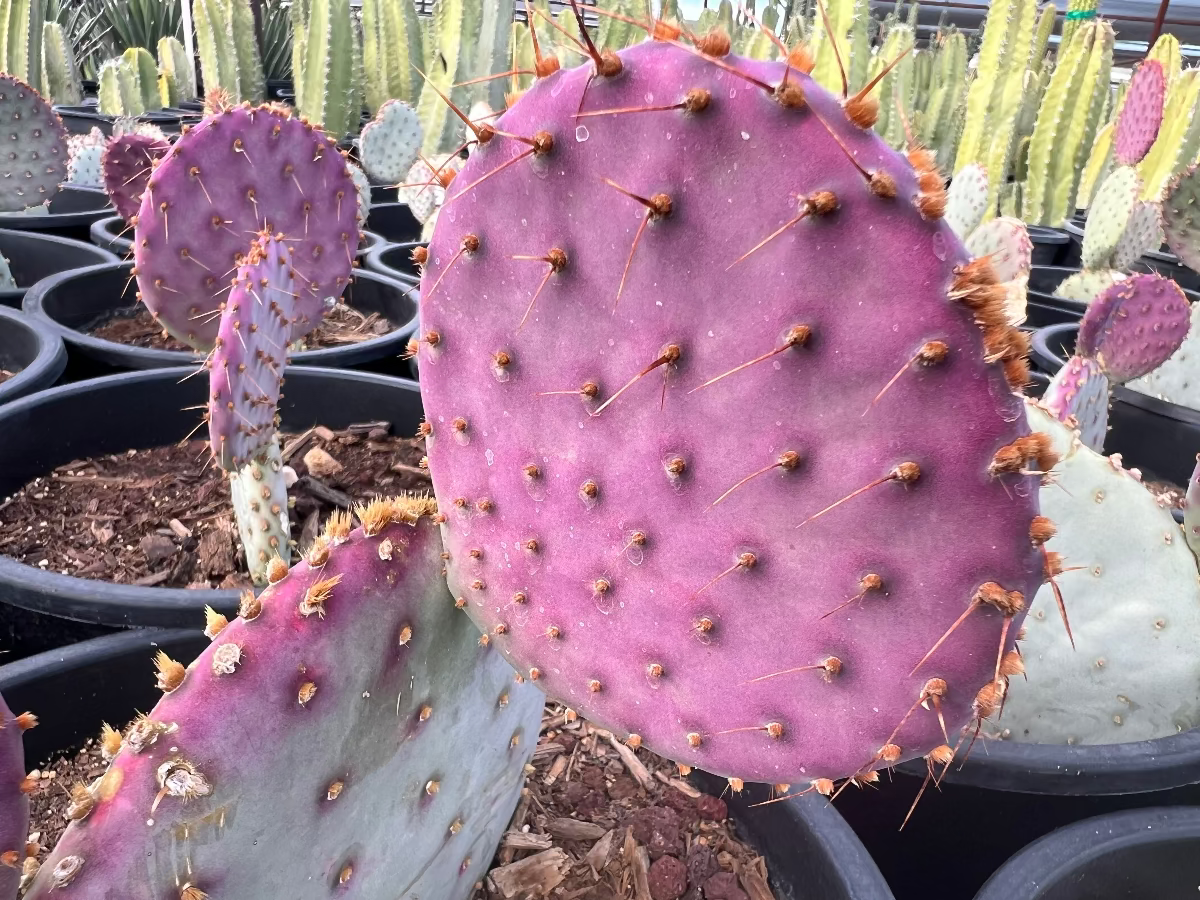
The Purple Prickly Pear (Opuntia santa-rita) is the showstopper of the prickly pear family and one of the most eye-catching native cacti you can plant in a Phoenix landscape. Its broad, flat pads shift from blue-green to deep purple under cold or drought stress — meaning you get stunning color exactly when your garden needs it most. Growing just 2–3 feet tall and spreading 3–5 feet wide, this low-growing cactus produces showy yellow flowers with red-orange centers in spring, followed by edible reddish-purple fruit. Whether you're building a drought-tolerant front yard in Scottsdale, filling a rocky slope in Fountain Hills, or creating a native cactus garden in Mesa — Purple Prickly Pear delivers year-round color with zero irrigation once established.
Purple Prickly Pear Plant Details
| Attribute | Detail |
|---|---|
| Scientific Name | Opuntia santa-rita |
| Common Names | Purple Prickly Pear, Santa Rita Prickly Pear, Violet Prickly Pear |
| Mature Height | 2–3 feet |
| Mature Width | 3–5 feet (spreading) |
| Growth Rate | Moderate — fills in within 1–2 years in Phoenix |
| Sun | Full sun (6+ hrs). Handles reflected heat from walls and pavement. |
| Water | Extremely low once established. Thrives on rainfall alone in Phoenix. |
| USDA Zones | 8–11 (Phoenix is Zone 9b–10a) |
| Soil | Well-draining. Adapts to Arizona caliche and rocky native soils. |
| Foliage | Evergreen — pads stay year-round, turn purple in cold/drought |
| Native Status | Native to Arizona, southern New Mexico, and northern Mexico |
Purple Prickly Pear Uses in Phoenix Landscapes
Drought-Tolerant Front Yard & Xeriscape
Purple Prickly Pear is the ultimate zero-water landscape plant once established. Mass-plant 3–5 specimens across a gravel or decomposed granite bed for a colorful, maintenance-free front yard. The purple pads pop against warm-toned gravel — a look that's become a signature of modern Scottsdale and Gilbert xeriscapes. Pair with Golden Barrel Cactus and Desert Spoon for texture contrast.
Native Cactus Garden
Create an authentic Sonoran Desert garden by grouping Purple Prickly Pear with Engleman's Prickly Pear, Mexican Fence Post, and Totem Pole cactus. The color contrast between the purple pads and the green columnar cacti creates a striking display. This combination thrives in Tempe, Chandler, and Mesa with almost no supplemental water.
Slope & Erosion Control
The spreading growth habit and dense root system make Purple Prickly Pear an excellent choice for stabilizing slopes and hillsides in Fountain Hills, Cave Creek, and north Scottsdale. Plant 3 feet apart on slopes — the pads will knit together within 2 seasons to create a colorful, erosion-resistant groundcover.
Wildlife & Pollinator Garden
The spring flowers attract native bees and butterflies, while the edible fruit feeds birds and desert wildlife through summer. Plant near a patio or window in Peoria or Glendale for front-row wildlife viewing.
Best Time to Plant Purple Prickly Pear in Phoenix
Fall (October–November) is ideal — warm soil encourages root growth while cooler air reduces transplant stress. This gives your prickly pear 6–8 months of root establishment before its first Phoenix summer. Spring (February–April) is the second-best window. Avoid planting in peak summer if possible, though established Purple Prickly Pear is incredibly heat-tolerant.
How to Plant Purple Prickly Pear
- Dig wide, not deep — 2–3x the root ball width, same depth as the container.
- Check for caliche — break through any hardpan layer for drainage. Prickly pear will rot in standing water.
- Backfill with native soil — no amendments needed. This cactus prefers lean, rocky soil.
- Spacing — 3 feet apart for mass planting or slope coverage; 4–5 feet for individual specimens.
- Water basin — build a shallow ring to direct water to roots during establishment only.
- Mulch — 2–3 inches of gravel or decomposed granite. Never use organic mulch against cacti.
Watering Purple Prickly Pear in Phoenix
First Year Watering Schedule
Weeks 1–2: Every 3–4 days, deep and slow. Month 1–2: Every 7–10 days. Month 3–6: Every 2 weeks. After Year 1: Rainfall only in most Phoenix locations. Supplement once monthly in peak summer only if pads look shriveled.
Drip Irrigation
Place one 1 GPH emitter 12 inches from the base during the first year. After establishment, remove or turn off supplemental irrigation — overwatering is the #1 killer of prickly pear in Phoenix landscapes.
How fast does Purple Prickly Pear grow in Phoenix?
Moderate growth — a 1-gallon plant will fill a 3–4 foot area within 2 years in full sun. New pads emerge in spring and summer, each one adding to the spreading clump.
Why do the pads turn purple?
The purple coloring intensifies during cold weather (winter) and drought stress. It's caused by anthocyanin pigments — the same compounds that make blueberries blue. The more stress, the deeper the purple. In summer with regular water, pads shift back toward blue-green.
Is Purple Prickly Pear fruit edible?
Yes! The reddish-purple fruit (called tunas) is edible and has been used in traditional Southwestern cuisine for centuries. Harvest with tongs in late summer — they make excellent jams, syrups, and agua fresca.
Does Purple Prickly Pear have spines?
Purple Prickly Pear has fewer spines than most prickly pear species, but it does have glochids (tiny hair-like barbs). Plant it at least 3 feet from walkways and play areas. Use leather gloves when handling.
Can Purple Prickly Pear handle Phoenix summer heat?
Absolutely — it's native to the Sonoran Desert and handles temperatures well above 115°F. It also tolerates reflected heat from walls, concrete, and asphalt without any issues.
You May Also Like
Engleman's Prickly Pear — Arizona's classic green prickly pear, perfect for pairing with Purple Prickly Pear for a two-tone cactus display.
Golden Barrel Cactus — A round, golden-spined cactus that contrasts beautifully with the flat purple pads.
Mexican Fence Post — A tall columnar cactus that adds vertical height behind low-growing prickly pear.
Queen Victoria Agave — A compact, geometric agave with white markings — stunning accent next to purple pads.
Totem Pole Major — A smooth, spineless columnar cactus that pairs perfectly in modern desert gardens.
How Many Purple Prickly Pear Do I Need?
This is a low, spreading cactus (3 to 5 ft wide) that knits together for slope cover, mass plantings, and erosion control. Space plants about 3 ft on center to fill in within two seasons. Use the coverage table to plan a bed or slope:
| Area to Cover | Plants at 3 ft Centers |
|---|---|
| 50 sq ft | 5–6 |
| 100 sq ft | 11–12 |
| 200 sq ft | 22–24 |
For a single color accent in a gravel bed, one plant reads beautifully. Keep all plantings at least 3 ft back from walkways and play areas, since the pads carry glochids.
Purple Prickly Pear Season-by-Season in Phoenix
- Spring (Feb–Apr): Showy yellow flowers with red-orange centers open along the pad edges, drawing native bees and butterflies. New pads flush as the weather warms. Strong second planting window.
- Summer (May–Sep): Shrugs off temperatures well above 115°F and reflected heat on rainfall alone. Edible reddish-purple tunas ripen by late summer. Keep soil dry between any supplemental soaks.
- Fall (Oct–Nov): Prime planting season. Warm soil and mild air give roots months to establish.
- Winter (Dec–Jan): Cold and drought stress deepen the pads to vivid purple, the plant's signature look. Very cold hardy to about 15°F, so it sails through Valley winters with no protection.
At a Glance
✔ Arizona Native ✔ Heat-Loving (Reflected-Heat Tolerant) ✔ Drought-Tolerant ✔ Pollinator-Friendly ✔ Edible ✔ Evergreen ✔ Low-Maintenance ✔ Fire-Wise ✔ Deer & Rabbit-Resistant ✔ Cold-Hardy to 15°F
Plant It With
- Engleman's Prickly Pear: Arizona's green native prickly pear for a two-tone pad display.
- Mexican Fence Post: tall columns that add vertical height behind the low purple pads.
- Totem Pole Major: a smooth sculptural column that pairs cleanly in a modern desert bed.
- Desert Spoon: a silvery rosette that adds soft texture contrast to the flat pads.
Is Purple Prickly Pear Right for Your Yard?
It thrives in full sun and reflected heat in lean, fast-draining native soil, making it a no-irrigation choice for front yards, slopes, and native cactus gardens. Break through caliche so water never stands at the roots. It is not a fit right beside walkways, patios, or play areas, since the glochids catch skin and clothing: give it at least 3 ft of clearance.
Shipping Notes
- Free Standard Shipping on $100+ Orders to the USA.
- Except Preorder products are shipped in 48 hours.
- Delivery to the USA:
- Standard Shipping : 3-10 business days
- If time is of the essence, please consider selecting expedited delivery for faster service.
Exchange/Return Notes
- We offer a 30-day return/exchange service after receiving.
- Final sale items are not eligible for returns or exchanges.
- To process your return/exchange, please contact us at [email protected]
- Please click here for more details>>> Return & Exchange Policy