Pay in installments of $6.94 with
 ,
,
 and
and

Shipping Estimate
USA
- USA
- CAN
- USA
- CAN
Ships within 48 hours · Estimated delivery Jul 22 - Jul 27
 Promo Codes Available:
For Your Every Summer RSVP, with Code: SUMMER15
Description
buy succulents online india Echeveria Pulvinata Succulents Online In India – Plant OrbitDispatch in 2 3 days Country of origin: India It's Compulsory to make unboxing video of parcel for refunds within 24 hours. Bare Rooted Overview of Echeveria Pulvinata Common Name: Chenille Plant, Plush Plant, Ruby Slipper Botanical Name: Echeveria pulvinata Family: Crassulaceae Type: Succulent Mature Size: Up to 12 inches (30 cm) tall, with rosettes reaching 4 inches (10 cm) in diameter Native Area: Mexico Hardiness Zones: 9a to 11 (USDA)Echeveria
- Dispatch in 2-3 days
- Country of origin: India
- It's Compulsory to make unboxing video of parcel for refunds within 24 hours.
- Bare Rooted
Overview of Echeveria Pulvinata
Common Name: Chenille Plant, Plush Plant, Ruby Slipper
Botanical Name: Echeveria pulvinata
Family: Crassulaceae
Type: Succulent
Mature Size: Up to 12 inches (30 cm) tall, with rosettes reaching 4 inches (10 cm) in diameter
Native Area: Mexico
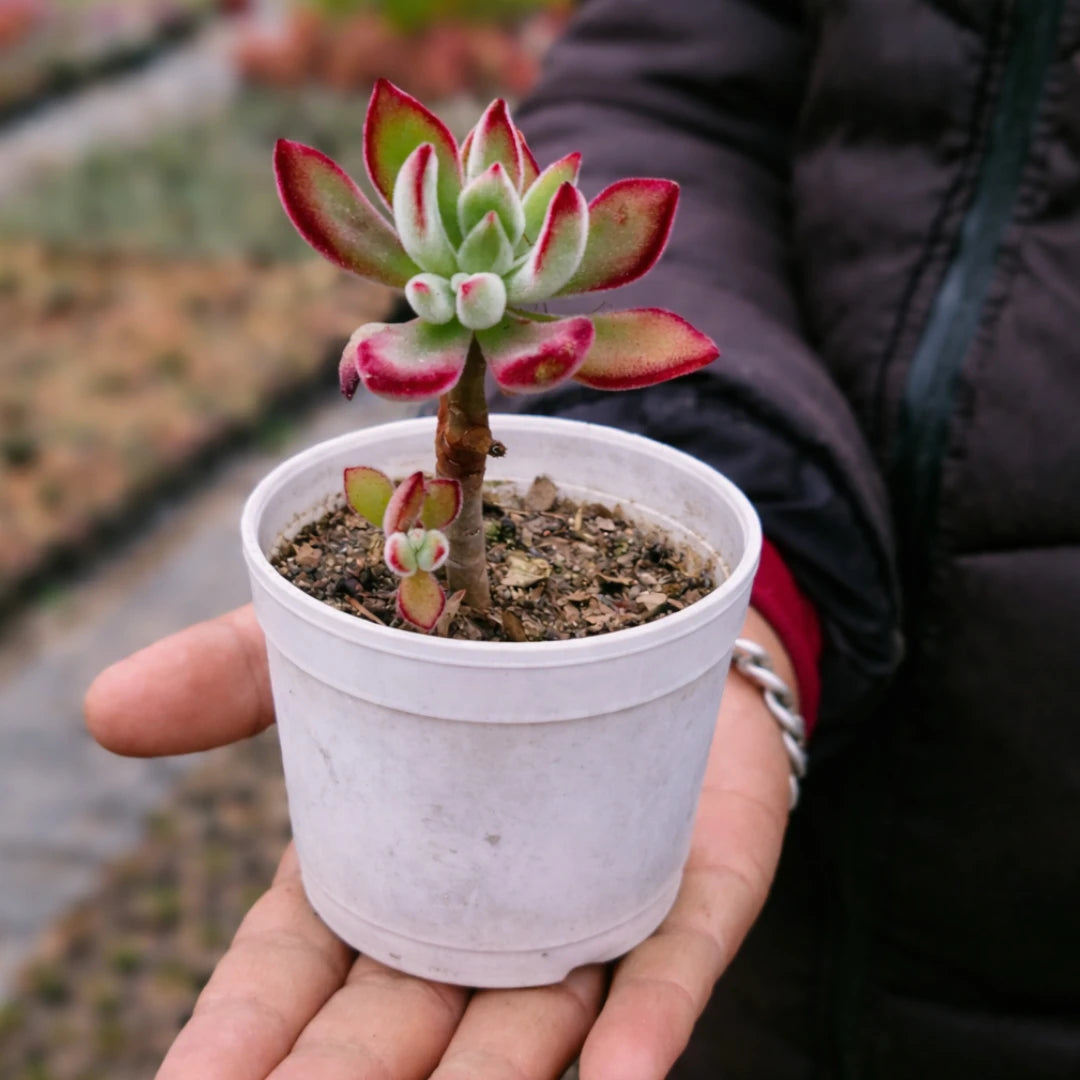
Hardiness Zones: 9a to 11 (USDA)Echeveria pulvinata, commonly known as the Chenille Plant or Plush Plant, is a visually striking succulent characterized by its thick, fuzzy leaves that often exhibit a green color with red tips. The plant forms attractive rosettes and produces bright orange to yellow bell-shaped flowers in the spring and summer, making it a popular choice for succulent enthusiasts.
Care Instructions
Light Requirements
- Ideal Exposure: Echeveria pulvinata thrives in bright, indirect sunlight. It requires about 5 to 6 hours of sunlight daily. Placing it near a south or west-facing window is ideal, but it should be protected from harsh afternoon sun to prevent leaf burn.
Soil and Potting
- Soil Type: Use a well-draining soil mix formulated for succulents or cacti. A blend of potting soil with perlite or coarse sand is recommended for optimal drainage.
- Potting Tip: Ensure pots have drainage holes to prevent water accumulation, which can lead to root rot.
Watering
- Watering Schedule: Allow the soil to dry out completely between waterings. Water thoroughly when the top inch of soil feels dry, typically every 1 to 2 weeks during the growing season. In winter, reduce watering frequency.
- Signs of Overwatering: Yellowing leaves or mushy stems indicate overwatering and may lead to root rot.
Temperature and Humidity
- Optimal Temperature: This succulent prefers temperatures between 50°F to 80°F (10°C to 27°C). It should be protected from frost and extreme cold.
- Humidity Needs: Echeveria pulvinata thrives in low humidity environments typical of its native habitat.
Fertilization
- Feeding Schedule: Fertilize sparingly during the growing season (spring and summer) with a diluted balanced fertilizer. Avoid fertilizing during winter when the plant is dormant.
Common Issues
Pests
- Echeveria pulvinata can be susceptible to pests such as mealybugs and aphids. Regular inspections are important; treat infestations promptly with insecticidal soap or neem oil.
Diseases
- The main concern for this succulent is overwatering, which can lead to root rot. Proper watering techniques are essential for maintaining plant health.
Frequently Asked Questions
-
How often should I water my Echeveria pulvinata?
Water when the top inch of soil feels dry, typically every 1 to 2 weeks during the growing season and less frequently in winter. -
Can I grow Echeveria pulvinata outdoors?
Yes, it can be grown outdoors in USDA hardiness zones 9a to 11 but should be protected from frost and extreme cold. -
Why are my plant's leaves turning yellow?
Yellowing leaves may indicate overwatering or insufficient light. Adjust your watering habits and ensure adequate sunlight exposure. -
How do I propagate Echeveria pulvinata?
Propagation can be done through leaf cuttings or stem cuttings. Allow cuttings to callous for a few days before placing them in well-draining soil. -
Is Echeveria pulvinata toxic?
This plant is generally considered non-toxic; however, it's best kept out of reach of pets and small children who may ingest parts of the plant.
Shipping Notes
- Free Standard Shipping on $100+ Orders to the USA.
- Except Preorder products are shipped in 48 hours.
- Delivery to the USA:
- Standard Shipping : 3-10 business days
- If time is of the essence, please consider selecting expedited delivery for faster service.
Exchange/Return Notes
- We offer a 30-day return/exchange service after receiving.
- Final sale items are not eligible for returns or exchanges.
- To process your return/exchange, please contact us at [email protected]
- Please click here for more details>>> Return & Exchange Policy