Shipping Estimate
USA
- USA
- CAN
- USA
- CAN
Ships within 48 hours · Estimated delivery Jul 12 - Jul 17
 Promo Codes Available:
For Your Every Summer RSVP, with Code: SUMMER15
Description
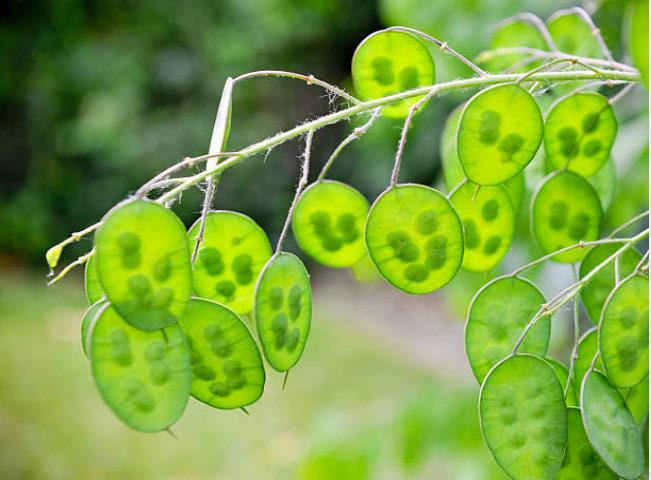
honesty money plant Honesty Money Plant SeedsA worthy investment that provide a bountiful return for years to come! Money Plant is a biennial famous for its silvery white, flattened, disc like seed pods popular in dried arrangements. While famous for the seed pods, this plant's flowers are STRIKING in the spring garden! The first year mainly sprouts foliage of heart shaped leaves but the second year brings wonderfully fragrant lavender spring flowers and the famous silvery seed pods that give
A worthy investment that provide a bountiful return for years to come! Money Plant is a biennial famous for its silvery white, flattened, disc-like seed pods popular in dried arrangements. While famous for the seed pods, this plant's flowers are STRIKING in the spring garden! The first year mainly sprouts foliage of heart-shaped leaves but the second year brings wonderfully fragrant lavender spring flowers and the famous silvery seed pods that give this plant its names. Silver Dollar plants grow 2-3 ft. tall. Very attractive to butterflies, bees & other pollinators.
Direct sowing the seeds in Spring & Fall will give you flowers and pods yearly. The reason for the staggered planting is that Honesty Plant is a biennial. The seeds germinate and the plant grows during one year but the flowers and “coin pods” don’t come until the next year. Some of the seed you plant at the first of summer may sprout and have enough time to flower this year. Great for a landscaped yard and a wonderful plant for naturalizing in borders, woodlands, or wild gardens.
Popular in winter arrangements, Money Plant was introduced to England from Germany in the late 1500s and brought to America by the Puritans. Also called Honesty Plant, Silver Dollar Plant, Satin Flower, Penny Flower, Judas' Penny, and Moonwort, Lunaria annua Lunaria bienna.
According to historical record, Thomas Jefferson once grew this species in his extensive experimental gardens at Monticello. The genus name "Lunaria" means "moon," referring to the appearance of Money Plant seed pods.
***Money plant is a biennial, meaning it grows leaves the first year and flowers the second. After flowering, it dies. However, it readily reseeds itself to create a permanent stand.
~ planting ~
***Please Read: This has become a very popular item, and for good reason! Lunaria is a biennial/perennial that does not like transplanting and thus is NOT recommended for starting indoors. Complete growing instructions below.***
Silver dollar is hard to transplant.
Fall Planting: Direct sow Money Plant seeds in early fall, sprinkled on the ground and covered with a light amount of soil is best. Consider spacing 15 to 18 inches apart for good air circulation between grown plants. Adding a few inches of organic matter to the soil before planting will help start a healthy growth. Give it a good drink of water.
Spring Planting: COLD STRATIFICATION = mix the seeds with moist sand and store in the refrigerator for 60 days before planting.
Indoor Planting: It is VERY DIFFICULT to have success if starting indoors as this plant does not like to be transplanted. Also, cold stratification is necessary to try and replicate what would would happen naturally if planted directly in the fall.
If attempting this method, which I do not recommend, please note that it might not be successful.
If you do decide to germinate this way, make sure you treat them as a spring planting and COLD STRATIFICATION = mix the seeds with moist sand and store in the refrigerator for 60 days before planting. This plant does not like transplanting, so best to direct sow.
~ growing ~
Lunaria are easy to grow and require little to no attention once established. They can be grown in almost any soils and thrive in partial and shady areas.
Once your Lunaria is established, you can largely leave it to itself. Water them only during droughts when the soil has dried out. You can also add a general purpose fertilizer once a month if growth seems slow and especially in very poor soils.
~ harvesting ~
Ornamental Honesty Plant seed pods make long-lasting additions to dried flower arrangements. After the pods have completely dried on the plant, cut the stems and hang them upside down in a dry place until the entire stem is dry. If desired, carefully remove the outer layer of the seed pods to reveal the silvery inner layer.
Shipping Notes
- Free Standard Shipping on $100+ Orders to the USA.
- Except Preorder products are shipped in 48 hours.
- Delivery to the USA:
- Standard Shipping : 3-10 business days
- If time is of the essence, please consider selecting expedited delivery for faster service.
Exchange/Return Notes
- We offer a 30-day return/exchange service after receiving.
- Final sale items are not eligible for returns or exchanges.
- To process your return/exchange, please contact us at [email protected]
- Please click here for more details>>> Return & Exchange Policy