Pay in installments of $5.29 with
 ,
,
 and
and

Shipping Estimate
USA
- USA
- CAN
- USA
- CAN
Ships within 48 hours · Estimated delivery Jul 21 - Jul 26
 Promo Codes Available:
For Your Every Summer RSVP, with Code: SUMMER15
Description
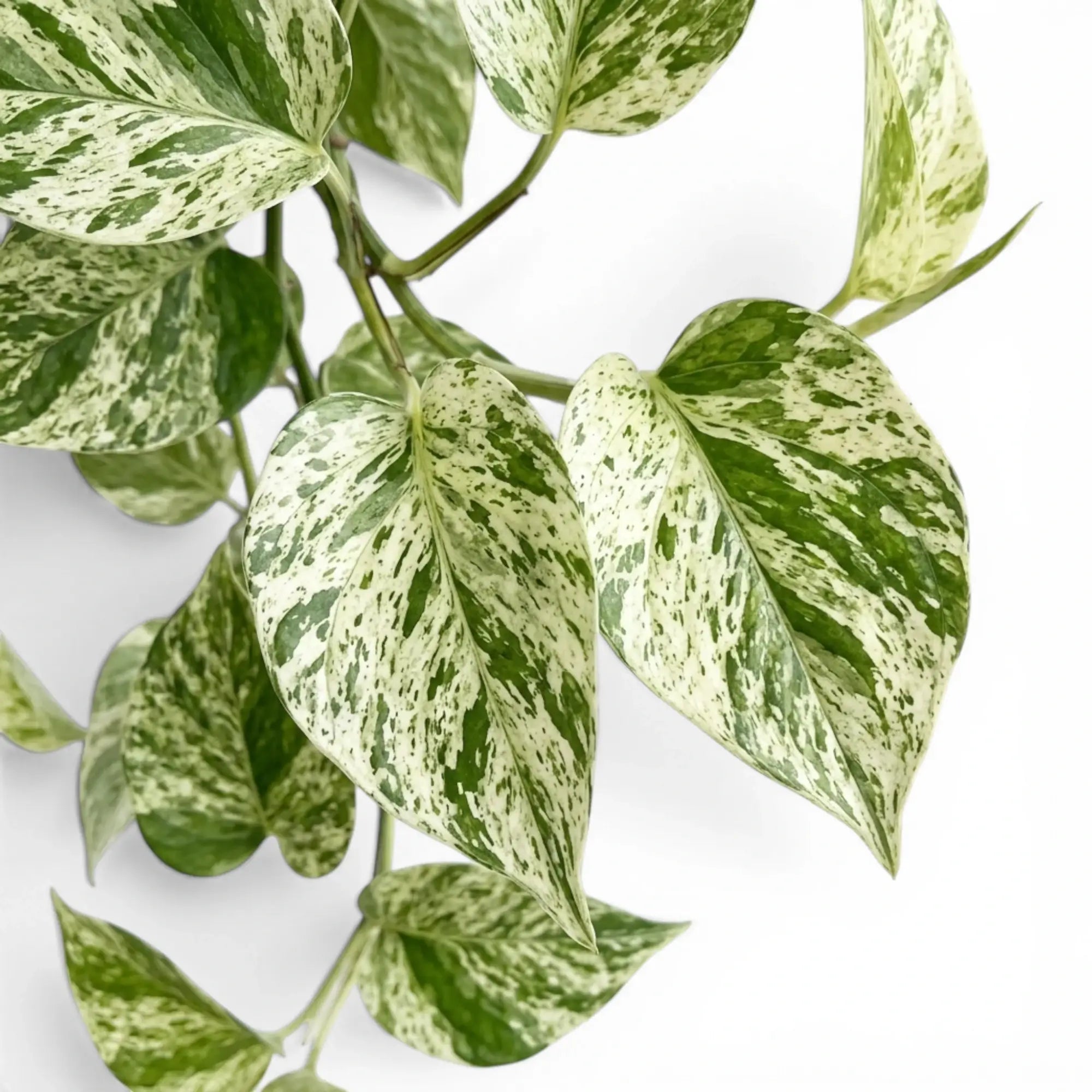
repotting marble queen pothos Epipremnum 'Marble Queen'Epipremnum aureum 'Marble Queen' Epipremnum aureum 'Marble Queen' is a variegated pothos with glossy heart shaped leaves washed, flecked, and streaked in cream white and green. Each leaf carries its own balance of pale and green tissue, giving the vine a light, marbled appearance while keeping the node based vining growth of Epipremnum aureum. The plant grows from long stems with nodes and aerial roots. In a pot it can trail over the rim, climb a
Epipremnum aureum 'Marble Queen'
Epipremnum aureum 'Marble Queen' is a variegated pothos with glossy heart-shaped leaves washed, flecked, and streaked in cream-white and green. Each leaf carries its own balance of pale and green tissue, giving the vine a light, marbled appearance while keeping the node-based vining growth of Epipremnum aureum.
The plant grows from long stems with nodes and aerial roots. In a pot it can trail over the rim, climb a support, or be pruned into a fuller shape. Because many leaves carry a high proportion of pale tissue, 'Marble Queen' usually grows at a measured pace and needs bright indirect light, airy substrate, and consistent warmth.
As a selection of Epipremnum aureum, it belongs to a wet-tropical climbing species from Mo‘orea in the Society Islands, where aerial roots help the stems attach and climb through humid forest.
Pale marbling and vine habits
- Cream-white and green marbling across glossy juvenile leaves.
- Flexible vines that can hang, climb, or be cut back for denser growth.
- Aerial roots at the nodes for support attachment and easy propagation.
- Light-coloured foliage needs bright indirect light that avoids scorch.
- Node-based stems with aerial roots for trailing, climbing and propagation.
How the marbled leaves develop indoors
'Marble Queen' has pale marbling across green leaf tissue, and the green sections remain important for growth. Leaves with very large cream sections can age or mark sooner when exposed to strong sun, dry heat, or salt build-up. With healthy roots and soft bright light, new leaves expand cleanly and pale sections mark less easily.
Like the species, this cultivar stays juvenile indoors under normal pot culture. Leaves remain heart-shaped and comparatively modest in size unless the plant receives long-term support, warmth, and climbing conditions. Regular pruning keeps long vines from becoming bare and allows rooted cuttings to be placed back into the pot for a fuller plant.
Care for cream-white pothos foliage
- Light: Give bright indirect light. Soft bright light reduces stretching while avoiding scorch on the pale parts of the leaf.
- Water: Water when the upper 25–35% of the mix has dried. Check deeper in the pot before watering, as pale variegated vines can use water more slowly.
- Substrate: Use a chunky aroid mix with bark, perlite, coco chips, or pumice. Dense wet soil increases the risk of root decline.
- Temperature: Keep between 18–27 °C. Warm, stable conditions help the plant maintain root activity and new leaf production.
- Humidity: Moderate indoor humidity is acceptable. Higher humidity helps new leaves unfurl with fewer dry marks, especially on long vines.
- Feeding: Feed lightly in spring and summer. Avoid heavy fertiliser doses, which can leave salt residue around the roots and mark pale leaf edges.
- Pruning: Cut stretched or mostly green stems above a node. Root the cuttings to thicken the plant or renew older vines.
Stress marks on pale leaves
- Brown tips on cream areas: Check sun exposure, dry heat, salt build-up, and irregular watering. Pale tissue usually shows stress first.
- New leaves with less marbling: Review light levels and prune greener stems if they begin to dominate the pot.
- Yellow leaves with wet mix: Let the root zone dry further before watering and check whether the potting mix drains freely.
- Small leaves on long vines: Add more bright indirect light or provide support so the stems can grow with better structure.
- Spotted or distorted new leaves: Inspect the newest growth for thrips, mites, or mechanical damage while the leaves are still rolled.
Safety for pets, children, and pruning
Epipremnum aureum 'Marble Queen' contains insoluble calcium oxalate crystals. Chewed foliage can cause irritation, and cut stems may bother sensitive skin, so place the plant thoughtfully and wash hands after pruning.
Meaning of the botanical name
Epipremnum refers to the climbing habit of the genus, from Greek roots meaning “upon” and “trunk.” Aureum means “golden.”
Shipping Notes
- Free Standard Shipping on $100+ Orders to the USA.
- Except Preorder products are shipped in 48 hours.
- Delivery to the USA:
- Standard Shipping : 3-10 business days
- If time is of the essence, please consider selecting expedited delivery for faster service.
Exchange/Return Notes
- We offer a 30-day return/exchange service after receiving.
- Final sale items are not eligible for returns or exchanges.
- To process your return/exchange, please contact us at [email protected]
- Please click here for more details>>> Return & Exchange Policy