SKU: 72452251761
dracaena twister plant

dracaena twister plant Dracaena ‘Tornado’ — 4" & 6" Pot Options

Sale price$21.81 Regular price$24.23
Save 10%

Pay in installments of $6.06 with ShopPay, AfterPay and Klarna

Shipping Estimate
USA
  • USA
  • CAN

Ships within 48 hours · Estimated delivery Oct 27 - Nov 1

Promo Codes Available:

For Your Every Summer RSVP, with Code: SUMMER15

Description

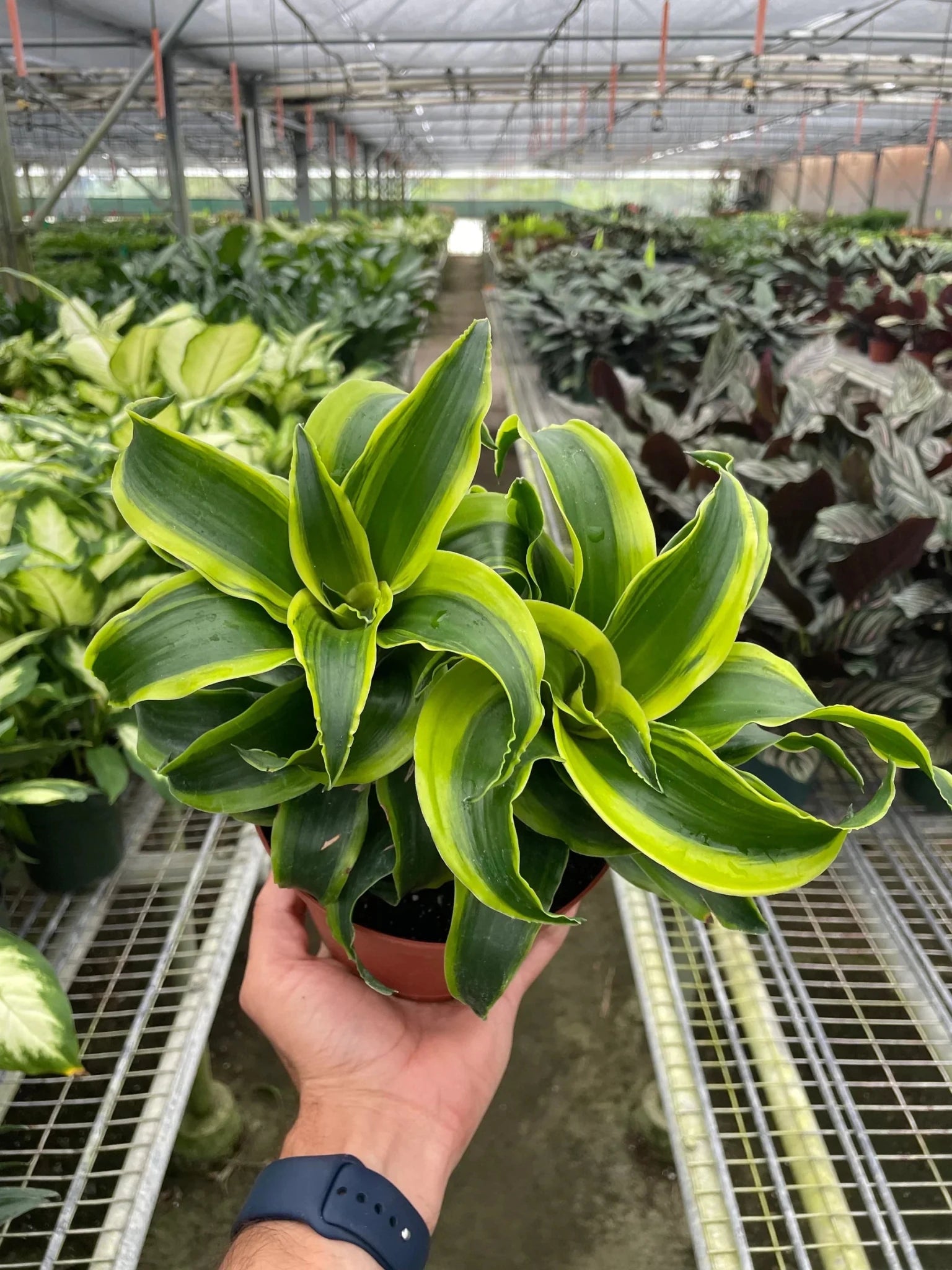
dracaena twister plant Dracaena ‘Tornado’ — 4" & 6" Pot OptionsCurated Indoor Plants Designed to Pair Beautifully with H Potter Dracaena Tornado curated by H Potterdark green spiral leaves with bright variegated edges, easy indoor care, and sculptural style for indoors. A modern statement plant with movement and texture, Dracaena Tornado features dark green leaves that twist in a spiral formation from a slender stem. Each leaf is finished with bright greenish yellow variegation along the edgesan elevated look

Curated Indoor Plants — Designed to Pair Beautifully with H Potter

Dracaena ‘Tornado’ curated by H Potter—dark green spiral leaves with bright variegated edges, easy indoor care, and sculptural style for indoors.

A modern statement plant with movement and texture, Dracaena ‘Tornado’ features dark green leaves that twist in a spiral formation from a slender stem. Each leaf is finished with bright greenish-yellow variegation along the edges—an elevated look that adds depth to entryways, offices, living rooms, and bright hallways.

What to expect: Your plant arrives healthy with natural variation in leaf pattern, size, and overall shape—each Dracaena is unique.
Why trust H Potter: For nearly 30 years, we’ve built outdoor and indoor pieces meant to live in real conditions. As we expand into plants, we’re applying the same standard—practical care guidance, protective packing, and styling that feels finished.
At a Glance

Plant Details

  • Botanical name: Dracaena fragrans
  • Common name: Dracaena ‘Tornado’
  • Nursery pot size options: 4" or 6" nursery pots
  • Approx. height at shipping: ~10"–22" (varies by pot size and growth stage)
  • Foliage: Dark green spiral leaves with greenish-yellow variegation at the edges
Quick ID tip: That spiral leaf twist is the signature “Tornado” look—architectural and clean, with natural variation plant to plant.

Care at a Glance

  • Light: Medium to bright, indirect light
  • Water: Let the top 1–2" of soil dry, then water; avoid soggy soil
  • Humidity: Average indoor humidity
  • Temp: Typical indoor temps; avoid cold drafts and heat vents
  • Difficulty: Easy / low-maintenance
Most common issue: Too much water. Dracaena prefer to dry slightly between waterings.
Why You’ll Love It
  • Sculptural, modern form: Spiral leaves add movement without needing flowers.
  • Easy care rhythm: A forgiving plant for busy homes and offices.
  • Variegated edge detail: Bright trim gives a finished, designed look.
  • Great for styling: Looks striking in clean planters, consoles, and corners that need height.
Care Guide

Light Medium to bright, indirect light

Place in a bright room away from harsh direct sun. Medium light works well too; brighter indirect light helps keep growth stronger and variegation crisp.

Water Let the soil dry slightly between waterings

Allow the top 1–2 inches of soil to dry, then water thoroughly and let excess drain. Avoid letting the pot sit in standing water.

How to know it’s time: The pot feels lighter and the soil is dry at the top. If it’s still damp, wait another day or two.

Humidity Comfortable indoor humidity

Average indoor humidity is typically fine. If your home is very dry, occasional gentle misting or a nearby humidity tray can help leaf edges stay fresh.

Temperature Keep away from drafts

Typical indoor temperatures are ideal. Avoid cold windows in winter, exterior doors, and direct heat vents.

Beginner success rule: Slightly dry is better than constantly wet. Dracaena are happiest with breathable soil and a steady routine.
48-Hour Arrival & Unboxing

Live plants may look a little travel-worn after shipping. A quick reset helps your Dracaena settle in beautifully.

When What to Do Why It Helps
Immediately Unbox promptly and remove packing materials. Prevents pressure marks and lets the plant breathe.
First 2–6 hours Place in medium/bright indirect light. Reduces stress during acclimation.
First 24 hours Check soil moisture; wait if it’s still moist. Avoids overwatering after transit.
Within 48 hours Water only if the top soil is dry; drain fully. Supports recovery and strong roots.
What’s normal after shipping: Slight leaf curl, minor edge marks, or soil settling. Most plants perk up quickly in stable light and careful watering.
Designed to Pair with H Potter
Shipping & Live Plant Handling

Live plants are packed with care and ship on a schedule designed to protect plant health in transit.

Our Packing & Shipping Process
STEP 1

We use wood fiber to cover soil to help prevent spillage.

STEP 2

Wood fiber is placed under the foliage.

STEP 3

We cover the planter and soil area with a protective plastic sleeve.

STEP 4

We secure it tightly with a zip-tie.

STEP 5

We place the plant in a paper bag and secure it.

STEP 6

The paper bag provides a clean presentation and added protection.


  • Shipping regions: Lower 48 United States
  • Weather considerations: We may delay shipping in extreme cold to protect plant health
  • Tracking: Tracking details are provided once your order ships
  • Live arrival policy: If a plant does not have a safe arrival, please text images to 208-640-4206 along with your name and order number

Add sculptural green to your space—without the fuss.

Choose a refined pot size, give it bright indirect light, and water when it’s ready. Dracaena ‘Tornado’ does the rest.

Shop Indoor Planters Explore Terrariums

FAQs

Is Dracaena ‘Tornado’ easy to care for?

Yes. It’s a low-maintenance indoor plant that prefers medium to bright indirect light and drying slightly between waterings.

How often should I water it?

Water when the top 1–2 inches of soil are dry. The exact timing depends on your home’s light and temperature.

Does it do well in lower light?

It can tolerate medium light, but brighter indirect light encourages stronger growth and keeps the variegation looking its best.

Will my plant look exactly like the photos?

Live plants vary naturally. Leaf twist, size, and variegation can differ slightly—each plant is unique.

Do you offer multiple pot sizes?

Yes. This plant may be available in a 4" or 6" nursery pot depending on current inventory.

Is Dracaena safe around pets?

If you have pets or small children, we recommend placing plants out of reach. For pet-specific guidance, consult a veterinary resource for your household.

Shipping Notes
  • Free Standard Shipping on $100+ Orders to the USA.
  • Except Preorder products are shipped in 48 hours.
  • Delivery to the USA:
  1. Standard Shipping : 3-10 business days
  • If time is of the essence, please consider selecting expedited delivery for faster service.
Exchange/Return Notes
  • We offer a 30-day return/exchange service after receiving.
  • Final sale items are not eligible for returns or exchanges.
  • To process your return/exchange, please contact us at [email protected]
  • Please click here for more details>>> Return & Exchange Policy
SKU: 72452251761

Discover Niche Categories That Outsell dracaena twister plant

Top-Converting Item to Boost Your Average Order

4.9 ★★★★★
Based on 17 reviews
Sort
Highest Rating
Newest First
Oldest First
Product Reviews
S
Verified Purchase
Sarah Kidd
Belleville, US
★★★★★ 5
works just like a name brand apple pencil!
Color: White
i wanted an apple pencil with my new ipad but absolutely refuse to pay the cost of the name brand. this connected/paired super easy and even had the magnet in it to connect to the size of the ipad. i mainly use it for playing games, navigating my ipad, and sometimes coloring and its easy to maneuver! it comes with 3 different tips for different sized writing if youre one to take notes. it charges super quick, id say within 10-15 minutes, and the charge lasts (depending on use) HOURS! i think i maybe charge it every 2-3 days, and i use it quite frequently. overall a really good dupe if youre balling on a budget like me!!
WAS THIS REVIEW HELPFUL?YesReportShare
Reviewed in the United States on May 13, 2026
K
Verified Purchase
K
Waukegan, US
★★★★★ 5
Great price and product!
Color: White
Works well and the battery lasts!
WAS THIS REVIEW HELPFUL?YesReportShare
Reviewed in the United States on May 14, 2026
L
Verified Purchase
Lyla Mae
Whiting, US
★★★★★ 5
WOW! This printer has been VERY impressive thus far *UPDATE*
Color: Black, Style: ET-2800-B, Pattern Name: Printer
My old printer broke (sooner than I would have liked) so I did A LOT of research before deciding to buy this Epson EcoTank printer for home office use. This is my honest review of it this far and I will definitely update my review if I run into any issues. So far, this printer has been pretty impressive (I've been using it for about a month). The price was pretty average for a printer... but I personally think all printers are overpriced so it was a bit more than I would have liked to spend. It is smaller and more lightweight than I was expecting which is a plus because it takes up less desk space than my previous HP printer. It is very easy to set up, comes with step-by-step easy instructions and guided instructions through the app. It only took me about 10 minutes (Mostly just waiting for the printer to initialize on its own). It is very easy and surprisingly satisfying to fill the ink tank. I like the idea that this ink might last longer than traditional cartridges and won't have as much plastic waste that went along with my old HP Inkjet. I have printed plain black and white documents as well as photos. I print all my photos at home, which is most of the printing that I do, so quality was important to me. The photos came out with pretty good quality! No ink smudges or off colors, colors are bright/vivid, and it is easy to modify what paper you're using with automatic prompts on the printer. Now for the negatives and the reason I'm giving this 4 stars... app to printer connection issues. This was a big issue with my old printer as well. I'm pretty tech savvy and I just have no idea why this is still always an issue for me. There is an extra Epson app that you are supposed to download for printing. Sometimes it can find my printer, sometimes it can't. Sometimes it gives me printer errors or won't let me print documents. And now every time I go to print something it says the paper being used doesn't match the paper settings so I have to bypass that error message (even though it does match in settings and the app, and this happens for both regular paper and photo paper). I've turned everything off and back on again, but the issues with consistent connection and error messages are still an issue. Usually with some fiddling around, I can get the documents/pictures to print but sometimes it feels like I'm jumping through unnecessary hoops. I'm still working out the kinks so if I find some magic solution I'll update my review. Considering this is an issue with most home printers I've used, it's not a deal breaker. All in all, if you are looking for a new home printer, I would definitely recommend this one. The quality has been great for me and I am pleased with my purchase (so far). Hope this helps! *UPDATE*: I have now printed HUNDREDS of photos, they are all excellent quality, and my ink tanks are still mostly full. This is WAY better than my HP printer as far as ink longevity. Changing my review to 5 stars just based on how long this ink lasts. User interface is still a tad annoying but so worth it regardless.
WAS THIS REVIEW HELPFUL?YesReportShare
Reviewed in the United States on May 10, 2024
S
Verified Purchase
Sam
Massapequa, US
★★★★★ 5
Almost a year after purchase and this printer has not let me down!
Color: Black, Style: ET-2800-B, Pattern Name: Printer
I wanted to wait to write a review on this printer to see how it held up over time. Happy to report, after almost a year, it is still working perfectly! I was very nervous about purchasing a printer since it was my first time having to shop for one and almost every printer I looked at had something negative to say about the product. After extensive research, I decided to take a leap with the Epson EcoTank 2800. I was looking for a printer to use for recreational use. Something with decent print quality and longevity as well as something on a reasonable budget. I normally print full pages of color and have been using it regularly for around a year and I have about half of the ink that came with the printer left. Safe to say, the ink lasts a while. The quality may not be the top of the line quality you can get with a more expensive printer, but for the price and just everyday use, the quality is satisfactory. It was easy to set up and walked you through the instructions to connect to devices and configure it. The screen is a little small but if you can overlook that, it really is a nice printer. I have used regular printer paper, card stock, and sticker paper with this printer and I try to load only a few sheets at a time to avoid a jam but I haven't had any issues with it so far. Overall, I am extremely happy with my purchase. It can be extremely difficult to find a decent printer and some reviews can be misleading or leave you with questions on if the product is for you. If you are looking for something for printing everyday with decent quality and ink consumption that won't cost you a fortune, this printer is definitely worth taking a chance on!
WAS THIS REVIEW HELPFUL?YesReportShare
Reviewed in the United States on April 24, 2026
H
Verified Purchase
Heavy G
Waukegan, US
★★★★★ 1
My Epson printer is total junk!
Color: White, Style: ET-2800-W, Pattern Name: Printer
I have had many printers over the years. I started with Canon dot matrix printers, and then ink jet printers. In the old days, and ink cartridge contained all the colors, so if red was out, you tossed away the rest of yellow and blue too. They were pricey and wasting ink wasn't something I was OK with. I would pull ink cartridges from dumpsters outside office supplies stores, take them home and draw the ink from them to fill my cartridges with. Then Epson came up with a cartridge for each color and black . That's when I switched to Epson and have used them ever since. I did have an HP in there when I got such a deal I couldn't pass it by, but after several years it died and I switched to Artisan printers. I still have an old 810 that is finicky and I don't want to have to coax it just to print a few pages. I got a WorkForce printer ,used it several times after I got it, and then it sat idle for 5 years or so. I moved recently and decided to set up the WorkForce printer. The new ink cartridges were practically new, but sat for 5 years maybe, so the nozzles and print head needed cleaning, I expected this. It uses mass amounts of ink to do this so then I was out of ink. I ordered new cartridges, and back to cleaning when they were inside. I never got anything to print, plus, the new paper I ordered was as glossy and slippery as photo paper, and the rollers couldn't grip it. I gave up and ordered this printer as a replacement. Setup went OK until I put paper in, then the rollers were slipping and I got jam messages, even though nothing was inside. I pulled the paper and let it finish the initial process. Then I put paper in when it wanted to align the print head. It fed paper OK for now, so I guess maybe I didn't get hosed on this Epson as I did buying the WorkForce Epson. UPDATE November 1st 2025 This is a frustrating printer!!!! I'm using WIFI network to connect the printer to my laptop computer. I like to be able to print or scan from anywhere in the house. If you purchase this frustrating Epson printer, you now have a ball and chain around your leg. You can't print a simple document without some kind of error code popping up and requiring that go look at the minuscule little screen and try to figure out what button you must press to get the document printed. If I have to be right next to the printer, I might as well use a wired connection. I am disabled and it's a real inconvenience for me to have to go to the printer and squint at the tiny screen to try to figure out why it's been ten minutes of my time and I still haven't gotten my 1 page document in my hand. High speed printing is not high speed when you can't get a printed page without having to make several trips back and forth to the printer. I set the default paper to the standard plain white letter paper, only to find it wants to scan to photo paper, so it just sits there like a block of cement and nothing gets done. I had an Epson Artisan 810 that I really liked, except for the automatic feeder quit working so you had to stand there and feed each sheet to be scanned by hand. I didn't want a sheet feeder on the printer because they break down and the you're feeding by hand anyway. I just hate printing anything at all now because of this printer. I wasted several hours one day trying to print documents that I downloaded and needed a physical copy to present in person for a project I'm doing. Normally I would send a PDF file, and let someone else bother printing if that was necessary. After years of purchasing Epson printers, this is absolutely the last Epson I have spent my money on. Never ever again. The first clue should have been when the quick start guide suggested using a smart phone to set up the printer. I'm not going to work from my 5 x 7 phone screen when I can instead use a 15 inch laptop screen, and keyboard. It's simply a stupid idea. Sorry, but no more Epson for me ever!!!! Update: 4/10/26 This is absolutely the most useless and frustrating Epson printer that I have ever ever owned. I cannot see good close up I need reading glasses to read. The digital screen on this printer is minuscule it's like a postage stamp size absolutely worthless. I have to carry a magnifying glass over to the f****** printer so that I can see what that little miniscule screen has to say on it. The most frustrating thing is every time I want to print something which is rare I don't print things every day the printer is not available is the message I always get I go over there by the printer I turn it off I turn it back on, that should clear out any crap that's on it so it's ready to print right? No you would be dead wrong! Instead you get a stupid little mini School screen and wants to be set on copy mode. I don't want to copy anything I don't want to scan anything I just want the damn thing ready to print. Anyway you come back to your your phone and you want to print and a printer still not available. I literally destroyed my phone I was that pissed off. I'm too old to be frustrated like that all the time. At 75 years of age I have had my share of printers over the years starting with the original dot matrix ones. Absolutely none of them were as difficult to use as this stupid printer I got now from Epson. When you want to print something you should be able to send it to the printer and it should print. You should not require a phone app to set the damn thing up! One thing I'll say, it's pretty good on ink because you can't make the damn thing print when you want it to !!!!!!!
WAS THIS REVIEW HELPFUL?YesReportShare
Reviewed in the United States on October 10, 2025

recommand products