SKU: 74591744882
cards with wildflower seeds

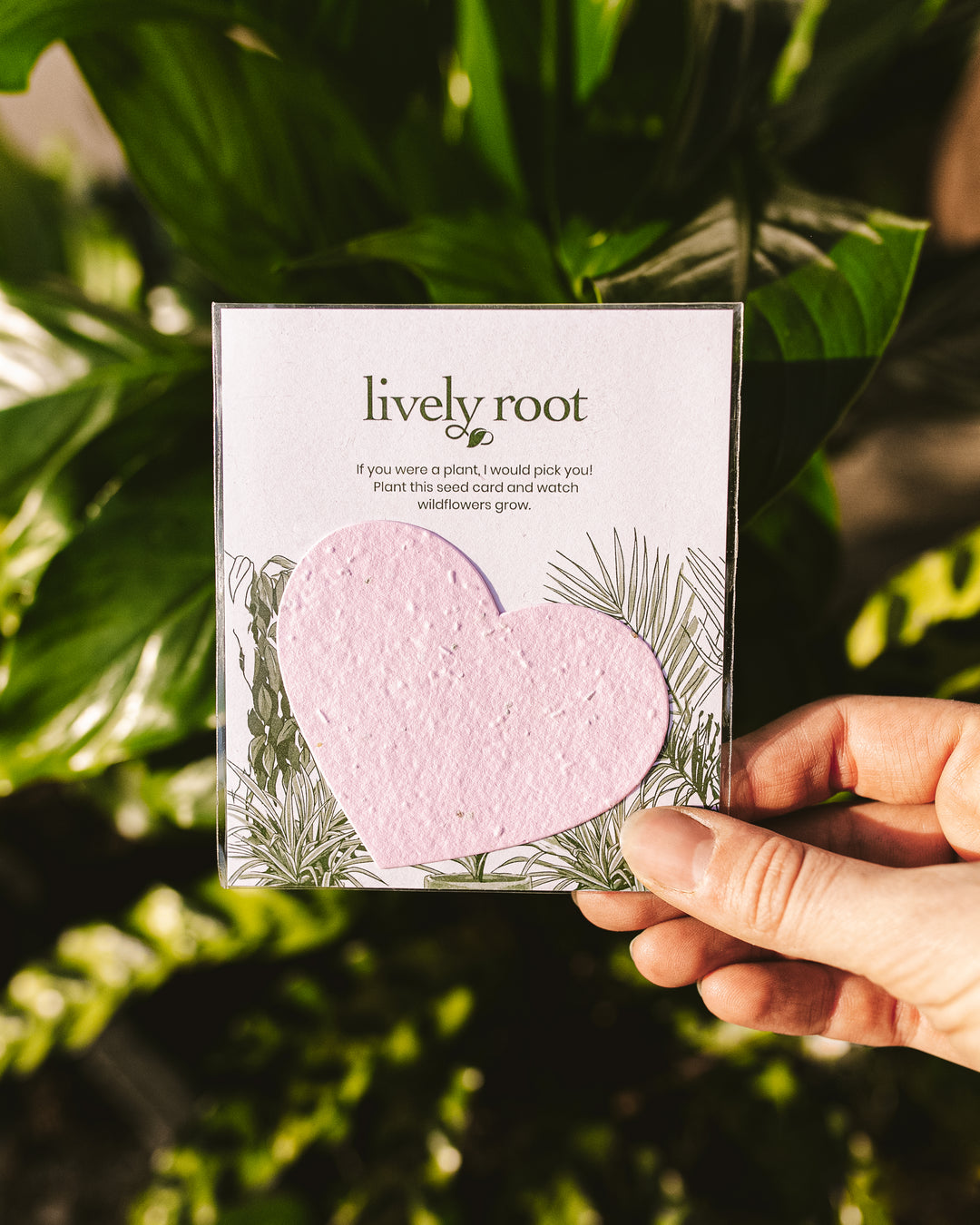
cards with wildflower seeds Wildflower Seed Paper Note Card I'd Pick You!

Sale price$23.31 Regular price$25.90
Save 10%

Pay in installments of $6.47 with ShopPay, AfterPay and Klarna

Shipping Estimate
USA
  • USA
  • CAN

Ships within 48 hours · Estimated delivery Oct 25 - Oct 30

Promo Codes Available:

For Your Every Summer RSVP, with Code: SUMMER15

Description

cards with wildflower seeds Wildflower Seed Paper Note Card I'd Pick You!Give them the card they have been waiting for the one that sprouts with love for life! Wildflower Seed Paper Cards use a biodegradable eco paper that is made with post consumer materials (no trees harmed for this paper!) and embedded with seeds. When the paper is planted in a pot of soil, the seeds grow and the paper composts away. All that is left behind is flowers, herbs or vegetables, and no waste. It's easy to plant and grow! Packed In corn based

Give them the card they have been waiting for - the one that sprouts with love for life!
Wildflower Seed Paper Cards use a biodegradable eco-paper that is made with post-consumer materials (no trees harmed for this paper!) and embedded with seeds. When the paper is planted in a pot of soil, the seeds grow and the paper composts away. All that is left behind is flowers, herbs or vegetables, and no waste. It's easy to plant and grow!

Packed In corn-based cello bag for our true love- the environment <3

Here are the seed types in the wildflower blend:

  • Bird's Eye – Annual
  • Clarkia – Annual
  • Black Eyed Susan – Perennial
  • Catchfly – Annual
  • Snapdragon – Annual
  • Sweet Alyssum – Annual

How To Plant Your Wildflower Seed Paper Card:

  1. Prepare your Pot

    Fill your pot 2/3 full with good potting soil. Tamp down the soil and add more if necessary. You want the pot to be firmly full, but not packed. The paper can be planted indoors or outside, so you get to choose according to the temperature and conditions at the time of planting (we don't recommend planting outside if it's blizzarding or desert-hot!).

  2. Plant The Paper

    Take your plantable paper and cover the soil in the prepared pot with the paper. It's okay if the paper overlaps. Spread a 1/8 inch layer of soil over the plantable paper pieces and tamp down gently on top.

  3. Water during Germinaation

    After planting the paper in your pot, give it a good soak. You want the paper and the soil to be nicely damp but not swimming in water. During the first 10 days, keep the paper moist at all times.

  4. Care After Germination<

    Once sprouts appear, continue to keep the paper moist but be careful not to overwater. Once sturdy plants appear, water as needed. The images below are what the pot looks like after planting a greeting card.

Shipping Notes
  • Free Standard Shipping on $100+ Orders to the USA.
  • Except Preorder products are shipped in 48 hours.
  • Delivery to the USA:
  1. Standard Shipping : 3-10 business days
  • If time is of the essence, please consider selecting expedited delivery for faster service.
Exchange/Return Notes
  • We offer a 30-day return/exchange service after receiving.
  • Final sale items are not eligible for returns or exchanges.
  • To process your return/exchange, please contact us at [email protected]
  • Please click here for more details>>> Return & Exchange Policy
SKU: 74591744882

Discover Niche Categories That Outsell cards with wildflower seeds

Top-Converting Item to Boost Your Average Order

4.0 ★★★★★
Based on 21 reviews
Sort
Highest Rating
Newest First
Oldest First
Product Reviews
C
Verified Purchase
Chayda Black
Boise, US
★★★★★ 5
Perfect product for the error message you get on your EPSON printer
Top tier product. This pad replacement came with the instructions on how to fix my Epson printed that I've converted into sublimation. I never knew it had a drip container and I literally thought I was going to have to spend a lot of money trying to fix it. I looked up some videos and saw i needed a replacement kit. THis is it is I have an epson 4800 the video walk through with the paper was EASY, to put it in was even easier. Highly recommend.
WAS THIS REVIEW HELPFUL?YesReportShare
Reviewed in the United States on February 13, 2026
J
Verified Purchase
John Schisel
Cuba, US
★★★★★ 5
Great product
Works well
WAS THIS REVIEW HELPFUL?YesReportShare
Reviewed in the United States on May 6, 2026
C
Verified Purchase
Connor Ellis
West Palm Beach, US
★★★★★ 5
Perfect
Software is a bit clunky to use but worked perfectly (not to mention a huge cost savings!)
WAS THIS REVIEW HELPFUL?YesReportShare
Reviewed in the United States on April 3, 2026
K
Verified Purchase
Katelyn
Natrona Heights, US
★★★★★ 4
They do have a key to resolve it. Make sure you can connect your computer to your printer.
The customer service is great. They answer your email within 2 hours. The product itself is great too! Comes with two ink pads, gloves, etc. just like what they are advertised. They have instructions and if you have any questions, you CAN contact them. Sadly, my computer couldn’t connect to the printer so I couldn’t use the key they gave me to resolve the problem. I got the printer second hand, wanted to fix the issue, but in order to fix it, we need a cable to connect the computer and the printer. It’s weird that we found two different software (same purpose), but one can connect, the other one (the one on the instructions with this product) can’t. I confirmed with them that we do need a cable. I asked my printer seller about the cable and googled about it, both said the printer doesn’t come with a cable. But when I emailed them (this product) about my issues, they said it should come with a cable to connect. So I don’t know the answer about the cable but what I know is that I either but a cable myself or buy a separate key on their website and hopefully it works. If you don’t know your key, you can email them and ask about it. They then will send you another instructions (another method I assume). It’s a really long key, so if you can connect your computer to the printer, I’m sure you can use the key that comes with the product. It’s just a little bit of a slow process, but at least you know now and you can easily fix it in the future. :) In case you want to know my printer model, it’s ET-4800. These are just my opinions, I hope you can fix yours without any issues! :)
WAS THIS REVIEW HELPFUL?YesReportShare
Reviewed in the United States on November 10, 2025
I
Verified Purchase
ilive4fire51
Belleville, US
★★★★★ 1
Waste of time and money
Don’t waste your time. It did not work. Tried everything the instructions said but the software would not recognize my laptop. So I could not change the replacement pad.
WAS THIS REVIEW HELPFUL?YesReportShare
Reviewed in the United States on January 24, 2026

recommand products