Pay in installments of $6.29 with
 ,
,
 and
and

Shipping Estimate
USA
- USA
- CAN
- USA
- CAN
Ships within 48 hours · Estimated delivery Oct 17 - Oct 22
 Promo Codes Available:
For Your Every Summer RSVP, with Code: SUMMER15
Description
bird of paradise cactus soil Buy Desert Bird of Paradise Phoenix, AZ | CaesalpiniaPhoenix's Showstopper Yellow Bloomer Desert Bird of Paradise Desert Bird of Paradise (Caesalpinia gilliesii) is one of the most dramatic and eye catching flowering shrubs available for Phoenix Valley landscapes. With its brilliant yellow blooms with long red stamens and feathery, fern like foliage, it creates an exotic tropical look with virtually zero water once established. Growing 310 feet tall and 36 feet wide, it handles full blazing sun and
Phoenix's Showstopper Yellow Bloomer — Desert Bird of Paradise
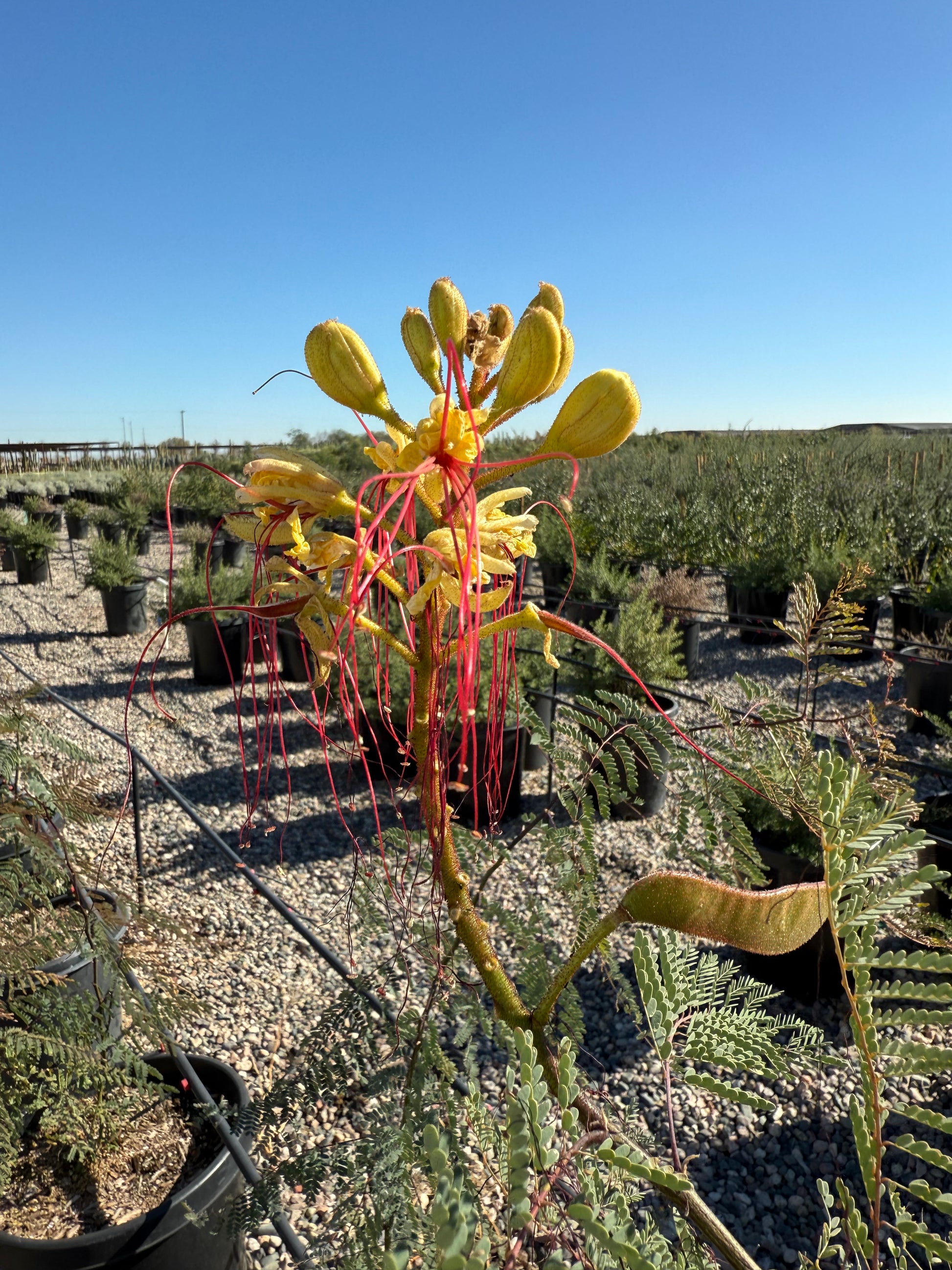
Desert Bird of Paradise (Caesalpinia gilliesii) is one of the most dramatic and eye-catching flowering shrubs available for Phoenix Valley landscapes. With its brilliant yellow blooms with long red stamens and feathery, fern-like foliage, it creates an exotic tropical look with virtually zero water once established. Growing 3–10 feet tall and 3–6 feet wide, it handles full blazing sun and reflected heat like a champion. Whether you're creating a bold focal point in Scottsdale, adding xeriscape color in Chandler, or designing a resort-style desert garden in Mesa or Gilbert — Desert Bird of Paradise delivers unmatched visual impact with minimal care.
Desert Bird of Paradise Plant Details
| Attribute | Detail |
|---|---|
| Scientific Name | Caesalpinia gilliesii |
| Common Names | Desert Bird of Paradise, Yellow Bird of Paradise, Poinciana |
| Mature Height | 3–10 feet |
| Mature Width | 3–6 feet |
| Growth Rate | Fast — 2–3 feet per year in Phoenix with summer water |
| Sun | Full sun (6+ hrs). Thrives in reflected heat from walls and paving. |
| Water | Low once established. Extremely drought-tolerant. |
| USDA Zones | 8–11 (Phoenix is Zone 9b–10a) |
| Soil | Well-draining. Adapts to Arizona caliche soils once drainage is established. |
| Foliage | Semi-evergreen — may drop leaves in coldest winter months |
| Flower Color | Bright yellow petals with long red stamens — blooms spring through fall |
| Wildlife Value | Attracts hummingbirds and butterflies; seeds attract birds |
Desert Bird of Paradise Uses in Phoenix Landscapes
Bold Focal Point and Specimen Plant
Few plants command attention like Desert Bird of Paradise in full bloom. Its large, tropical-looking yellow flowers and delicate fern-like foliage create a stunning contrast against stucco walls, desert rock, or poolside gravel. Plant as a single specimen where you need a dramatic anchor — it will become the centerpiece of any garden in Tempe, Peoria, or Glendale. Allow 6–8 feet of space for full development.
Xeriscape Color Garden
Desert Bird of Paradise is a staple of water-wise, colorful landscapes across the Phoenix Valley. It pairs beautifully with Desert Ruellia (purple), Autumn Sage (red), and Texas Sage (purple) for a multicolor, pollinator-friendly xeriscape that blooms from spring through fall. Space 5–6 feet apart for a loose, informal color border — a 30-foot border needs about 5–6 plants.
Screen and Background Planting
With a potential height of up to 10 feet, Desert Bird of Paradise can serve as a fast-growing privacy screen or background plant. Planted along a fence or block wall in groups, it creates a lush, colorful backdrop. Space 4–5 feet apart for a denser screen effect — a 20-foot fence run needs about 4–5 plants. Combine with Green Hopseed Bush for a mixed evergreen/flowering screen.
Pollinator and Hummingbird Garden
The long red stamens and yellow petals of Desert Bird of Paradise are perfectly shaped for hummingbird feeding. Anna's Hummingbirds, which are year-round Phoenix residents, are frequent visitors. Plant alongside Chuparosa and Desert Ruellia to create a complete hummingbird corridor in your garden in Chandler, Surprise, or Avondale.
Best Time to Plant Desert Bird of Paradise in Phoenix
Fall (October–November) is the ideal planting window. Warm soil encourages root development while cooler air reduces transplant stress. Plants established in fall get 6–8 months of root growth before facing their first Phoenix summer. Spring (February–April) is the second-best option. Avoid planting in June through August — the intense summer heat combined with transplant shock is hard on new plants, though established plants revel in summer heat and bloom most prolifically in those months.
How to Plant Desert Bird of Paradise
- Dig wide, not deep — excavate a hole 2–3 times the root ball width and the same depth as the container.
- Check for caliche — if you hit a hard white layer, break through it with a breaker bar to ensure proper drainage.
- Backfill with native soil — a light 20% organic compost blend is acceptable; avoid over-amending desert soils.
- Spacing — 5–6 feet apart for loose screening; 8+ feet for individual specimen plants.
- Build a water basin — form a 3–4 inch berm around the drip line to direct water to the roots.
- Mulch — apply 2–3 inches of bark mulch or gravel mulch to retain soil moisture and moderate root zone temperature.
Watering Desert Bird of Paradise in Phoenix
First Year Watering Schedule
Weeks 1–2: Water every 1–2 days, deep and slow (20–30 minutes). Month 1–2: Every 3–4 days. Month 3–6: Every 7–10 days (every 5–7 days during peak summer). After Year 1: Every 14–21 days in summer; every 4–6 weeks in winter or skip entirely during monsoon season. Once fully established, Desert Bird of Paradise survives on natural rainfall alone in many Phoenix Valley locations.
Drip Irrigation
Place 1–2 GPH drip emitters 18–24 inches from the trunk. Run drip irrigation for 45–60 minutes per session. Established plants need very little supplemental irrigation — the monsoon season (July–September) typically provides all the water needed for peak summer blooming. Overwatering leads to rank, floppy growth and reduces flower production.
How tall does Desert Bird of Paradise get in Phoenix? In full sun with occasional summer irrigation, Desert Bird of Paradise can reach 6–10 feet tall in Phoenix. In shadier spots or with less water, it typically stays in the 3–6 foot range. It's a fast grower — expect 2–3 feet of new growth per season under good conditions.
Is Desert Bird of Paradise toxic? Yes — all parts of Caesalpinia gilliesii contain compounds that are toxic to people and pets if ingested. Plant it in areas where children and pets won't graze on it. It's not a contact hazard — just avoid consumption.
Does Desert Bird of Paradise freeze in Phoenix? Desert Bird of Paradise is cold-hardy to about 15°F and thrives in Phoenix's Zone 9b–10a. It may experience some tip damage in exceptional cold snaps but recovers quickly in spring. It is much hardier than Red Bird of Paradise (Caesalpinia pulcherrima).
When does Desert Bird of Paradise bloom in Phoenix? It blooms from late spring (April–May) through fall (October). Blooming is most intense following monsoon rains in July through September. A well-watered plant will bloom almost continuously from May through October in Phoenix.
What's the difference between Desert Bird of Paradise and Red Bird of Paradise? Desert Bird of Paradise (Caesalpinia gilliesii) has yellow flowers with red stamens and is more cold-hardy. Red Bird of Paradise (Caesalpinia pulcherrima) has vivid orange-red flowers and is slightly more frost-sensitive. Both are excellent choices for Phoenix landscapes.
You May Also Like
Desert Ruellia — A compact purple-flowering shrub that pairs beautifully with Desert Bird of Paradise's yellow blooms in pollinator gardens.
Autumn Sage — A hummingbird-favorite with red, pink, or white flowers that blooms alongside Desert Bird of Paradise all season long.
Chuparosa — A tubular red-flowering shrub that attracts hummingbirds and creates a vivid color contrast with yellow Bird of Paradise blooms.
Desert Cassia — Another stunning yellow-blooming desert shrub that provides similar color impact in slightly shadier spots.
Green Hopseed Bush — A fast-growing evergreen privacy shrub that makes a perfect green backdrop for the colorful Desert Bird of Paradise.
How Many Desert Bird of Paradise Do I Need?
Desert Bird of Paradise matures around 3 to 6 feet wide, so space plants about 5 feet apart for an informal flowering screen or color border. Use this table to estimate plant counts:
| Run Length | Plants Needed (5 ft spacing) |
|---|---|
| 10 ft | 2 plants |
| 20 ft | 4 to 5 plants |
| 30 ft | 6 to 7 plants |
| 40 ft | 8 to 9 plants |
For a single specimen, give it 6 to 8 feet of open space so the fountain of fern-like foliage and yellow blooms can stand clear.
Desert Bird of Paradise Season-by-Season in Phoenix
- Spring (Feb to Apr): New growth flushes from the base and the first yellow blooms open in late spring. A strong second planting window before the summer heat arrives.
- Summer (May to Sep): Peak bloom. This shrub revels in full sun and reflected heat, and flowering surges with the monsoon rains from July through September.
- Fall (Oct to Nov): Blooming continues into October, and this is the prime season for planting and root establishment before winter.
- Winter (Dec to Jan): Semi-evergreen and may drop leaves in the coldest weeks. Hardy to about 15 degrees F, so it shrugs off normal Valley frost and shows only minor tip damage in hard cold snaps.
At a Glance
✔ Pollinator-Friendly ✔ Hummingbird-Friendly ✔ Heat-Loving (Reflected-Heat Tolerant) ✔ Drought-Tolerant ✔ Low-Maintenance ✔ Cold-Hardy to 15°F
Plant It With
- Desert Ruellia: purple blooms that contrast with the yellow flowers in a pollinator border.
- Autumn Sage - Red: a hummingbird favorite that blooms alongside it all season.
- Chuparosa - Red: tubular red flowers that help build a complete hummingbird corridor.
- Green Hopseed Bush: a fast evergreen backdrop that sets off the colorful blooms.
Is Desert Bird of Paradise Right for Your Yard?
It thrives in full sun and reflected heat, needs well-draining soil with any caliche broken through, and asks for very little water once established. Give it room to reach 6 to 10 feet tall. Not a fit if you want a tidy, compact shrub or a low-litter poolside plant, since it has an open, airy form and drops seed pods. All parts are toxic if eaten, so keep it clear of areas where children or pets graze.
Shipping Notes
- Free Standard Shipping on $100+ Orders to the USA.
- Except Preorder products are shipped in 48 hours.
- Delivery to the USA:
- Standard Shipping : 3-10 business days
- If time is of the essence, please consider selecting expedited delivery for faster service.
Exchange/Return Notes
- We offer a 30-day return/exchange service after receiving.
- Final sale items are not eligible for returns or exchanges.
- To process your return/exchange, please contact us at [email protected]
- Please click here for more details>>> Return & Exchange Policy