Pay in installments of $7.43 with
 ,
,
 and
and

Shipping Estimate
USA
- USA
- CAN
- USA
- CAN
Ships within 48 hours · Estimated delivery Oct 27 - Nov 1
 Promo Codes Available:
For Your Every Summer RSVP, with Code: SUMMER15
Description
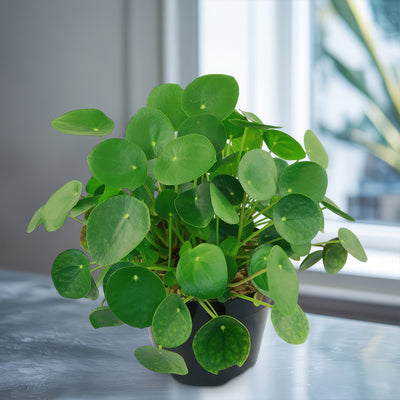
chinese money plant cold tolerance Chinese Money Plant ‘Pilea peperomioides’ 2 Gal. / Teal / With PotThe Chinese Money Plant, known as Pilea peperomioides, is one of the most beloved houseplants in the world, admired for its coin shaped leaves, minimalist look, and ease of care. Often seen gracing modern interiors and Instagram feeds, this quirky plant brings a charming architectural quality to any space. Traditionally, the Chinese Money Plant is believed to bring prosperity, good fortune, and financial abundance, which is why its often given as a
The Chinese Money Plant, known as Pilea peperomioides, is one of the most beloved houseplants in the world, admired for its coin-shaped leaves, minimalist look, and ease of care. Often seen gracing modern interiors and Instagram feeds, this quirky plant brings a charming architectural quality to any space.
Traditionally, the Chinese Money Plant is believed to bring prosperity, good fortune, and financial abundance, which is why it’s often given as a gift. This plant goes by many names, including the UFO Plant, Pancake Plant, Missionary Plant, and simply the Money Plant (not to be confused with Crassula ovata or Epipremnum aureum).
According to feng shui, the Chinese Money Plant is more than just a decorative addition, it's considered a symbol of prosperity and good luck.
The round, shiny leaves resemble coins, making it a go-to plant for those hoping to attract wealth and positive energy into their homes or offices.
To bring prosperity and good luck into your life, feng shui practice suggests placing the plant in the southeast corner of your living space, which is associated with wealth and abundance.
It’s also popular to give the plant as a gift, especially when it has produced “pups” or offsets, which are thought to spread fortune when shared.
The plant grows in a mounded shape and stays compact, typically reaching a mature size of about 12 inches tall and 12 inches wide.
It can grow to double its size in a year with proper lighting. Its symmetry and upright growth habit make it perfect for shelves, desks, or as a tabletop focal point.
Native to the mountainous regions of Yunnan Province in southern China, the Chinese money plant is defined by its shiny, round, flat leaves perched above long, slender stems that radiate from a central point.
The Chinese Money Plant can produce tiny, pale-pink to white flowers on thin stalks in ideal indoor conditions, usually during spring. However, blooming is rare and not its main feature. What makes this plant especially unique is its tendency to produce numerous offsets or “pups” at the base and even along its roots, which can be gently removed and propagated with ease.
The full-grown Chinese Money Plant is popular for its easy-care nature, unique round leaves, and air-purifying qualities, making it a great decorative houseplant for modern interiors. Its upright, architectural look adds charm to tabletops, shelves, or hanging planters.
When and How to Water Your Chinese Money Plant
The Chinese Money Plant is mildly drought-tolerant and does not like sitting in wet soil, which can quickly lead to root rot. During average conditions, let the top 1–2 inches of soil dry out between waterings. If you’re unsure, it’s safer to wait a day or two longer than to water too soon.
The plant can tolerate short dry spells better than overwatering. Water your Chinese Money Plant every 7–10 days during its growing season (March to September) using about 1/4 to 1/2 cup of water and reduce watering to every 14–21 days during dormancy (October to February).
From March to September, during its growing season, water the plant every 7–10 days with about 1/4 to 1/2 cup of water, depending on pot size and indoor climate. You’ll notice it grows faster and pushes out new leaves during this time, so more frequent watering is appropriate. Make sure to use a pot with good drainage and empty any saucers to prevent soggy soil.
From October to February, in its dormant season, reduce watering to every 14–21 days using around 1/4 cup, only when the soil feels completely dry. Growth will slow down or stop, and watering too much during this period increases the risk of root rot. Place it in a slightly cooler location during dormancy, if possible, to help mimic natural seasonal changes.
Light Requirements – Where to Place Your Chinese Money Plant
When growing indoors, place your Chinese Money Plant near a bright east or north-facing window with indirect light for 6–8 hours daily.
Chinese Money Plant thrives in bright, indirect indoor light and grows best near east- or north-facing windows.
Avoid intense, direct midday sunlight, which can scorch the leaves.
If you only have south- or west-facing windows, place it a few feet back or use a sheer curtain. Under low-light conditions, it may become leggy, producing fewer and smaller leaves.
When growing outdoors, give your plant filtered morning sun and bright shade in the afternoon, ideally 3–4 hours of gentle light daily. It can be placed on a shaded patio or balcony during warm months; but must be brought indoors before temperatures drop.
Avoid direct sun exposure during summer afternoons, which can burn the delicate foliage.
Optimal Soil & Fertilizer Needs
The Chinese Money Plant prefers a well-drained, airy, slightly acidic to neutral soil (pH 6.0–7.0), and should be fertilized once a year. A quality indoor potting mix amended with perlite or pumice ensures proper drainage. Planet Desert specializes in succulents and has Go to cactus mix blend 1 gal 4 qt cacti succulent dirt compost growing media that includes an organic substrate with mycorrhizae to help with the growth of a healthy root system, to help your succulents thrive. Avoid compacted or moisture-retentive soils, as they increase the risk of rot.
Fertilize your plant once a year in spring using a diluted balanced liquid NPK fertilizer of about 5-10-5. Too much feeding can lead to salt buildup or leggy growth. No fertilizer is needed during the dormant season (October to February), as the plant slows its growth and won’t benefit from added nutrients. Flush the soil occasionally with plain water to remove any accumulated salts.
Pro Tip: It’s perfectly natural for your Chinese Money Plant to shed an occasional older leaf as it focuses energy on fresh growth. But if you notice multiple leaves dropping at once, overwatering and potential root rot are often to blame. Act quickly by checking the soil and root-adjust watering to help your plant bounce back.
Chinese Money Plant Indoor Requirements
The best place to grow a Chinese Money Plant indoors is near an east- or north-facing window where it can receive bright, indirect light throughout the day. Avoid placing it directly in harsh afternoon sun, which may scorch its delicate, round leaves. When grown indoors, the Chinese Money Plant thrives in temperatures between 60–75°F, with moderate humidity levels of 40% to 60%. It does well in typical household conditions but appreciates extra humidity, which you can provide with a pebble tray or by grouping it with other plants. Always position it away from cold drafts, air conditioners, and direct heat sources like radiators to prevent stress.
Hardiness Zones & More
In all other U.S. states, where winter temperatures dip below this threshold, it is best grown indoors or kept as a seasonal outdoor plant during warm months.
If you choose to place it outside during summer, be sure to bring it back indoors by late September or early October to protect it from cold damage.
The Pilea peperomioides can only be grown outdoors year-round in Hawaii, where USDA Zones 10–11 provide the consistently warm, frost-free climate it needs.
In these tropical conditions, the plant enjoys filtered sunlight, mild humidity, and temperatures that stay safely above 50°F.
Wildlife – Pilea peperomioides Flowers Attract the Following Friendly Pollinators
When in bloom, Pilea peperomioides may draw a few tiny flies or gnats, but it is not a plant that is known to draw bees, hummingbirds, or butterflies. This plant is more decorative than wildlife-supportive, but its tiny pale flowers can sometimes catch the attention of small insects. However, it’s not a nectar-rich plant and shouldn’t be relied upon to attract pollinators like salvia or milkweed.
According to the ASPCA, Pilea peperomioides is non-toxic to dogs, cats, and horses. This makes it a pet-friendly houseplant option and a great choice for families. Even if ingested, it rarely causes more than mild stomach upset. Still, always supervise pets around houseplants to discourage chewing.
How to Propagate Your Chinese Money Plant
Pilea peperomioides is easily propagated from baby plantlets, which grow from the base or roots of mature plants. When a healthy plant matures, it produces offsets (also called pups) that can be removed and replanted. Wait until the baby plant is 2–3 inches tall, then gently dig around the base and snip it from the parent with a clean knife or scissors.
Ensure the pup has some roots for faster establishment. Plant the offset in a small pot with moist, well-draining soil. Keep it in bright, indirect light and water lightly. Within a few weeks, it should root and begin growing independently. You can also try propagating leaf cuttings in water, but this method is slower and less reliable.
Potting and Repotting Chinese Money Plant
Chinese Money Plant prefers a small to medium-sized pot with excellent drainage, and it typically needs repotting once every 1–2 years as it outgrows its container. When potting or repotting, choose a container that has drainage holes and use a light, well-draining soil mix, such as a blend designed for indoor plants or a succulent mix with added perlite or coconut coir. Repotting is best done in spring, just before or as the plant enters its active growing season.
If you notice roots circling the bottom or poking through the drainage holes, or if water drains too quickly, it’s a sign your Pilea has outgrown its current pot. While repotting, it's a great opportunity to separate and propagate any baby offsets (“pups”) growing around the base. After repotting, water the plant lightly and place it in indirect light to help it adjust to its new environment without stress.
Key Takeaways
- The Chinese Money Plant is one of the most popular houseplants, known for its charming coin-shaped leaves, low maintenance, and modern aesthetic appeal.
- Feng Shui enthusiasts believe the Chinese Money Plant brings prosperity and positive energy, especially when placed in the southeast corner of your home or office.
- This plant is drought-tolerant, capable of thriving with minimal watering, making it ideal for busy plant owners or those in drier indoor environments.
- The Chinese Money Plant is safe for pets, as it is non-toxic to cats and dogs according to the ASPCA—perfect for pet-friendly households.
- It produces easy-to-propagate pups, allowing plant lovers to grow new plants from the mother plant and share them with others.
The Bottom Line
Overall, the Chinese Money Plant ‘Pilea peperomioides’ is a stylish, easy-care indoor plant with charming round leaves and simple care needs. With its charming look, symbolic significance in feng shui, and reputation for easy care, it has become a staple in modern plant collections around the world. It adds visual appeal with its upright stems and coin-like foliage, requires minimal watering, and thrives in bright, indirect light. Pet-friendly and easy to propagate, it’s an ideal choice for beginners or seasoned plant lovers alike. With the right watering schedule, soil mix, and light exposure, this trendy houseplant can reward you with lush growth and an ever-growing family of new pups. Order your very own Chinese money plant for sale today!
Shipping Notes
- Free Standard Shipping on $100+ Orders to the USA.
- Except Preorder products are shipped in 48 hours.
- Delivery to the USA:
- Standard Shipping : 3-10 business days
- If time is of the essence, please consider selecting expedited delivery for faster service.
Exchange/Return Notes
- We offer a 30-day return/exchange service after receiving.
- Final sale items are not eligible for returns or exchanges.
- To process your return/exchange, please contact us at [email protected]
- Please click here for more details>>> Return & Exchange Policy