SKU: 77798965787
monstera plant support stick

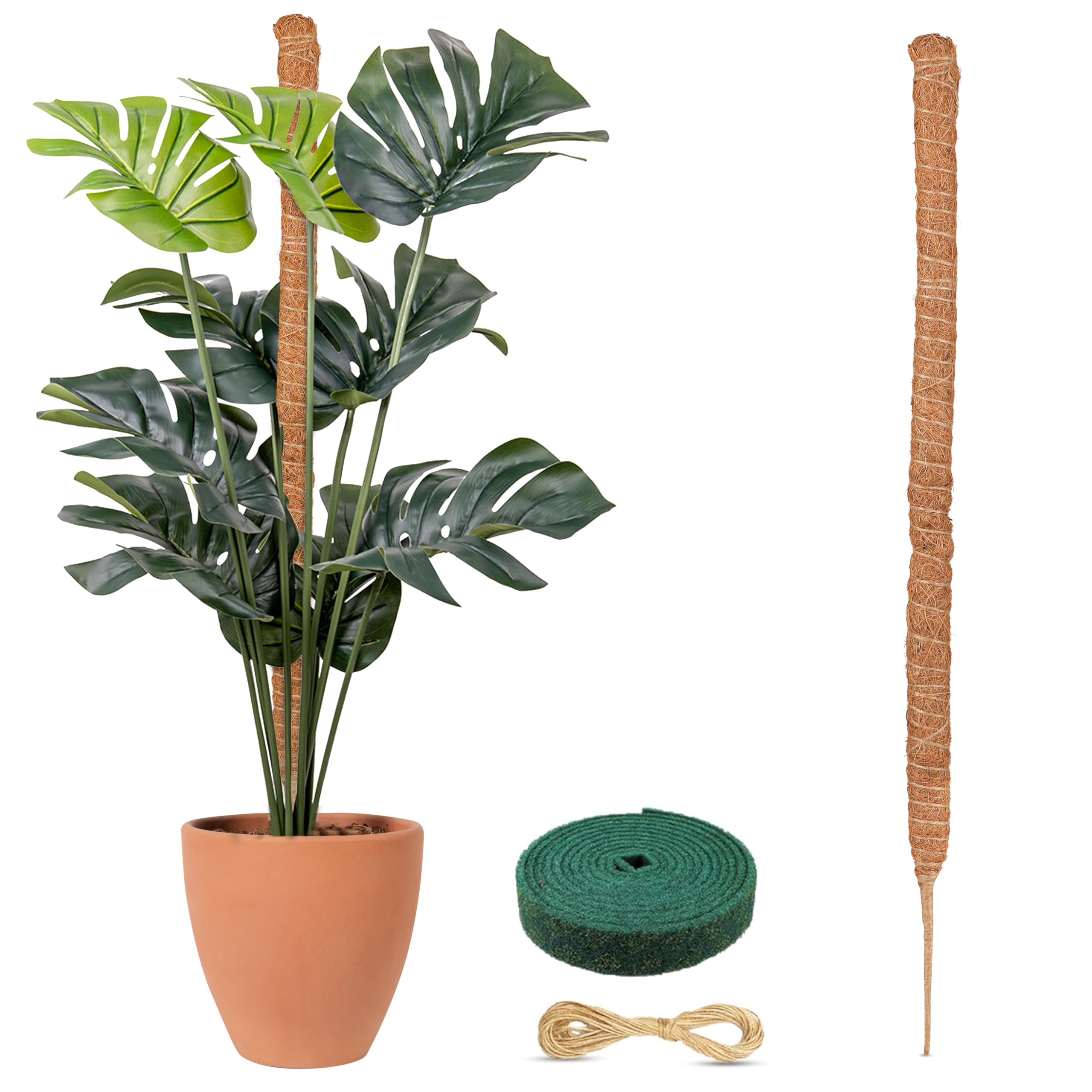
monstera plant support stick 63" Moss Pole for Monstera | Climbing Plant Stake Support, Stackable Coir Pole, Vertical Growth Houseplants

Sale price$24.98 Regular price$27.76
Save 10%

Pay in installments of $6.94 with ShopPay, AfterPay and Klarna

Shipping Estimate
USA
  • USA
  • CAN

Ships within 48 hours · Estimated delivery Oct 11 - Oct 16

Promo Codes Available:

For Your Every Summer RSVP, with Code: SUMMER15

Description

monstera plant support stick 63" Moss Pole for Monstera | Climbing Plant Stake Support, Stackable Coir Pole, Vertical Growth HouseplantsTechnical Details : Brand: EcoNour Manufacturer: EcoNour Style: Tube Color: Brown Material: Coir ASIN: B0CHYFPGTB EcoNour Moss Pole for Plants 63 inches Monstera Plant Support for Plant Climbing and Growth About the item : Moss Poles for Houseplants EcoNour Bendable Moss Poles are crafted from natural coconut fiber, an eco friendly material that supports healthy plant growth. These poles are ideal for climbing plants, providing them with the perfect

Technical Details :


Brand: EcoNour

Manufacturer: EcoNour

Style: Tube

Color: Brown

Material: Coir

ASIN: B0CHYFPGTB


EcoNour Moss Pole for Plants – 63 inches | Monstera Plant Support for Plant Climbing and Growth 


About the item :


Moss Poles for Houseplants

EcoNour Bendable Moss Poles are crafted from natural coconut fiber, an eco-friendly material that supports healthy plant growth. These poles are ideal for climbing plants, providing them with the perfect surface to attach new air roots, which helps in absorbing water and nutrients effectively. Whether it’s monstera, pothos, or philodendrons, these poles encourage upward growth, enhancing their overall structure and health. This makes them an excellent addition to any plant care routine, especially for those looking to grow lush, vibrant indoor plants.

Moss Pole Support For Plants

Promoting vertical growth, EcoNour Moss Poles are perfect for compact spaces like small apartments or urban gardens where horizontal gardening isn't an option. By training your plants to grow upwards, these poles maximize space efficiency and allow you to create an attractive indoor garden in even the tiniest areas. Crafted with a focus on botanic needs, they help plants reach new heights while adding an elegant touch to your indoor decor.

Versatile Support For Climbing Plants

Our monstera moss poles offer unmatched versatility, allowing you to shape them into unique forms such as hearts, arches, or spirals to complement your home’s style. These creative designs not only support climbing plants but also enhance the aesthetic appeal of your living space. Perfect for both functional and decorative purposes, these poles ensure your plants grow healthily while transforming your home into a botanical haven.


Easy to Use Moss Poles

Using the EcoNour Moss Pole is straightforward and hassle-free. Simply insert the sturdy stake into the soil for stability, and tie the plant stems to the pole using the included jute or green rope. This ensures that your climbing plants remain supported while growing upward without damaging the stems. It’s an easy and efficient solution for nurturing your plants, even for gardening beginners.

Suitable Moss Poles for All Medium and Large Plants

The 63-inch bendable moss pole is a versatile solution for all medium and large climbing plants, both indoors and outdoors. It provides excellent support for popular houseplants like monstera, pothos, and philodendrons, as well as other trailing or climbing species. Whether you're cultivating a green corner indoors or maintaining an outdoor garden, these moss poles adapt to your plants’ growing needs and ensure they thrive in any environment.


Give your climbing plants the care they deserve with the perfect moss pole for plants. A strong moss pole acts as the ultimate monstera plant support, especially when combined with a sturdy monstera moss pole or moss pole monstera system. Whether you're using a moss pole for monstera or setting up a monstera support, the right monstera pole or moss stick for plants ensures healthy vertical growth. Add a moss stick or moss pole for monstera plant to support leaves and stems. Use a monstera plant stake or monstera support pole to help your plant stand tall.

A monstera deliciosa moss pole or monstera stake gives added strength. Searching for a moss pole near me? Choose options like support for monstera plant or a moss pole for cheese plant for multiple varieties. Whether it's monstera deliciosa support or a moss pole for monstera deliciosa, every plant needs structure. A climbing pole for monstera or climbing plant support can bring dramatic impact to your space.

Use a moss pole plant support or moss pole for climbing plants for natural training. For flexibility, try a bendable moss pole or a reliable monstera plant support pole. A monstera plant moss pole or monstera climbing pole adds support without sacrificing style. Try an indoor climbing plant support, monstera pole support, or display your monstera on moss pole as a statement piece. A large moss pole is ideal for mature plants, while a moss pole for indoor plants suits compact areas.

Add a support for monstera to help with climbing, or display your monstera with moss pole to encourage aerial roots. Try a sphagnum moss pole, monstera plant pole, or climbing plant moss pole for lush growth. For living rooms, use a support for climbing plants indoor or a plant support for monstera that blends into the decor. A pole for monstera or indoor plant moss pole is ideal for minimal setups.

When training vines, a moss stick for monstera, moss stake, or monstera stick support does wonders. Add a plant support monstera to maintain vertical growth. Choose a support for indoor climbing plants and try a moss stake for plants to keep stems aligned. If you’re after the best moss pole for monstera, you can’t go wrong with high-quality plant support for climbing plants.

Explore poles for climbing plants or a flexible indoor moss pole for your collection. Try a monstera support stake, or collect quality moss for moss pole when crafting your own. Whether it’s a plant pole for monstera, a large moss pole for monstera, or a moss pole for plants nearby, every choice supports healthy development.

Support your climbers with creeper plant support, or use a moss stick monstera for tighter spaces. Looking for the best moss pole or plant stake for monstera? Add stakes for monstera or explore creative monstera support ideas. The best support for monstera often starts with staking monstera properly. Create your own with a diy moss pole for monstera, and learn how to make a moss pole using sphagnum moss for moss pole and the best moss for moss pole. If you’re staking a monstera, consider a bamboo stake for monstera for a more natural look. Discover the best monstera support, try new monstera stake ideas, or explore monstera support diy options. Use plant ties for monstera and a reliable indoor plant climber support for safety.

The support for climbers plants matters—add a moss plant support, grow your monstera plant with moss pole, and give your monstera moss pole plant support that extra touch. A moss pole indoor plants setup or climbing plant support indoor helps even small spaces thrive. Choose a moss pole support to train vines, or admire your monstera growing on moss pole each day. Every moss pole for a monstera plant needs a moss plant support pole for strength.

Enjoy your plant with moss pole, or grow plants for moss pole and display your plants on moss pole proudly. Use a moss support pole, moss stick plant support, or a monstera plant climbing pole to bring life to your home. If you need to buy moss pole, find reliable options for monstera plant care moss pole setups. Looking for cheese plant support? Use garden climbing plant support to support monstera plant needs. Keep your monstera moss healthy and remember: it all begins with a great monstera and moss pole partnership.

Shipping Notes
  • Free Standard Shipping on $100+ Orders to the USA.
  • Except Preorder products are shipped in 48 hours.
  • Delivery to the USA:
  1. Standard Shipping : 3-10 business days
  • If time is of the essence, please consider selecting expedited delivery for faster service.
Exchange/Return Notes
  • We offer a 30-day return/exchange service after receiving.
  • Final sale items are not eligible for returns or exchanges.
  • To process your return/exchange, please contact us at [email protected]
  • Please click here for more details>>> Return & Exchange Policy
SKU: 77798965787

Discover Niche Categories That Outsell monstera plant support stick

Top-Converting Item to Boost Your Average Order

4.4 ★★★★★
Based on 17 reviews
Sort
Highest Rating
Newest First
Oldest First
Product Reviews
A
Verified Purchase
Aaron
Houston, US
★★★★★ 5
Great 10gbps USB-C Hub, worked with Anker support through compat issues with PD4 iteration 1
Original Review (updates below): ----- The moment I noticed this thing on Amazon, I bought it and it literally just arrived. Finally, 4K60 over just USB-C with other ports (including making up to 10Gbps available to them) for a reasonable price. Unfortunately, the first two things I've done with it were both disappointing. I'll cut to the chase, the power delivery pass through isn't working with one of their own chargers. The first device I tried connecting this with is my Anker PD4 with one USB-C cable as the only thing plugged into it so I can test the truly up to 100W (-15 for its own power) claims. I've tried connecting it with Apple's 2m USB-C charge cable (100w capable) and an equivalent CableMatters cable that also supports 100W. When plugged directly into my laptop, both of these cables immediately start charging it and show up as 100W power sources. When this Anker hub is plugged in and either of them is connected to the power delivery port on the side of it, the laptop does not charge (laptop is a 16" Macbook Pro, I've tried multiple ports just for the heck of it). My second complaint is that when absolutely nothing is plugged into it, it becomes fairly warm to the touch. Why, when it's doing nothing, is it hot? I'm clearly not running data or even power through it so I have low hopes for it under load. The fact that it doesn't work in exactly the scenario they want it to most (a MacBook Pro with one of their own chargers) seems like a pretty big fail. I've got lots of USB-C things though so I thought I'd grab a couple and try those. Using an Apple 96W USB-C charger, the device does pass through power delivery properly. It shows up as providing 79W to the laptop (siphoning off 17W in this instance). I also have a 56W Aukey charger that splits power between a USB-A port and a USB-C port that can provide 45W of power delivery. When plugged into that charger it does appear to work as well and appears in macOS as a 30W power source. Maybe the problem is the Anker PD4? But it works fine providing power to the laptop directly. Would love to hear from Anker about these two products working together and what I should actually expect. Having it be unreliable for power delivery isn't great, but power and heat aside (it is getting a little bit warmer now that it's providing power from the Apple power adapter, but still definitely holdable), the hardware looks and feels good and the cable feels durable. Worth also noting that there's a white LED ring on the side of it that appears to be always on when it's plugged in. Don't know why it needs an LED. ----- Update, June 22, 2020: I've done some more testing and Anker has reached out to me to investigate what might be the issue. I can say that the hub works as I would expect from a quick test with my iPad Pro 11" with the above functioning chargers. It was able to pass through power with the 96W Apple Charger on the other end to both the iPad port as well as a Magic Keyboard port. The ethernet adapter showed up in iOS settings and an external drive was functional. When connected via the Magic Keyboard, which is a power only connection, as expected it provided only power. Still no power passthrough of any kind when connected to the PD4. ----- Update July 1, 2020: I've written back and forth with Anker and they've sent me a replacement hub. It also doesn't work with the PD4. I've tried multiple USB-C cables but they have also shipped a cable to test with it. For now I'm increasing the review from 2 to 3 stars because I am more and more suspicious about the PD4 and less about this hub. They claim that they have tested the setup I have separately without issue, and I've sent video showing the problems I've encountered, so the troubleshooting is ongoing. Have had a chance to use Ethernet on it without issue. Still need to try to test out its throughput when trying to use a 10Gbps USB-C enclosure and a 4K60 monitor at the same time (+ ethernet). More updates to come. ----- Update July 10, 2020: I've continued to talk with Anker support and they shipped me a replacement PD4. The one I had was labeled as "Iteration 1" on its barcode, the one I got back was labeled "Iteration 2". I tested it out and it works perfectly with this hub, passing through the correct amount of power to multiple Macbook Pros and fast charging an iPad Pro. Clearly the fault doesn't lie with this hub and is instead an issue with the first iteration PD4, so I'm updating my review accordingly. Working with Anker support was great. I've also been able to test USB-C throughput (without driving a display as well so far) and it properly utilizes 10Gbps. I've attached some extra images showing various devices connected to it (keyboard dongle, SD card, USB-C 10Gbps external SSD enclosure, USB sound card, ethernet).
WAS THIS REVIEW HELPFUL?YesReportShare
Reviewed in the United States on June 19, 2020
J
Verified Purchase
Juan Muratalla
Boise, US
★★★★★ 5
Excellent Quality and Reliable Performance from Anker’s 8-in-1 USB-C Hub
I’m really impressed with this Anker USB-C Hub with Ethernet (8-in-1). The build quality feels premium, setup was completely plug-and-play, and all ports work flawlessly with my laptop. The Ethernet connection is stable and fast, which has been perfect for work calls and large file transfers. I also love how compact and portable it is while still offering plenty of connectivity options. HDMI output looks great, USB ports transfer quickly, and the SD card reader is very convenient for photo and video work. Anker continues to deliver reliable products, and this hub is no exception. Highly recommended if you need a dependable all-in-one USB-C hub for productivity or travel.
WAS THIS REVIEW HELPFUL?YesReportShare
Reviewed in the United States on May 20, 2026
T
Verified Purchase
Tommy
Whiting, US
★★★★★ 5
Works great (quick test)
Just got this and tested and works great I attached to my MacBook with Ethernet and had a solid connection I tested my steam deck by plugging in Ethernet then adding HDMI then adding power and everything worked as it was plugged in I tested my Nintendo switch even though it clearly states it's not supported and it did not work at all. Even the power pass through did nothing. This is not even remotely a problem since it was advertised as such but I figured it was with a try and worth noting
WAS THIS REVIEW HELPFUL?YesReportShare
Reviewed in the United States on May 31, 2026
K
Verified Purchase
kunoh
Charlottesville, US
★★★★★ 4
Despite some caveats; this is a versatile hub
The Anker 555 8-in-1 USB-C Hub is a good buy if you’re looking for a hub from a reputable brand. I use it with an M1 Macbook Air, and it has been reliable so far. This hub has the following ports: 1 USB-C data port, 1 USB-C Power Delivery Port, 2 USB-A data ports, 1 HDMI port, an Ethernet port, and a microSD/SD card reader. Charging, PD (Power Delivery): To keep my Macbook charging, I connect a PD (Power Delivery) capable cable to the USB-C port meant for PD. (The other USB-C Port on this hub is meant only for data.) Once connected, the hub will eventually become warm to the touch, but this hasn’t caused any problems so far. Video Performance - no problems in 1440p I can connect my 1440p 144hz monitor to this hub’s HDMI port and my Macbook Air has no problem outputting a refresh speed of 144hz, as well the lower refresh rates of 120hz and 60hz. (I do not have a 4k monitor, so I could not test that.) USB-A Ports - works flawlessly I’ve tried keyboards, USB Drives, and even gaming Mice. All of these devices work as expected when connected to the USB-A Ports. Ethernet - Excellent speed I've connect this hub using an Ethernet cable to Gigabit speed Internet. The speed is just as fast as other computers on the network, and there is no slowdown at all, even with most of the ports on the hub being used. Gaming Keyboards with USB-C connectors - some issues. Some peripherals such as keyboards with USB-C connectors may not work on the USB-C ports on this hub. I tried using a Glorious GMMK Mechanical Keyboard and it did not work with this hub’s USB-C ports. (Of course you could try to simply use a USB-C to USB-A adaptor and then connect via the other USB ports on the hub instead.) Extension Cable - Use a Thunderbolt 4 cable Although this is totally optional, I like to use a small, 6-inch USB-C Extension cable to allow this hub to have more slack away from my laptop when connected. To allow this to work, I had to use a Thunderbolt 4 extension cable. I've tried other cables such as a Thunderbolt 3 extension cable. However, some of the attached devices on the hub were not recognized. Only the the Thunderbolt 4 extension cable allowed all my attached devices to be recognized. Other devices I have successfully connected an external SSD via the USB-C data port on this hub. I also regularly use an external DAC using the USB-A ports connecting to an IFI HIP DAC. Both of these devices work perfectly with this hub. Data transfer speed is rated at 10Gbs, though I haven't actually confirmed that. It works well enough for my purposes of transferring text documents and the occasional batch of vacation photos to my external SSD. Conclusion This hub from Anker is rated at 10Gbs which is plenty for me. But if you regularly transfer large amounts of data (like for video editing), I would instead recommend a powered docking station such as those from CalDigit. But for me, this portable hub does everything I need, and for much less money.
WAS THIS REVIEW HELPFUL?YesReportShare
Reviewed in the United States on January 28, 2023
S
Verified Purchase
SamCat
Charlottesville, US
★★★★★ 5
Almost perfect, could use one more USB-C Gen 2 port and a metal case instead of plastic.
Never really had any problems with Anker gear, I've come to trust the brand name. This little hub is almost perfect for use with my 2019 MacBook Pro, but where Anker really dropped the ball is by not adding one more USB-C port. I mean, there's two, but if one is dedicated to power devices only that doesn't really leave much room for expansion by only giving you one extra, I mean they were thoughtful enough to give you two USB-A ports. I do like that the USB-C and two USB-A ports are version 3.2 Gen 2 rated for up to 10Gbps transfer speeds versus Gen 1 at 5Gbps. The plastic casing does get hot, not sure if aluminum metal would be any better, but it would feel nicer, plastic just feels cheap. Also, a dark case with dark letter printing doesn't work because you can't see the writing, should have used lighter letter coloring. Otherwise, solid performer. I'll keep it along with my other one because having two hubs with a laptop is convenient so I don't have to always haul a hub around from place to place. PROS: • 1 USB-C port version 3.2 Gen 2 rated up to 10Gbps. • 2 USB-A ports version 3.2 Gen 2 rated up to 10Gbps. • Also includes, HDMI, Ethernet, SD and micro SD card ports. CONS: • Plastic casing, gets hot. • Should have one more USB-C port. • Port description lettering is too dark, gets lost against dark case color, should have used white or silver lettering instead. • No audio port.
WAS THIS REVIEW HELPFUL?YesReportShare
Reviewed in the United States on May 7, 2024

recommand products