Pay in installments of $6.99 with
 ,
,
 and
and

Shipping Estimate
USA
- USA
- CAN
- USA
- CAN
Ships within 48 hours · Estimated delivery Jul 20 - Jul 25
 Promo Codes Available:
For Your Every Summer RSVP, with Code: SUMMER15
Description
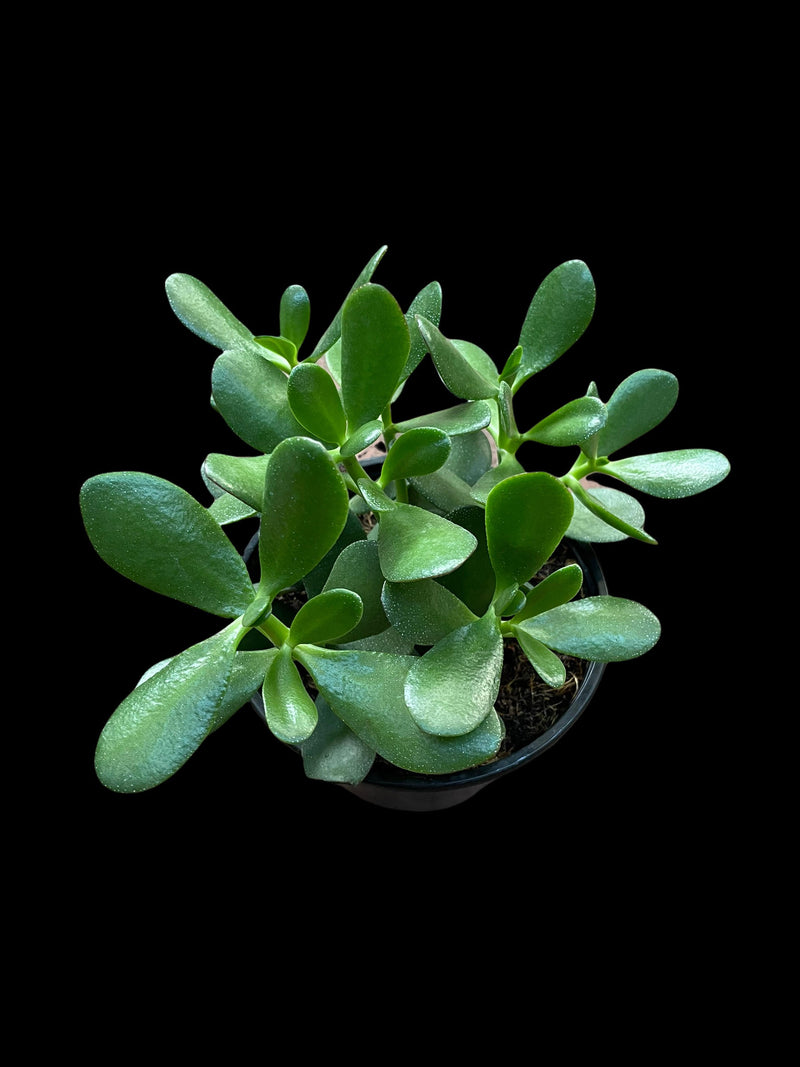
jade plant other names Crassula Ovata 'Jade Tree' – Jordan's JungleCACTUS AND SUCCULENT CARE: Cactus and Succulents come in thousands of sizes, shapes, colors and textures, and encompass a number of plant families. While classified Cactus are their own family, made up of about 125 genera and nearly 2,000 known species, succulent species can be found in a number of different plant families, including Cactus, Crassula, Euphorbia and Dracaena. While Cactus are native to the Americas, from Patagonia to western Canada,
CACTUS AND SUCCULENT CARE:
Cactus and Succulents come in thousands of sizes, shapes, colors and textures, and encompass a number of plant families. While classified Cactus are their own family, made up of about 125 genera and nearly 2,000 known species, succulent species can be found in a number of different plant families, including Cactus, Crassula, Euphorbia and Dracaena.
While Cactus are native to the Americas, from Patagonia to western Canada, Succulents can be found on every continent except Antarctica.
Cactus and Succulents both have adapted ways to preserve, store and use water. A succulent is defined by "a plant with thick, fleshy and swollen stems and/or leaves, adapted to dry environments." All succulents have the ability to take in and store water, since they are from areas of the world that rainfall is scarce.
When we think about Cactus and succulents, we think that they do not need to be watered often. In some ways, this is true, but in some others, it is the opposite. The key to successful Cactus and Succulent ownership is small amounts of water more frequently. There are many factors that prove to this. Cactus and succulents are designed to take in small amounts of water on a somewhat regular basis. The shape of their structure, shallow roots and even the environment they natively came from allow for this. In hot, dry conditions of the desert, the night time temps drop significantly, resulting in condensation and dew. That small amount of water will naturally slide down the sides of a Cactus, or trickle down through the rosettes of an Echeveria or Aloe, providing a small pool of water at the base of the plant. The shallow root structure is at or just below the surface of the soil, easily able to reach and drink up this small amount of water.
The ridges of a Cactus, or the leaves of a succulent (among other parts of succulents) take this water, and store it, drinking small amounts as the plant needs it.
Go too long in between watering, and the plant has exhausted all of it's resources, causing it to shrivel up and die. On the opposite end of this, as many people think, watering more heavily, but only every 2-3 weeks, provides the Cactus or succulent with too much water, all at once. They don't know when to stop drinking, so they will take up all the water, and turn to mush: basically exploding from the water.
Avoid both of these things by providing your Cactus or succulent with small amounts of water more frequently. How you do this is going to be trial and error, and everyone has a different approach. Some spray their Cactus with water each day, lightly misting it so as to produce a "condensation" effect. Some water directly in to the soil, in small amounts twice a week. Both can work.
We find that a decent rule of thumb is to provide a 4" pot, for example, with 1 tablespoon of water, two or three times a week. That is not a lot of water, and it will not cause the plant to explode, but will provide enough sustenance to prevent wrinkling or browning.
In the Winter months, you will most likely need to reduce this watering by at least 50%, as they go dormant.
Cactus and succulents generally have a very short growing season and a much longer dormant season. Because of this, fertilization should only occur in the short growing months of the Summer. You can use a general purpose fertilizer, or one designed specifically for Cactus, but either should only be used in June, July and August.
A loose, fast draining soil or soilless mix is ideal. A peat based mixture with lots of perlite, vermiculite or sand will do the trick. There are a number of pre-packaged Cactus and Succulent mixes on the market, but some are better than others. We use and recommend Premier or Coast of Maine. Both of these are great, but we still find that adding perlite or vermiculite to a commercial pre-mixed Cactus soil is good practice to keep it airy and fast draining. .
Because most Cactus and succulents do not have a significant root system, there is very little need to repot them, maybe every 2-3 years. When you do choose to repot, only go up 1 size.
Many people think that their succulent needs to be repotted because it is growing tall, in a strange fashion. Their root system is still shallow, but they are "stretching" because they are not receiving enough light. Try moving your plant to a new location with better, more even sun.
Most Cactus do very well in full sun environments, like the desert, where they are hit by the strong sun all day. Their spines, and even hairs, protect them from not only herbivores but also the harsh sun rays. They do best in lots of bright light. Many succulents such as Crown of Thorns, Euphorbias, Aloes and Haworthias can also tolerate full, all day sun, while others, such as Echeveria and many other types of Crassula prefer well lit, indirect sun. Morning sunlight is best for these soft tissue succulents so that they can absorb the warm morning rays without risking sunburn in the afternoon.
Most Cactus and succulents are generally free of pests, however, from time to time, we will find that Scale will effect them, along with Mealy Bugs on the leafier varieties of succulents. It is always best practice to isolate any new plants you bring in to your home for a few weeks to watch for little pests. If you were to find any, see our At Home Pest Recipes here.
Most Cactus and succulents are propagated from cuttings, either of the stem or leaves. These cuttings should be allowed to "scar over" for a week or so before being placed on soil. Watering a cutting is tricky, but we find that spraying them lightly a few times a week is best, to give water to the tiny roots, without running the risk of the soil holding too much water and the young cuttings rotting. Growing from seed is also an option, but is incredibly slow and can prove to be difficult for a beginner.
If you have any more questions, or need further assistance, please feel free to give us a call or shoot us an email!
Shipping Notes
- Free Standard Shipping on $100+ Orders to the USA.
- Except Preorder products are shipped in 48 hours.
- Delivery to the USA:
- Standard Shipping : 3-10 business days
- If time is of the essence, please consider selecting expedited delivery for faster service.
Exchange/Return Notes
- We offer a 30-day return/exchange service after receiving.
- Final sale items are not eligible for returns or exchanges.
- To process your return/exchange, please contact us at [email protected]
- Please click here for more details>>> Return & Exchange Policy