SKU: 82513169167
plant lights for indoors

plant lights for indoors Full Spectrum Indoor Plant Grow Light | Grow Lamp

Sale price$21.69 Regular price$24.10
Save 10%

Shipping Estimate
USA
  • USA
  • CAN

Ships within 48 hours · Estimated delivery Jul 12 - Jul 17

Promo Codes Available:

For Your Every Summer RSVP, with Code: SUMMER15

Description

plant lights for indoors Full Spectrum Indoor Plant Grow Light | Grow Lampdescription Bring light to the darkest corners of your home. Our full spectrum led grow lights deliver the wavelengths your plants actually use to grow, so a shady shelf or a windowless room is no longer off limits. The lights are fully adjustable, so you can shape the light around your plants and your space, not the other way around. We've put years of work into the internals, especially the power supply and control box, which is the most common


description

Bring light to the darkest corners of your home. Our full spectrum led grow lights deliver the wavelengths your plants actually use to grow, so a shady shelf or a windowless room is no longer off-limits.

The lights are fully adjustable, so you can shape the light around your plants and your space, not the other way around.

We've put years of work into the internals, especially the power supply and control box, which is the most common failure point on cheaper grow lights.

We're confident these are some of the most durable lights you can buy, and we back them with a 1 year guarantee. If anything goes wrong in that time, just contact our support and we'll arrange a refund or replacement.

why you will love it

built in timer

The light has a built-in timer, so it switches off on its own after 3, 6 or 12 hours, or stays on indefinitely if you prefer.

custom light settings

Ten brightness levels per setting, so you can dial the light up or down to suit each plant.

fits your space

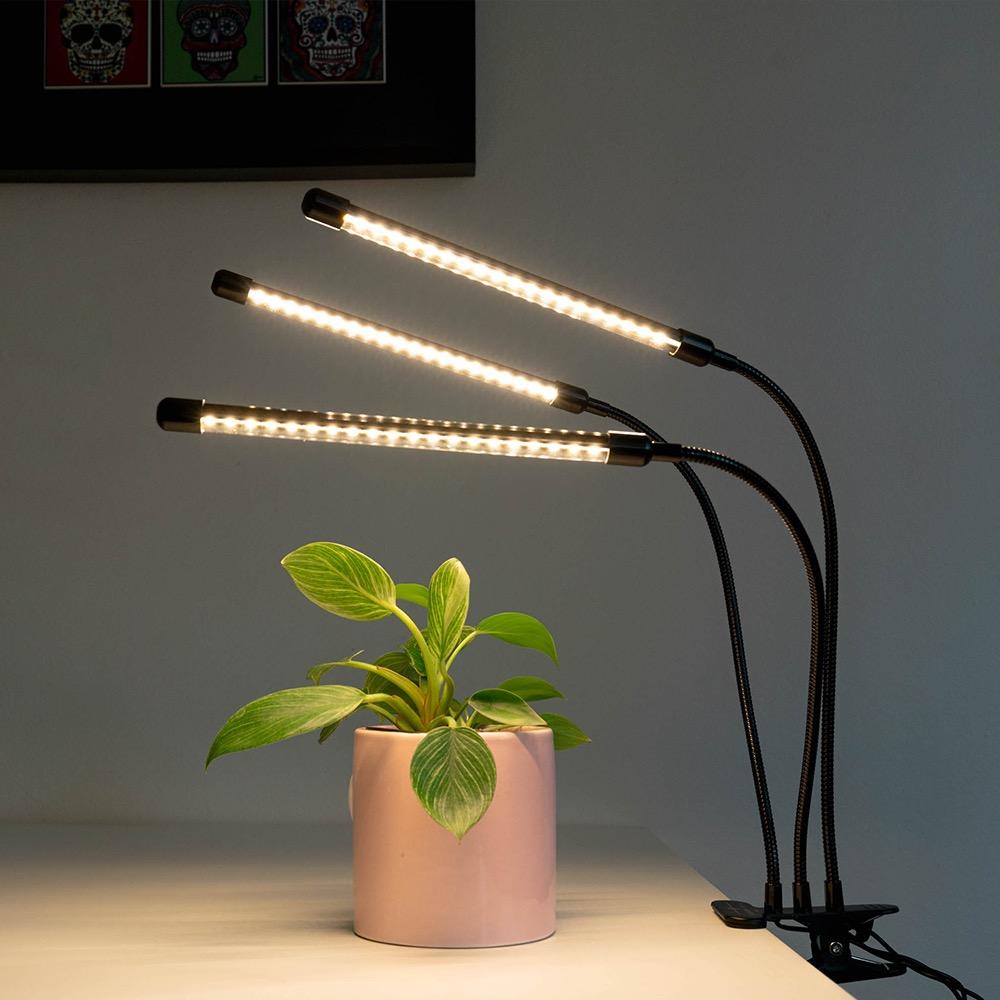
A simple clip fixes the light to a table, shelf or desk, and the flexible neck bends to reach plants wherever they sit, in soil or water.

how it works

Sunlight reaches your plants across a wide range of wavelengths, but plants only use a few of them to grow. Those useful wavelengths sit mostly in the blue and red parts of the visible spectrum. Our grow lights use LEDs tuned to emit those bands, concentrating the light where it does the most good.

The chart below shows where this light puts its energy: a peak in the blue band around 400 to 500nm and a stronger peak in the red band around 600 to 700nm, the two ranges plants rely on most for healthy growth.

Light output concentrated in the blue (400 to 500nm) and red (600 to 700nm) bands.

For more detail, see our FAQ articles on how to measure the effectiveness of a grow light and how grow lights differ from normal lights.

specifications

  • Light tube length: 27cm
  • Adjustable neck: 39cm
  • Power cord: 155cm
  • Clip opens comfortably to 6cm, and up to 7.5cm at a stretch
  • Positioning: keep the light no closer than 12 to 15cm from the plant, and no further than around 35 to 40cm
  • The clamp, adjustable necks and cord are black
  • Input voltage: 5V
  • Rated power: 10W (three-headed light)
  • Monthly energy cost: about $1.19 for the three-headed light (assumes 12 hours a day at an average Australian electricity price of 33c/kWh)
  • Expected lifespan: 50,000 hours

what's included

  • 1 × LED grow light
  • 1 × USB cable
  • 1 × wall socket adaptor
  • 1 × user manual
  • integrated controller

Note: the light does not come with a pot.

setup video

setting up your grow light

It arrives fully assembled. Clip it onto a table, shelf or other surface, then arrange the lights over your plants.

positioning your grow light

Keep the light at least 10cm from any leaves so they don't scorch.

  • Set the timer to match your plant and its spot:
    • 12 hours for plants in low-light spaces
    • 9 hours for spaces with indirect natural light
    • 3 hours for plants in bright, naturally lit spots
  • Think about where your plant comes from, too. A low-light houseplant may need very little extra light, while something like basil will want plenty.
  • Start dim and build up to the brighter settings over a few days, so your plants have time to adjust. If leaves start to brown or look scorched, lower the intensity.

The light in the video looks purple, but the setup is exactly the same.


Shipping Notes
  • Free Standard Shipping on $100+ Orders to the USA.
  • Except Preorder products are shipped in 48 hours.
  • Delivery to the USA:
  1. Standard Shipping : 3-10 business days
  • If time is of the essence, please consider selecting expedited delivery for faster service.
Exchange/Return Notes
  • We offer a 30-day return/exchange service after receiving.
  • Final sale items are not eligible for returns or exchanges.
  • To process your return/exchange, please contact us at [email protected]
  • Please click here for more details>>> Return & Exchange Policy
SKU: 82513169167

Discover Niche Categories That Outsell plant lights for indoors

Top-Converting Item to Boost Your Average Order

4.5 ★★★★★
Based on 482 reviews
Sort
Highest Rating
Newest First
Oldest First
Product Reviews
D
Verified Purchase
Daniel H. Phillips
West Palm Beach, US
★★★★★ 5
Small glitches but renews printer to like new.
Color: White Ink Pad 2xin
Makes the printer work like new, the software works well but I had to run the routines several times before the printer actually actually cleared. Now it works like a new printer.
WAS THIS REVIEW HELPFUL?YesReportShare
Reviewed in the United States on May 6, 2026
D
Verified Purchase
Dave
Pawtucket, US
★★★★★ 1
Really want an Epson Printer?
Color: White Ink Pad 2xin
Buyers get prepared for hours of frustration if have an Epson Ecotank printer because this seller does not tell you what's ahead when buying this product. One's instructions are vague and come with hours of frustration. Forget those U-tube videos they too only want to make small talk, you either buy this product and put up with hair-pulling software, or go directly to Epson and buy direct either way this will make you not want to buy another Epson product. Change out the Ink Pad reservoir in the back of printer at corner behind the ink tank. Will need a small Phillips-head driver (this kit comes with driver) to remove cover, once cover removed remove the ink pad attachment screw, save those screws for reinstalling new ink pad. Now comes the fun part resetting that E-11 Error shown on printer screen. Until this is resolve you will not be able to print anything. Before you get started with the given weblink nothing will not work until you turn off the Wi-Fi and connect printer to computer via USB cable; and, most printers do not come with that cable must buy on Amazon separately (under $5.00). Once cable connected check to make sure have a good connection from the Device Manager. Now clear out all pending print jobs. Then download the weblink shown in the instructions; do not even mess with that Driver and Utility Combo Pack (why instructions shows that who knows why...) just download www.wicrestpro.com then follow instructions; and, if you get a communications error you did not follow these steps in order. When you see Epson Adjustment Program click on the Port you will see selections (Auto Select and multiple printers locate your printer and click on that printer then click OK. Next screen click on Waste Ink pad counter, and make sure on next screen you don't go snooping around, just check all 3 boxes and click Initialize then here is when WTF may or not occur. When the OK button is clicked, counter will be initialized, and you click OK. If you get a Communication Error don't panic go back into your computer setting make sure Firewall for printer is off, Wi-Fi is off, Virus Protector is off, and remove "all pending print jobs" then make sure printer to USB cable is connected firmly. Then go back through same process most likely you will not get Communications error again, but a message reading turn off the printer then after turning off click ok, wait count to 20 then turn printer back on, install paper then click print test page. That's it you have now successfully installed the Ink Pad Counter.
WAS THIS REVIEW HELPFUL?YesReportShare
Reviewed in the United States on April 1, 2026
C
Verified Purchase
Char
Lowell, US
★★★★★ 4
PLEASE BE PATIENT
Color: White Ink Pad 2xin
OMG, this took me almost 2 weeks to get up and running. I followed all the instructions but still couldn’t get it to work. I even contacted Epson, and they told me it might be a hardware issue and that I would need to take the printer to one of their repair locations. I then contacted the seller, who tried to help by providing additional instructions, but I still had no luck. Eventually, after connecting the USB cable to another computer and carefully following the steps again, I was finally able to reset the waste ink pad successfully. It was definitely frustrating, but I’m grateful it finally worked in the end. I really love my Epson eco tank, it saved me a lot of money on ink with different brands so I’m ecstatic!!!!
WAS THIS REVIEW HELPFUL?YesReportShare
Reviewed in the United States on May 8, 2026
B
Verified Purchase
Briana Villatoro
New York, US
★★★★★ 5
Don't hesitate, worked perfectly and saved me a lot of money!
Color: White Ink Pad 2xin
Worked like a charm! It was straight forward with clear step by step instructions. Highly recommend.
WAS THIS REVIEW HELPFUL?YesReportShare
Reviewed in the United States on April 21, 2026
A
Verified Purchase
Amazon Customer
New York, US
★★★★★ 5
Easy to replace with no problems!
Color: White Ink Pad 2xin
Replaced Ink pad on my Epson ET 2800. Reset software instructions included which were very easy to follow.
WAS THIS REVIEW HELPFUL?YesReportShare
Reviewed in the United States on May 19, 2026

recommand products