Pay in installments of $6.45 with
 ,
,
 and
and

Shipping Estimate
USA
- USA
- CAN
- USA
- CAN
Ships within 48 hours · Estimated delivery Oct 25 - Oct 30
 Promo Codes Available:
For Your Every Summer RSVP, with Code: SUMMER15
Description
succulent ruby slippers Shop 'Echeveria harmsii – Ruby Slipper Succulent' Care and InfoIntroducing the Echeveria harmsii, known as the Ruby slipper succulent, which is a stunning succulent plant that belongs to the Echeveria, opens in a new tab genus. The name "Ruby Slipper" is derived from the vibrant red tips that adorn its fleshy, gray green leaves, reminiscent of the famous ruby slippers from "The Wizard of Oz." This plant is admired for its striking appearance and relatively easy care requirements. Native to Mexico, it thrives in
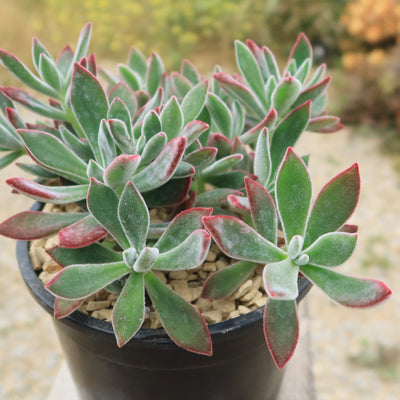
Introducing the Echeveria harmsii, known as the Ruby slipper succulent, which is a stunning succulent plant that belongs to the Echeveria, opens in a new tab genus. The name "Ruby Slipper" is derived from the vibrant red tips that adorn its fleshy, gray-green leaves, reminiscent of the famous ruby slippers from "The Wizard of Oz." This plant is admired for its striking appearance and relatively easy-care requirements.
Native to Mexico, it thrives in arid regions and is well-adapted to dry desert-like conditions. This succulent has several other common names such as ruby red, plush plant, red slippers plant, and red Echeveria.
The Echeveria harmsii is a light green succulent with thick, fleshy spoon-shaped velvet plush leaves that form beautiful rosettes, adding a touch of elegance to any succulent collection.
It can tolerate full sunlight, but direct sunlight above 6-8 hours a day isn't ideal for maintaining its vibrant colors.
As the plant grows, the leaves thicken and grow longer, creating a larger rosette shape.
The Ruby Slipper succulent typically reaches a height of around 6 inches and can spread up to 8 inches wide.
Its compact size makes it a versatile choice for both indoor and outdoor settings, bringing a pop of color and beauty wherever it is placed.
When it comes to flowers, during the spring and summer months, these charming Echeveria harmsii ruby slippers produce delicate, bell-shaped bright orange flowers on tall stalks. The Ruby Slipper plant's flowers are known for their vibrant hues, which contrast beautifully with the plant's gray-green foliage.
Propagation of the Ruby Slipper plant is relatively simple and can be achieved through methods such as stem cuttings or offsets. By carefully removing a healthy stem or offset from the mother plant and allowing it to callus before planting it in well-draining soil, you can successfully propagate new Ruby Slipper plants. With proper care and attention, these cuttings will develop roots and grow into mature plants, continuing the cycle of beauty and growth in your rock gardens.
Watering Needs
Like other succulents, opens in a new tab, Echeveria harmsii prefers infrequent but deep watering. It's crucial to allow the soil to dry out completely between waterings to prevent waterlogged conditions, which can be harmful to the plant.
To determine when to water your Echeveria ruby slipper, you can check the moisture level of the soil by inserting your finger into the soil up to an inch deep. If the soil feels dry at this depth, it's time to water your plants.
When watering Echeveria harmsii, it's essential to water the soil directly at the base of the plant rather than overhead. This helps prevent water from accumulating in the rosette of the plant, which can lead to rot issues. Use a watering can or a gentle stream of water to water the plant thoroughly but ensure excess water can drain away.
In the spring and summer, during the growing season, Echeveria harmsii may require slightly more frequent watering as it actively grows. However, in the dormant winter months, reduces watering significantly to mimic its natural environment.
Light Requirements
When growing Echeveria harmsii indoors, it's crucial to provide it with sufficient light to ensure its health and vibrancy. Place your Echeveria in a spot where it can receive bright, indirect sunlight for around 6 hours a day. A south or east-facing window is typically ideal for indoor succulents, as it offers the right balance of light intensity without the risk of scorching the leaves.
If natural light is limited indoors, you can supplement with a grow light designed for succulents. Position the grow light a few inches above the plant and leave it on for about 12-14 hours a day to mimic natural sunlight. Regularly rotate the plant to ensure even light distribution and prevent it from leaning toward the light source.
When growing Echeveria harmsii outdoors, choose a location that receives full sunlight but offers some protection from the intense midday sun. Place the plant in an area with partial shade during the hottest hours of the day to prevent sunburn on the leaves. It thrives in bright, indirect sunlight, so a location with morning sun and filtered afternoon light is ideal for outdoor cultivation.
Monitor your Echeveria harmsii ruby slipper plant for signs of sun damage, such as leaf discoloration or wilting. If you notice any issues, consider adjusting the plant's location to ensure it receives the right amount of light without being exposed to prolonged, direct sunlight. By providing the appropriate light conditions, both indoors and outdoors, you can help your Echeveria harmsii flourish and showcase its unique beauty.
Optimal Soil & Fertilizer Needs
The Echeveria harmsii prefers sandy, well-drained soil, as excess moisture can promote root and stem rot. Planet Desert specializes in succulents and has specialized succulent potting soil, opens in a new tab that includes an organic substrate with mycorrhizae to help with the growth of a healthy root system to help your succulents thrive. As an okay alternative, you can create your own potting mix, opens in a new tab by combining equal portions of perlite, coarse sand, and good natural potting soil.
When it comes to fertilizing Echeveria harmsii, it's best to use a balanced, water-soluble fertilizer specifically formulated for succulents. During the growing season in spring, you can fertilize your ruby slipper plant with a diluted succulent fertilizer once a year. Be cautious not to over-fertilize, as this can lead to fertilizer burn and damage the plant. In the fall and winter, when the plant is in its dormant phase, you can reduce or stop fertilizing to align with its natural growth cycle.
Hardiness Zones & More
When growing indoors, the Echeveria harmsii prefers a warm environment with temperatures ranging between 65-75°F during the day and slightly cooler temperatures at night. Echeveria harmsii prefers low to moderate humidity levels, making it well-suited for indoor environments with average humidity levels. Avoid placing the plant in areas with high humidity, as this can increase the risk of fungal diseases. Adequate air circulation around the plant can help maintain optimal humidity levels and prevent moisture-related issues.
For outdoor cultivation, this plant is suitable in USDA zones 9-11, where temperatures remain above freezing to support healthy growth. Outdoor environments with good air circulation and low humidity are ideal for this succulent to prevent moisture-related issues and maintain overall plant health.
Final Thoughts
Overall, the Echeveria harmsii (Ruby slipper plant) is a delightful succulent known for its captivating appearance and ease of care. Its striking, red-tipped light green leaves, compact size, and vibrant bell-shaped flowers make it a standout choice for succulent enthusiasts of all levels. Whether displayed individually or as part of a succulent arrangement, the Ruby Slipper plant is sure to add a touch of elegance and beauty to any space it graces. Its compact size and low maintenance requirements make it an ideal choice for beginners or those with limited space.
Shipping Notes
- Free Standard Shipping on $100+ Orders to the USA.
- Except Preorder products are shipped in 48 hours.
- Delivery to the USA:
- Standard Shipping : 3-10 business days
- If time is of the essence, please consider selecting expedited delivery for faster service.
Exchange/Return Notes
- We offer a 30-day return/exchange service after receiving.
- Final sale items are not eligible for returns or exchanges.
- To process your return/exchange, please contact us at [email protected]
- Please click here for more details>>> Return & Exchange Policy