Pay in installments of $6.04 with
 ,
,
 and
and

Shipping Estimate
USA
- USA
- CAN
- USA
- CAN
Ships within 48 hours · Estimated delivery Jul 21 - Jul 26
 Promo Codes Available:
For Your Every Summer RSVP, with Code: SUMMER15
Description
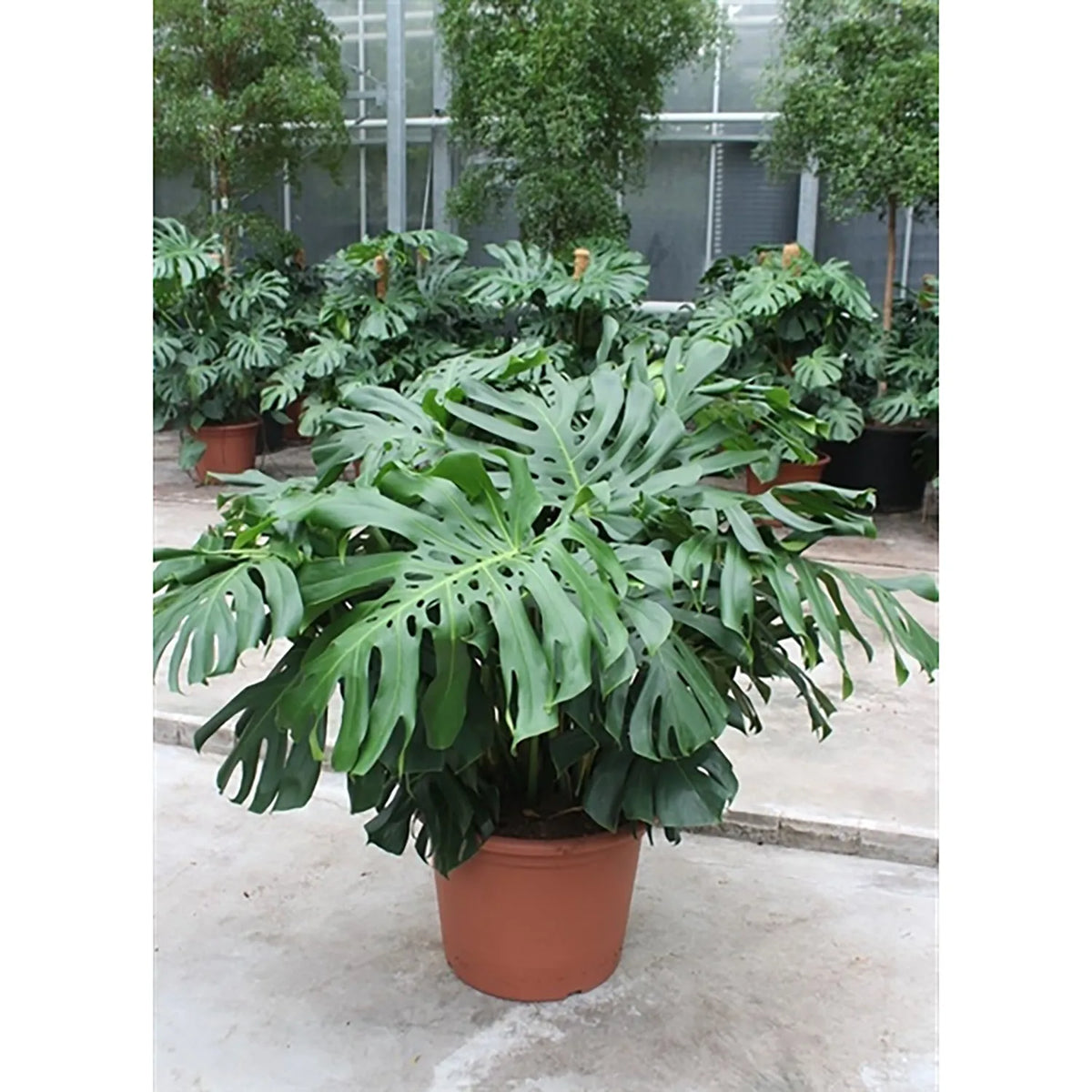
6 monstera deliciosa 120Description: Monstera Deliciosa, also known as the Swiss Cheese Plant, is a timeless favourite among houseplant enthusiasts, celebrated for its large, glossy, fenestrated leaves and tropical appeal. This specimen, standing 120140 cm tall and containing six plants in a single 55 cm pot, is perfect for creating a lush, statement look in large indoor spaces. Native to the tropical rainforests of Central and South America, Monstera Deliciosa is not only
Description: Monstera Deliciosa, also known as the Swiss Cheese Plant, is a timeless favourite among houseplant enthusiasts, celebrated for its large, glossy, fenestrated leaves and tropical appeal. This specimen, standing 120–140 cm tall and containing six plants in a single 55 cm pot, is perfect for creating a lush, statement look in large indoor spaces.
Native to the tropical rainforests of Central and South America, Monstera Deliciosa is not only visually stunning but also easy to care for, making it an excellent choice for both beginners and experienced plant owners. The multiple plants in the pot enhance its fullness, creating a dense, dramatic appearance.
Care Guide
1. Light Requirements
- Preferred: Bright, indirect light to maintain vibrant green foliage and encourage the characteristic leaf splits (fenestrations).
- Tolerates: Moderate light, though growth may be slower, and leaves may develop fewer splits.
- Avoid: Prolonged direct sunlight, which can scorch the leaves, and very low light, which may cause leggy growth.
2. Watering
- Frequency: Water when the top 5 cm (2 inches) of soil feels dry.
- Method: Water thoroughly until it drains out of the bottom, then discard excess water. Avoid letting the plant sit in water.
- Caution: Overwatering can lead to root rot, while underwatering may cause leaf wilting.
3. Humidity
- Thrives in moderate to high humidity (50–60%).
- Increase humidity by misting the plant, using a humidifier, or placing it near a pebble tray with water, especially in dry indoor environments.
4. Temperature
- Ideal range: 18–27°C (65–80°F).
- Protect from temperatures below 10°C (50°F), cold drafts, or sudden temperature changes.
5. Soil
- Requires a well-draining, nutrient-rich potting mix.
- A mix of standard potting soil with added perlite or bark is ideal to replicate its natural growing conditions.
6. Fertilising
- Feed with a balanced liquid fertiliser every 4–6 weeks during the growing season (spring and summer).
- Reduce feeding in autumn and stop during winter when growth slows.
7. Pruning
- Prune to maintain the plant’s shape and size. Cut back leggy growth and remove yellowing or damaged leaves at the base.
- Regular pruning encourages new growth and helps keep the plant bushy.
8. Repotting
- Repot every 2–3 years or when the plant becomes root-bound.
- Use a pot slightly larger than the current one with fresh, well-draining soil.
- For large specimens, top-dress by replacing the top layer of soil annually.
9. Propagation
- Propagate Monstera through stem cuttings with at least one node and aerial root.
- Place cuttings in water or soil and keep them in a warm, bright location until roots develop.
10. Common Problems
- Yellow Leaves: Usually a sign of overwatering or poor drainage. Check soil moisture and adjust watering habits.
- Brown Leaf Edges: Often caused by low humidity, underwatering, or excessive direct sunlight.
- Leggy Growth: Results from insufficient light. Move the plant to a brighter location.
- No Fenestrations: Indicates young leaves or insufficient light. Mature leaves develop splits with proper care.
11. Pests
- Occasionally affected by spider mites, mealybugs, or scale.
- Regularly wipe leaves with a damp cloth to remove dust and deter pests. Treat infestations with neem oil or insecticidal soap.
Styling Tips
- Place the XXL Monstera Deliciosa in a bright corner or as a centrepiece in a large room to showcase its dramatic foliage.
- Use the included 55 cm pot or pair it with a neutral or textured planter for a modern look.
- Let its trailing aerial roots add a natural, untamed aesthetic, or train them with a moss pole or stake for a vertical effect.
- Pair it with smaller plants like pothos or ferns for a layered, tropical vibe.
Benefits of Monstera Deliciosa
- Air-Purifying: Helps improve indoor air quality by filtering toxins.
- Low Maintenance: Thrives with basic care, making it ideal for busy households.
- Aesthetic Appeal: Its bold, fenestrated leaves bring a sense of luxury and tropical beauty to any space.
This Monstera Deliciosa, with six plants in one pot, offers a full, lush display that will elevate the ambience of any interior, combining timeless style with easy care.
Shipping Notes
- Free Standard Shipping on $100+ Orders to the USA.
- Except Preorder products are shipped in 48 hours.
- Delivery to the USA:
- Standard Shipping : 3-10 business days
- If time is of the essence, please consider selecting expedited delivery for faster service.
Exchange/Return Notes
- We offer a 30-day return/exchange service after receiving.
- Final sale items are not eligible for returns or exchanges.
- To process your return/exchange, please contact us at [email protected]
- Please click here for more details>>> Return & Exchange Policy