SKU: 94650010781
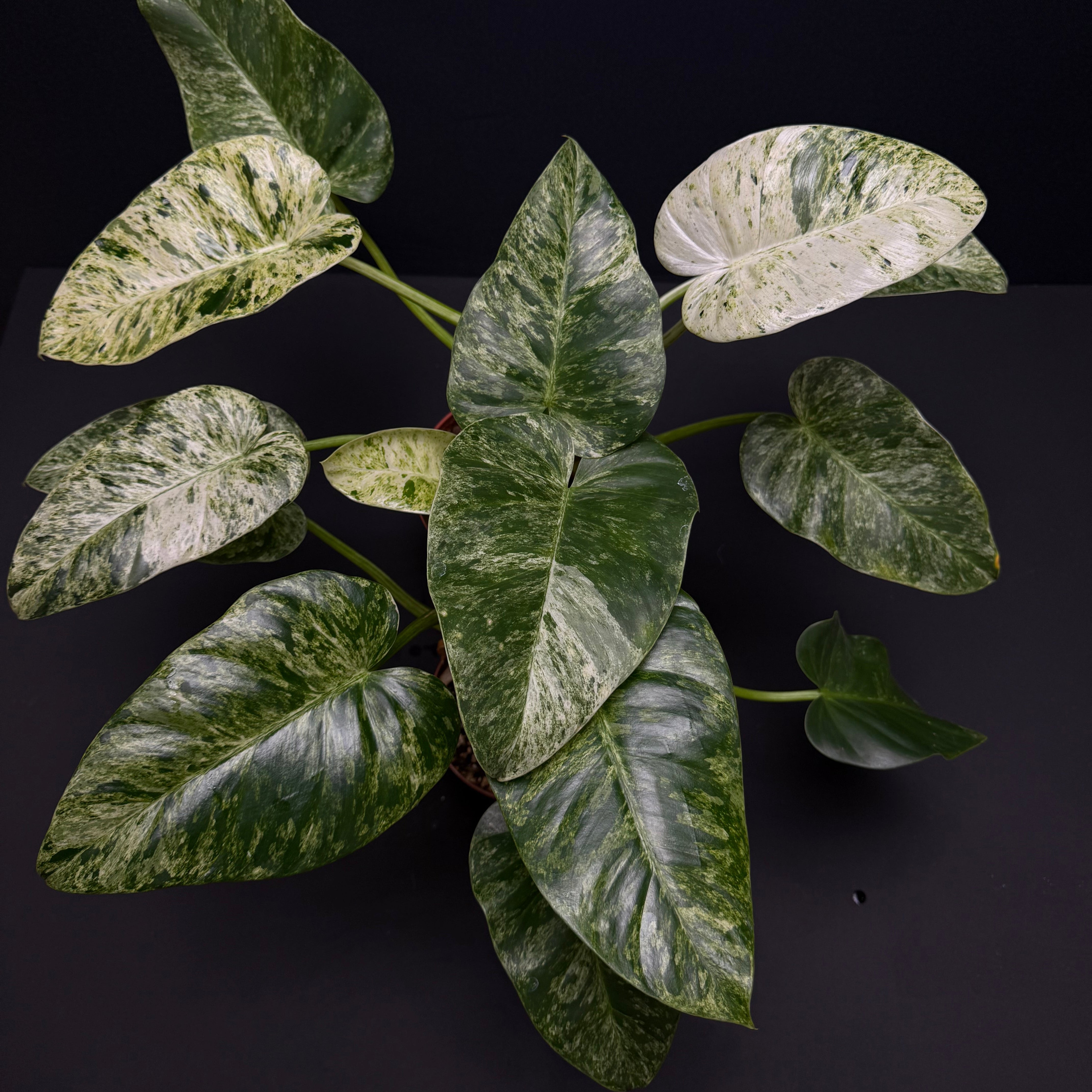
philodendron giganteum giant philodendron

philodendron giganteum giant philodendron Philodendron giganteum blizzard variegated – Green Mirrors

Sale price$20.89 Regular price$23.21
Save 10%

Pay in installments of $5.80 with ShopPay, AfterPay and Klarna

Shipping Estimate
USA
  • USA
  • CAN

Ships within 48 hours · Estimated delivery Aug 28 - Sep 2

Promo Codes Available:

For Your Every Summer RSVP, with Code: SUMMER15

Description

philodendron giganteum giant philodendron Philodendron giganteum blizzard variegated – Green MirrorsSpecies: Philodendron giganteum Cultivar: Philodendron giganteum blizzard Plant genus: Philodendron Plant family: Araceae Native plant: Brazil North, Dominican Republic, Leeward Is., Puerto Rico, Trinidad Tobago, Venezuela, Windward Is. Soil drainage: Moist and well drained, we recommend a substrate mix composed of coco coir, perlite, vermiculite, sphagnum moss, pumice. Soil pH: Acidic Fertilizers: For optimal plant development, we recommend using a

Species: Philodendron giganteum

Cultivar: Philodendron giganteum blizzard

Plant genus: Philodendron

Plant family: Araceae

Native plant: Brazil North, Dominican Republic, Leeward Is., Puerto Rico, Trinidad-Tobago, Venezuela, Windward Is.

Soil drainage: Moist and well-drained, we recommend a substrate mix composed of coco coir, perlite, vermiculite, sphagnum moss, pumice.

Soil pH: Acidic

Fertilizers: For optimal plant development, we recommend using a bio-type fertilizer (we use the BioBizz brand for the plants we cultivate) with added silica, from early March to late November.

Air humidity: Philodendron giganteum is a species well adapted to indoor environments, with air humidity starting from 40%.

Temperature: 18-26 degrees Celsius

Light: Full indirect light


Height of plant including pot: 

Size M: 40-45cm

Size L: 50cm


Pot diameter: 

M: 12cm

L: 15cm


Philodendron giganteum is, as its name suggests, a species that (under optimal growing conditions) looks like Gulliver in the land of the dwarfs compared to other Philodendron species. And we are not exaggerating at all—on mature plants, the petiole reaches a length of 60-70 cm, while the heart-shaped leaf can grow to a size of 50-80 cm. Philodendron giganteum blizzard is its variegated variant, with the name "blizzard" describing the absolutely spectacular white-green variegation.

Like all Philodendron species, Philodendron giganteum thrives in abundant indirect light (exposure to direct sunlight can discolor its leaves) and prefers a substrate that is watered when the top two centimeters have dried out.

The plant should be mounted on a support pole wrapped in coconut fiber or moss, in which case the aerial roots will cling to this support, resulting in a plant with a more vigorous stem and increasingly larger leaves.


Attention! To check the moisture level of the substrate, inserting a finger into the pot at a depth of 2 cm is the best way to measure soil moisture.

Thus, if you feel the substrate is wet, keep the watering can away from it for one to two days, and if you feel it's dry, water it.

Attention 2! When watering, consider the pot in which the plant is planted, as well as the amount of substrate and its degree of aeration. In other words, don't pour a liter of water into a pot with a diameter and height of 12 cm, as you may drown the plant's roots. It's best to discard excess water from the collector pot half an hour after watering.


Good luck with caring for it! And don't forget to give us updates about your plant, using the hashtag #greenmirrors and tagging @green.mirrors in your Instagram posts! We promise to share them in our stories.


Tags: Philodendron, Philodendron giganteum, Philodendron giganteum blizzard variegated, Araceae, rare plants, unusual plants, leaf decorative plants, climbing plants, purifying plants, indoor decorative plants

Shipping Notes
  • Free Standard Shipping on $100+ Orders to the USA.
  • Except Preorder products are shipped in 48 hours.
  • Delivery to the USA:
  1. Standard Shipping : 3-10 business days
  • If time is of the essence, please consider selecting expedited delivery for faster service.
Exchange/Return Notes
  • We offer a 30-day return/exchange service after receiving.
  • Final sale items are not eligible for returns or exchanges.
  • To process your return/exchange, please contact us at [email protected]
  • Please click here for more details>>> Return & Exchange Policy
SKU: 94650010781

Discover Niche Categories That Outsell philodendron giganteum giant philodendron

Top-Converting Item to Boost Your Average Order

4.8 ★★★★★
Based on 7 reviews
Sort
Highest Rating
Newest First
Oldest First
Product Reviews
R
Verified Purchase
Ricky stein
Birmingham, US
★★★★★ 1
Don’t buy
Set name: K2 SE Combo, Set name: K2 SE Combo
This printer is pretty awesome. Here is the biggest catch to it. We have spent hundreds of dollars on the app and or validating what we could buy between buying filament and everything else. This thing does not connect properly. It is very technical if you are not smart. This is a terrible thing to buy. I’m a very educated person and so are the other 3 to 4 people in my household that have all tried to use this thing it will not let you change individuals to print off it and even the amount of money you spend to buy credit credits and or other items that you want to purchase in the store do not print properly. This sucks don’t buy it even though this equipment is awesome. This is the worst thing I wish I’d never bought. I do not say this in the test and or ignorance I have studied. I have read up. I’ve looked at forums. I’ve been on Reddit. Everyone says this creatality is extremely difficult and we have definitely found this out firsthand. I would definitely return this, but I think my window has closed. It sucks when you buy a product and you have it for like 2 to 3 weeks before you get to use it but then your window to return it is closed. The app does not match what is online and or if you have more than one person that wants to print, you cannot share unless the other person is logged out and even if the person is logged out, it does not always match the same, so for example, I have tons of money and credit on my account, but it will not let me print out certain apps and or creations then it tells me that it will work on our item that we have purchased, but then it’ll say it does not work. It will not print. 3-D printer is a scam. It sucks. It has great potential but this is not the one for you. Don’t waste your money too much money.
WAS THIS REVIEW HELPFUL?YesReportShare
Reviewed in the United States on February 18, 2026
E
Verified Purchase
Elton Smith
Omaha, US
★★★★★ 5
Forget Adventurer 5M , This is the true and easy to use beginner machine
Set name: Ender 3 V3 SE
This is my 3rd 3d printer. Once I spent about 45 minutes assembling it has been printing nonstop since the amazon driver dropped it off, these are the best for reliability and perfect for hobbyists. It is not the quickest machine out there, but it makes up for it with a quality print good price as well.
WAS THIS REVIEW HELPFUL?YesReportShare
Reviewed in the United States on May 25, 2026
H
Verified Purchase
hearmeout
Bozeman, US
★★★★★ 4
One - Month Review
Set name: Ender 3 V3 SE, Set name: Ender 3 V3 SE
First - I wrote a out of the box review - I do not know if this review will replace the old review or compliment it. Just in case this review replaces the old review - I will repeat a few of the important points from the previous review. I must also say it helps a great deal if you are already familiar with Ender because about 80% or more of the machine is built the same way as the older models. If this is your first Ender - read the instructions and check to make sure you have all the parts. Placing the parts where you can easily tear open the bags and not having to search for a part cuts down the assembly time. While the assembled printer takes up a small footprint - give yourself room to work. This is my 3rd printer - my first one I made from scratch. It took about 2 weeks to get it assembled and another two weeks to get it to print properly. Most of that time was spent modifying the Martin software so it would run my machine! My second one was an Ender V1. It took me about 90 minutes to assemble and about 30 minutes to get it to work. Over the years - I modified it to the point it was virtually impossible to tell the difference between it and a V3. I replaced it because a least one of the motors was going bad and I did not want to do the repairs. I picked this printer for 3 reasons 1) it was on sale, 2) I am now wheelchair bound and needed a printer that did not require too much assembly, and 3) I had worked with Ender before and knew how they worked. I was able to keep some of the old parts from the old machine (but threw most away). Everything was packaged well, but the small parts are in plastic bags that you have to tear or cut open - so be careful you do not lose any parts! There are only three parts to be assembled. They are the base, the frame, and the screen. I had no trouble getting the machine together - did have some trouble getting it to work. I was never able to reach customer service which ranged between "Who are you Kidding?" and "Did you really expect any?" I did some internet searching (there is lots of stuff out there - many are good YouTube videos). I found I needed to do an update - it got a bit complicated here. Part of the update was done using the hidden slot on the LEFT side of the removable screen and part was done using a SD card on the LEFT side of the Unit. (Ender does NOT tell you this on their website!). I was already angry when I tried their slicer and it did NOT work - after not being able to get customer service again. I deleted their slicer and used my Cura. After doing a few prints using Cura (which works fine) a couple days later, I reinstalled their slicer and did some troubleshooting - I found I had a setting wrong. I use both Cura and their slicer now because of the differences. Each one has some features the other one lacks. One example: The Cura has a large number of preset configurations, and it is easy to save a custom configuration. The Creality titles the g-code with a filename that includes the estimate print time. I tried customer service and actually someone! They did give me the manual settings for generic Pla - when I asked how to save those settings they send me to a useless link. I will research how to save one day - but will use my Cura for generic pla until then. What I like about the machine. 1} While it is nosier (a trade-off for higher speed) - it is still much quieter than the original Ender I had before modifications. 2)The new ribbon and print head are a big improvement. The filament is easier to change, and you can easily make prints with different colors! I do not miss the bowden tube and individual wires at all! 3) I like to put my prints on a card. The old machine used a micro-SD card - and I quicky bought an adapter! The new machine takes regular SD cards and no adapter is needed! 4) I really like the automatic leveling feature. There have been times I have spent hours getting my manual table set the way I wanted. So far - it has worked great. I have only made about 50 prints - so I cannot tell you how reliable it is in long term use. 5) The quality of prints is much better than my old machine. I am not sure whether this due to being a better machine or the stepper motor needing replacement. What I do not like: 1) The SD card has to be put into its slot upside down. 2) The controls and the SD card slot are all on the left side of the printer. I think putting the computer connection and the SD card would have been much better on the front of the machine. 3) Updating is like putting up a Christmas tree. The firmware is done with a hidden C connector on the left side of the detachable screen (this is like putting up a Christmas tree). Fine details on display etc. are put in using the SD card (this is like putting the lights on the tree). Once you figure out what goes where - it is the easiest printer to update I have had. 4. This one is a mixed bag. I do not give their customer service good marks - but the fact I found solutions on the internet was a good thing.
WAS THIS REVIEW HELPFUL?YesReportShare
Reviewed in the United States on April 5, 2026
S
Verified Purchase
Sid Hubbs
West Palm Beach, US
★★★★★ 5
The K2 SE is a great entry level printer. Don't let the naysayers get you down!
Set name: K2 SE
I bought the K2 SE because it was inexpensive and I wanted to get into 3D printing. I had a Creality laser engraver that worked well, so I figured I'd go with the brand I knew. I bought the additional enclosure because I was planning to use this in the garage where my wood shop is, and I wanted to keep some dust out. I have been pushing this thing pretty hard for three months now and it has not so much as looked at me cross eyed. It takes everything I throw at it. The quality seems to be there, as nothing is wearing out. I have a little superlube oil and grease to keep up the maintenance, and I suspect any failures people report have been on unmaintained machines. If you're the type that drives your car without changing the oil, 3D printing is not for you. A quick note on 3D printing, for the uninitiated. When you see the one and two star reviews for the K2 SE, make sure you read why the reviewer is leaving the low rating. "Doesn't come with filament" - if you're not buying a combo with filament, none of the printers on the market come with filament. "Makes bubbles and pops when printing" - this is wet filament and not the fault of the printer (dry your filament). 3D printing is not a set it and forget it proposition, at least not at first. It requires a little skill (that can be built), a little knowledge (the U of Tube), and a little patience while you learn how to use the machine. Now for the machine itself... The print quality surprised me as a first time 3D printer user. I have purchased 3D printed items in the past and the lines were not something that impressed me. The K2 SE prints pretty much the same quality as the higher end Bambu Labs printers. The speed is all I could ask for, and I have fed this thing all kinds of PLA, PETG and TPU from Creality, Sunlu, Polymaker and AnyCubic without a problem. Any issues I have had have been the fault of the operator (me) not knowing I had to dry PETG before I use it. I have a Creality filament dryer now and dry my PETG right out of the package, then store it in an airtight container with dessicant. I have two printers running dried PETG sitting behind me right now and they're doing great. If I have a single complaint about the K2 SE, it's the bed size. At 215 x 220 it's smaller than the industry "standard" of 256 x 256, and if you get some of the larger prints that are designed for a "standard" sized printer, they won't fit the build plate. But I knew that coming into this, because they advertise the size right up front. Overall, I'm happy with the K2 SE. It was an excellent entry level printer and I have learned a lot from using it. I may even buy a second to add to my growing farm.
WAS THIS REVIEW HELPFUL?YesReportShare
Reviewed in the United States on May 20, 2026
R
Verified Purchase
ReluctantConsumer
Belleville, US
★★★★★ 5
Creality K1 SE - Prints great with stock settings - needs a side spool mount
Set name: K2 SE, Set name: K2 SE
I bought the Creality K1 SE a little over a week ago. I had an Ender 3 S1 before this printer. The K1 SE is so, so much easier to print with right out of the box! I definitely recommend it. It's a good way to get the improvements that were built into Creality's K1C, but at a nicer price. Plus, you can install your own version of Klipper if you want. I've printed 10 or so things in PLA and PETG, and I haven't had any failed prints. The automatic bed leveling has just worked. I have not had any problems with bed adhesion. On the Ender 3 S1, I only used a textured PEI plate, but the smooth build plate on the K1 SE works fine. The extruder cooling fan also seems ok for what I've printed so far. I printed an overhang test and the 75 degree overhang looks fine, but it had trouble at 80 degrees. The bridging test looked ok. (The longest bridge was only 25 mm on that test however.) I've put the printer in a soft-sided enclosure that I had used for my old Ender 3 S1. (It's easy to find similar encolsures.) The LEDs on the K1 SE are bright enough to see inside which is something that I was concerned about before I purchased. However, this enclosure makes it difficult to access the back of the printer where the filament spool is mounted, so I designed a mount that clamps onto the side-bar - see the pictures. The files are on Printables - "Creality K1 SE Side Spool Mount".
WAS THIS REVIEW HELPFUL?YesReportShare
Reviewed in the United States on January 21, 2025

recommand products