Pay in installments of $6.46 with
 ,
,
 and
and

Shipping Estimate
USA
- USA
- CAN
- USA
- CAN
Ships within 48 hours · Estimated delivery Oct 9 - Oct 14
 Promo Codes Available:
For Your Every Summer RSVP, with Code: SUMMER15
Description
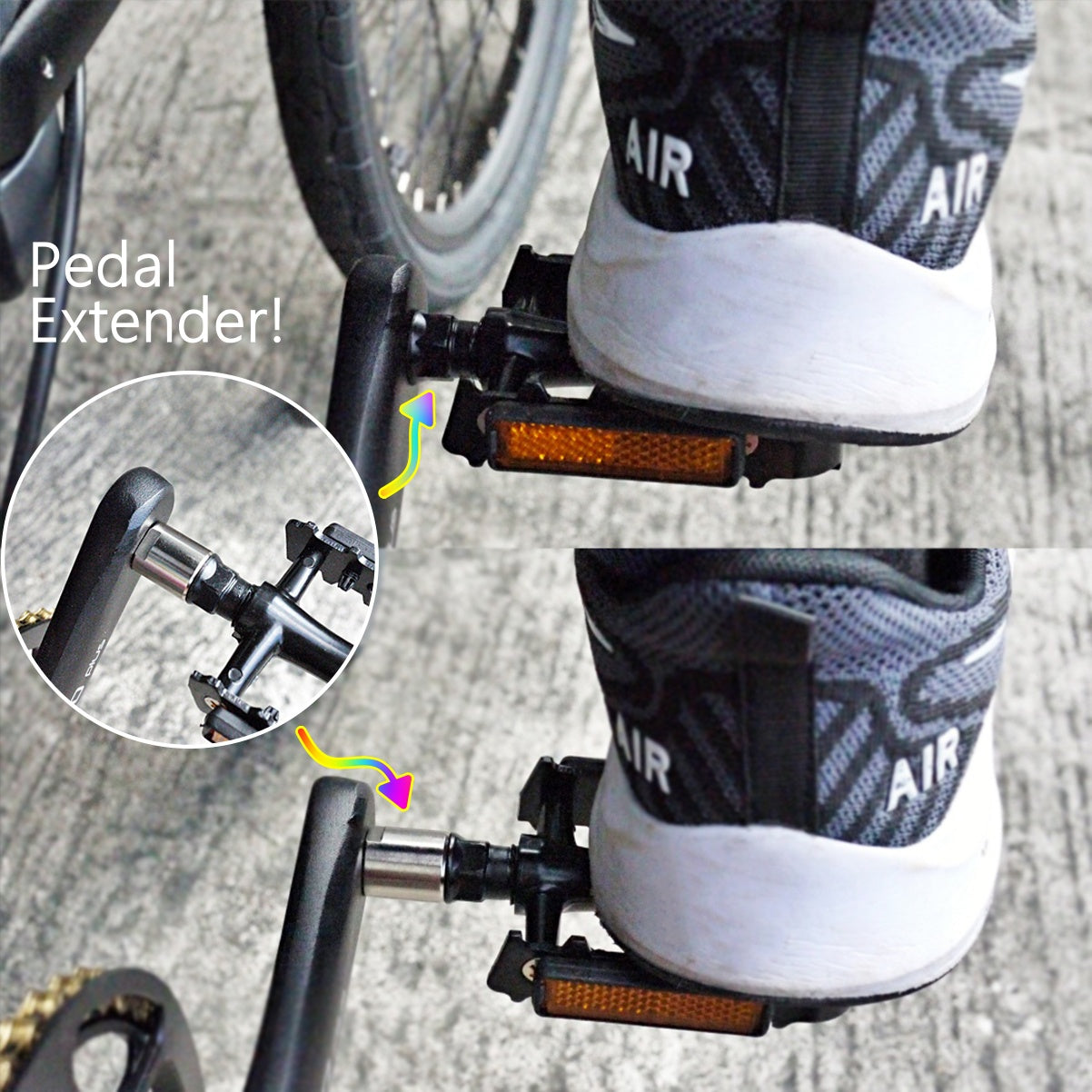
bicycle pedal adapter 9/16 to 9/16 Pedal Adapter ExtenderIntroducing our Pedal Extenders 21mm 9 16 9 16 Black the perfect solution for enhancing your cycling experience. These pedal extenders are designed to provide you with an additional 21mm extension without altering the pedal size, ensuring a comfortable and personalized fit for your cycling needs. Key Features: Size: 9 16 Crank to 9 16 Pedals The pedal extenders are meticulously crafted with precision to seamlessly fit 9 16 crank to 9 16 pedals,
Introducing our Pedal Extenders 21mm 9/16-9/16 Black – the perfect solution for enhancing your cycling experience. These pedal extenders are designed to provide you with an additional 21mm extension without altering the pedal size, ensuring a comfortable and personalized fit for your cycling needs.
Key Features:
Size: 9/16 Crank to 9/16 Pedals The pedal extenders are meticulously crafted with precision to seamlessly fit 9/16 crank to 9/16 pedals, allowing you to enjoy the benefits of extended reach without the need for a size change.
Style: Platform Pedals Embrace the versatility of platform pedals, offering a broad and stable surface for your feet. This style ensures an optimal grip and support, enhancing your control and confidence during every ride.
Material: Steel Built to withstand the rigors of cycling, these pedal extenders are constructed from durable steel. The robust material not only ensures longevity but also provides the strength needed for a secure and reliable cycling experience.
Enhanced Comfort and Performance: With a 21mm extension, these pedal extenders cater to riders seeking improved comfort and performance. Achieve a more ergonomic and personalized riding position, reducing strain and enhancing your overall cycling experience.
Easy Installation: Designed for user-friendly installation, these pedal extenders can be effortlessly attached to your existing pedals. The straightforward process ensures that you spend less time on setup and more time enjoying the benefits of extended pedal reach.
Upgrade your cycling adventure with our Pedal Extenders 21mm 9/16-9/16 Black. Whether you're an avid cyclist or a casual rider, these extenders provide a simple yet effective solution to enhance your comfort and performance on the road or trail. Pedal with confidence, knowing that your ride is optimized for your unique preferences.
PEDALS EXTENDERS 21MM 9/16-9/16 BLACK.
- Size: 9/16 Crank to 9/16 Pedals
- Style: Platform Pedals
- Material: Steel
- Bearing: Bearing
- Color: Black
Bicycle Pedals sizes
Understanding Bicycle Pedal Sizes: 1/2" vs 9/16"
Understanding Bicycle Pedal Sizes: Unraveling the Mystery of 1/2" and 9/16"
When it comes to choosing bicycle pedals, one often encounters the terms 1/2" and 9/16". These numbers refer to the pedal thread sizes, and understanding them is crucial for ensuring compatibility with your bike. In this guide, we'll delve into the differences between these two pedal sizes and shed light on the types of bikes that commonly use each.
1. Understanding Pedal Thread Sizes
a. 1/2" Pedals: A Legacy Size
Description: Pedals with a 1/2" thread size were once the standard for many bicycles. This older and less common size is typically found on some children's bikes, entry-level adult bikes, vintage models, and bikes with a one-piece crank.
Use Cases: If you own a vintage bicycle, a bike designed for casual, non-performance use, or a bike with a one-piece crank, it may have 1/2" pedal threads.
b. 9/16" Pedals: The Modern Standard
Description: In the cycling world today, 9/16" is the prevailing pedal thread size for most adult bikes. This larger and more robust thread size provides increased durability and strength, making it the standard for performance and contemporary bicycles with a three-piece crank.
Use Cases: If you have a modern road bike, mountain bike, hybrid bike, or any other high-performance bicycle with a three-piece crank, it likely uses pedals with a 9/16" thread size.
2. Determining Your Bike's Pedal Thread Size
a. Check Your Bike's Specifications
Refer to your bike's specifications, either in the owner's manual or on the manufacturer's website. This information should include the pedal thread size.
b. Measure Your Current Pedals
If you have existing pedals on your bike, you can directly measure the pedal axle diameter. 9/16" pedals will have a larger diameter compared to 1/2" pedals.
c. Consult with a Bike Shop
If you're unsure or don't have the means to measure, visit your local bike shop. They can quickly determine your bike's pedal thread size and recommend suitable replacements.
3. Upgrading Pedals and Compatibility
If you're considering upgrading your pedals, it's essential to choose pedals with the correct thread size for your bike. Most high-quality pedals are available in both 1/2" and 9/16" variants, but always double-check before making a purchase.
4. Conclusion: Matching Pedals to Your Bike
In conclusion, understanding the distinction between 1/2" and 9/16" pedal thread sizes is pivotal when it comes to maintaining or upgrading your bike. While 1/2" pedals are associated with older or entry-level bicycles, the 9/16" size has become the modern standard for performance-oriented and contemporary bike models, especially those with a three-piece crank. Knowing your bike's specifications and selecting the right pedal thread size ensures a seamless fit, allowing you to fully enjoy your cycling adventures. So, whether you're cruising on a vintage ride or conquering challenging trails on a modern mountain bike, pedal on with confidence!
.installation tips
Installing Bicycle Pedals: Wrenches, Grease, and Righty-Tighty, Lefty-Loosey
Installing Bicycle Pedals: Wrenches, Grease, and Righty-Tighty, Lefty-Loosey
Installing bicycle pedals might seem like a straightforward task, but doing it right ensures a smooth and trouble-free ride. Whether you're replacing old pedals or installing a new set, here's a step-by-step guide to help you get it done efficiently.
Tools You'll Need
- Pedal Wrench (15mm): A long-handled wrench designed for pedal removal and installation.
- 6mm Allen Wrench: For pedals with an Allen key fitting on the pedal axle.
- Grease: To apply a small amount to the pedal threads for prevention of corrosion.
Step-by-Step Installation Guide
1. Identify the Drive Side and Non-Drive Side Pedals
Most bicycles have different threading on the drive side (right side) and the non-drive side (left side). The drive side typically has regular, right-handed threads (clockwise to tighten), while the non-drive side has reverse, left-handed threads (counter-clockwise to tighten).
2. Choose the Correct Pedal for Each Side
Pedals are usually labeled "L" for the left side (non-drive) and "R" for the right side (drive). Ensure you're installing the correct pedal on each side.
3. Apply Grease to the Pedal Threads
Add a small amount of grease to the pedal threads. This helps prevent the pedal from seizing onto the crank arm over time, making future removal much easier.
4. Begin Installation by Hand
Thread the pedal into the crank arm by hand initially. This helps prevent cross-threading and allows you to feel if the threads are engaging correctly. Remember the righty-tighty, lefty-loosey rule: clockwise to tighten on the drive side and counter-clockwise on the non-drive side.
5. Use the Pedal Wrench or Allen Wrench
Once the pedal is threaded in by hand, use the appropriate tool to tighten it further. For a 15mm pedal wrench, turn clockwise on the drive side and counter-clockwise on the non-drive side. If using an Allen wrench, turn it in the direction specified for your pedals.
6. Tighten Securely but Avoid Over-Tightening
Ensure the pedals are securely tightened, but be cautious not to over-tighten. Over-tightening can lead to difficulty in future removal and potential damage to the threads. Use the length of the pedal wrench to your advantage for better leverage.
7. Repeat the Process for the Other Pedal
Follow the same steps for the other pedal, remembering the drive side has regular threads, and the non-drive side has reverse threads.
Conclusion
Installing bicycle pedals is a task that, when done correctly, ensures a safe and comfortable riding experience. By using the right tools, applying a bit of grease, and paying attention to threading directions, you'll have your pedals securely in place in no time. Take your time, follow these steps, and enjoy the benefits of a smooth and trouble-free ride on your newly installed pedals. Happy cycling!
Tab 3 Content
Demystifying Bicycle Pedals: A Guide to Types and Choices
Demystifying Bicycle Pedals: A Guide to Types and Choices
When it comes to cycling, the choice of pedals plays a crucial role in determining your riding experience. Whether you're a seasoned cyclist or just starting out, understanding the different types of pedals available can greatly impact your comfort, efficiency, and overall enjoyment on the bike. In this guide, we'll explore four main types of pedals: Clipless Pedals, Platform Pedals, Hybrid Pedals, and Toe Clips with Straps.
1. Clipless Pedals: Enhancing Efficiency with Cleats
Description: Despite the name, clipless pedals involve a unique system that requires special cycling shoes with cleats. This system provides a secure connection between the cyclist's foot and the pedal, enhancing power transfer and overall efficiency.
a. SPD Pedals: Versatility for Various Riding Styles
SPD (Shimano Pedaling Dynamics) pedals are widely popular, especially in mountain biking, commuting, and touring. They feature a small, recessed cleat, providing both efficient pedaling and walkability off the bike.
b. SPD-SL Pedals: Precision for Road Cycling
SPD-SL pedals, another creation from Shimano, are designed for road cyclists. These pedals feature a larger cleat that attaches to the bottom of road cycling shoes, offering stability and efficient power transfer during high-speed road rides.
c. Look Keo Pedals: Lightweight and Streamlined
Look Keo pedals are prevalent in the road cycling scene. Similar to SPD-SL, they feature a larger cleat for stability and efficient power transfer. The Look Keo system is known for its lightweight design and streamlined aesthetics.
2. Platform Pedals: Simplicity and Universality
Description: Platform pedals are the simplest form, providing a flat surface without any mechanism for attaching special cycling shoes. This type of pedal is versatile and is commonly found on mountain bikes, hybrid bikes, and commuter bikes.
Use Cases: Platform pedals are favored by casual cyclists, commuters, and those who appreciate the freedom to use regular shoes while riding.
3. Hybrid Pedals: The Best of Both Worlds
Description: Hybrid pedals combine features of both clipless and platform pedals. One side of the pedal has a flat surface for use with regular shoes, while the other side features a mechanism for attaching cycling cleats. This design offers flexibility for riders who may switch between casual and cycling shoes.
Use Cases: Hybrid pedals are an excellent choice for cyclists seeking the efficiency of clipless pedals and the convenience of platform pedals.
4. Toe Clips and Straps: A Classic Approach to Foot Retention
Description: Toe clips, also known as toe cages, are metal or plastic cages attached to the front of platform pedals. Cyclists can slide their regular shoes into the cages and secure them with straps, providing some level of foot retention.
Use Cases: Toe clips are often chosen by cyclists looking for a middle ground between platform pedals and clipless pedals. They offer increased control and efficiency without the need for special cycling shoes.
In conclusion, the choice of bicycle pedals is a personal one, influenced by your riding style, preferences, and comfort. Whether you opt for the secure connection of clipless pedals, the simplicity of platform pedals, the flexibility of hybrid pedals, or the classic approach of toe clips, each type has its own advantages. Consider your cycling goals and test different options to find the pedals that enhance your riding experience. Happy cycling!
Why choose Live 4 Bikes
Live 4 Bikes: Your Trusted Partner for Cycling Excellence
Live 4 Bikes: Your Trusted Partner for Cycling Excellence
Choosing the right place for your cycling gear and accessories is a decision that goes beyond a mere transaction. It's about finding a partner who understands your passion, values your time, and prioritizes your satisfaction. At Live 4 Bikes, we stand as that trusted partner, dedicated to providing not just products but an unparalleled experience for cyclists of all levels.
Our Commitment to Outstanding Customer Service
At the heart of Live 4 Bikes is a commitment to delivering outstanding customer service. We understand that every cyclist is unique, with distinct needs and preferences. Our knowledgeable and passionate team is here to ensure you not only find the right product but also enjoy a seamless and enjoyable shopping experience.
We take pride in going the extra mile to assist you with any questions or concerns you may have. Whether you're a seasoned rider or a beginner exploring the world of cycling, our team is ready to provide expert advice and guidance to make your cycling journey exceptional.
Saving Your Time with Expert Assistance
Time is a precious commodity, and at Live 4 Bikes, we value yours. Our goal is to save you time by helping you order the correct parts the first time around. We understand the frustration of receiving the wrong product or having to deal with returns. That's why our team is dedicated to leveraging their expertise to ensure that your purchase is not just a transaction but an investment in your cycling joy.
By offering personalized assistance, we aim to streamline the purchasing process, so you can spend more time on the road and less time navigating the complexities of product compatibility. Your satisfaction is our priority, and we believe that begins with getting it right from the start.
A Comprehensive Range of Cycling Excellence
Live 4 Bikes isn't just a retailer; we're curators of cycling excellence. Our extensive range of products spans from cutting-edge components to stylish accessories, catering to the diverse needs of cyclists. Whether you're in search of high-performance gear for your next race or comfortable accessories for leisurely rides, Live 4 Bikes has you covered.
Our carefully curated selection is a testament to our dedication to providing quality products that enhance your cycling experience. We partner with reputable brands and stay on top of industry trends to ensure that you have access to the latest and best in the world of cycling.
Join the Live 4 Bikes Community
Choosing Live 4 Bikes is not just about making a purchase; it's about becoming part of a vibrant and passionate community of cyclists. Connect with like-minded individuals, share your cycling adventures, and stay informed about the latest innovations in the cycling world.
Whether you're a professional racer, a casual rider, or someone just starting their cycling journey, Live 4 Bikes is here to support you every pedal stroke of the way. Choose excellence, choose outstanding service, and choose Live 4 Bikes for a cycling experience like no other.
Make Live 4 Bikes your destination for all things cycling, and let us be the catalyst for your cycling passion. Your journey begins here, and we're excited to be a part of it. Happy riding!
.Shipping Notes
- Free Standard Shipping on $100+ Orders to the USA.
- Except Preorder products are shipped in 48 hours.
- Delivery to the USA:
- Standard Shipping : 3-10 business days
- If time is of the essence, please consider selecting expedited delivery for faster service.
Exchange/Return Notes
- We offer a 30-day return/exchange service after receiving.
- Final sale items are not eligible for returns or exchanges.
- To process your return/exchange, please contact us at [email protected]
- Please click here for more details>>> Return & Exchange Policy